
Many teams start workflow automation projects with a tool-first question.
Should we use n8n, Zapier, Make, HubSpot workflows, Airtable automations, or something custom?
That question matters. But it is rarely the first question to answer.
Before choosing the automation platform, the team needs to understand how the workflow should
actually move. Who owns each step? Which system is the source of truth? What information needs to
move between tools? What happens when something does not follow the standard path? Where should
status be visible?
When those answers are unclear, workflow automation does not fix the operation. It usually exposes
the confusion faster.
Workflow Automation Does Not Fix a Broken Workflow
A common mistake is treating automation as a shortcut around operational mess.
A team sees repeated manual work and assumes the next step is to automate it. A closed deal should
create a project. A Shopify order should update reporting. A form submission should trigger a follow-up.
A support ticket should notify the right person. A spreadsheet should refresh without manual work.
On the surface, these are workflow automation opportunities.
But underneath, the workflow may still be unclear.
The team may not know who owns the next step. The CRM may not have the right fields. The project
tool may be missing delivery context. Finance may need information that sales never captures. Support
may be checking multiple systems because no single view can be trusted.
If those issues are not addressed first, automation can move bad information faster, trigger the wrong
handoff, notify the wrong person, or create more cleanup work.
This is why workflow automation works better after workflow design.
The Tool Is Not the Operating System
Tools like n8n, Zapier, and Make can be useful.
They can connect systems, move data, trigger notifications, update records, and reduce repetitive work.
But they should not be responsible for defining how the business operates.
A workflow automation tool can execute logic. It cannot decide the operating model for the team.
That operating model needs to be designed first.
For example, an ecommerce team may want to automate fulfillment updates. The basic automation
sounds simple: when an order ships, update the customer or internal team.
But the real workflow may involve Shopify, Amazon, a 3PL portal, inventory tools, customer support,
finance, and reporting. If fulfillment status is delayed, inventory data does not match, or support does
not know what changed, the issue is not only the automation. It is the workflow structure behind it.
The same thing happens in service businesses.
A company may want to automate the handoff from CRM to project delivery. But if sales notes are
inconsistent, scope is unclear, ownership is not defined, billing details are missing, and delivery teams do
not know what was promised, the automation will only transfer an incomplete handoff faster.
Good workflow automation does not begin with “what trigger should we set?”
It begins with “what should happen, who should own it, and what information needs to be trusted?”
System Design Comes Before Workflow Automation
Workflow automation becomes stronger when it is built on top of clear system design.
System design, in this context, does not mean technical architecture only. It means designing how work, people, tools, data, decisions, and visibility should connect.
Before automation, teams should define a few practical things.
Who owns each step?
If ownership is unclear, automation creates alerts without accountability. Someone gets notified, but no
one is truly responsible for moving the work forward.
What is the source of truth?
If the same information lives in multiple tools, automation can sync the wrong data or create more
confusion. Teams need to know which system is trusted for each type of information.
What information needs to move?
Automation should not move every piece of data. It should move the information required for the next
person, system, report, or decision to work properly.
What happens when there is an exception?
Real workflows are not always clean. Orders get delayed. Clients change scope. Payments fail. Inventory
does not match. Tasks get blocked. A workflow needs an exception path before automation can support it safely.
What should be visible?
A workflow is only useful if teams and leaders can see what is happening. Status visibility and reporting
should be designed into the workflow, not added after problems appear.
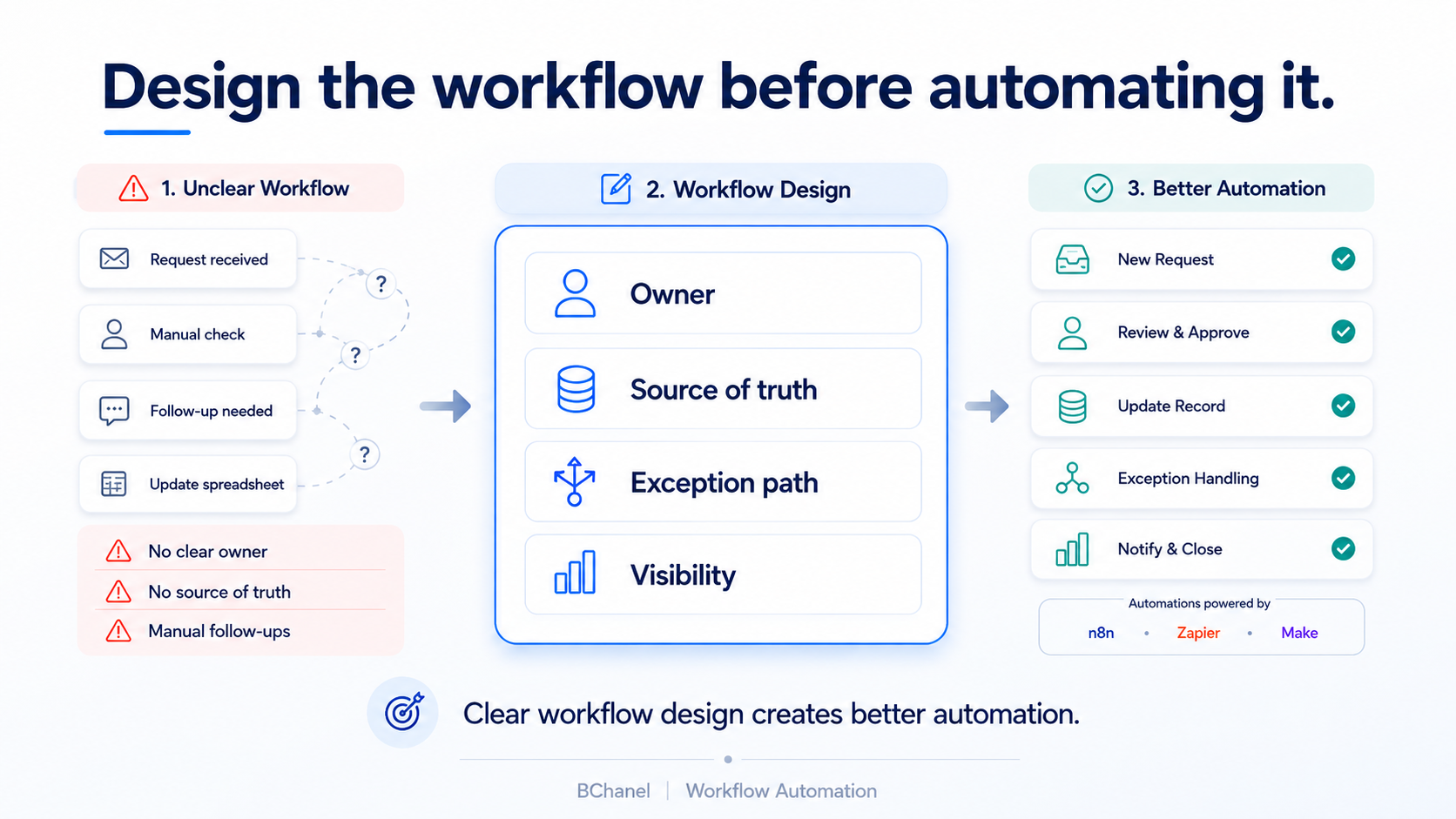
The Better Path: Assessment, Design, Then Automation
At BChanel, we think about workflow automation as part of a larger operating path.
The first step is not building the automation. It is understanding the workflow.
That starts with an operational assessment: identifying bottlenecks, manual checks, ownership gaps,
reporting delays, disconnected tools, and the places where teams are losing visibility.
We covered this idea in more detail in How to Turn Operational Assessment Findings Into a System
Design Roadmap, where the focus is on turning operational problems into clear implementation priorities.
From there, the workflow needs to be designed.
This means defining how work should move, which systems should be involved, what each team owns,
where information should live, and what should happen when something breaks the normal path.
Only after that does automation become useful.
At that point, platforms like n8n, Zapier, Make, HubSpot workflows, or custom integrations can be used
with more confidence because the team is no longer automating a messy process. They are supporting a workflow that has already been clarified.
Workflow-First Automation Creates Better Outcomes
When workflow automation is built on top of a clear workflow, the outcome is usually stronger.
Teams spend less time checking tools manually. Handoffs become easier to trust. Reporting becomes
more reliable. Exceptions are easier to spot. Leaders get better visibility into where work stands.
More importantly, automation becomes easier to maintain.
Many automations become fragile because they were built around temporary workarounds. One field
changes, one process shifts, one person leaves, and the automation stops making sense.
Workflow-first automation reduces that risk because the logic is not hidden inside the tool. It is connected to a clear operating model.
This also matters for more advanced automation and AI agents. As we explained in AgenticOS
Readiness: Why AI Agents Need Clear Workflows, Ownership, and Reliable Data, advanced systems only
work safely when workflows, approvals, ownership, and data flows are already reliable.
The tool executes the workflow. It should not define the workflow by accident.
Where BChanel Fits
BChanel helps growing teams improve workflows before they automate them.
That usually means starting with an assessment of how work currently moves across teams, systems,
and reporting. Then we help redesign the workflow so ownership, data movement, visibility, and exception paths are clear.
After that, automation can be implemented around a stronger structure.
This is especially useful for teams that already have several tools in place but still depend on manual
checks, spreadsheets, Slack follow-ups, repeated status updates, or reporting that takes too much effort to trust.
The goal is not to automate everything.
The goal is to identify the workflows worth fixing first, design them clearly, and then automate the parts that can actually improve speed, visibility, and execution.
FAQ
What is workflow automation?
Workflow automation is the use of tools or systems to move work, data, notifications, approvals, or
updates without relying on repeated manual steps. It can be built with platforms like n8n, Zapier, Make, HubSpot workflows, or custom integrations.
Why does workflow automation fail?
Workflow automation often fails when the underlying workflow is unclear. If ownership, data quality,
source of truth, handoffs, or exception paths are weak, automation can create more confusion instead of better execution.
What should come before workflow automation?
Before workflow automation, teams should define how the workflow should move, who owns each
step, which system holds the source of truth, what data needs to move, and what should happen when something does not follow the normal path.
Is system design necessary before automation?
Yes. System design helps define the operating structure behind automation. Without it, teams may
automate individual tasks without understanding how the full workflow should operate across people, tools, data, and reporting.
How can BChanel help?
BChanel helps teams design the workflow first — ownership, source of truth, exception paths, and visibility — so automation supports a clear operation instead of speeding up a messy one.