
Automation projects usually fail before the automation is even built.
Not because the tool is bad. Not because the team is not technical enough. And not because automation itself is the wrong idea.
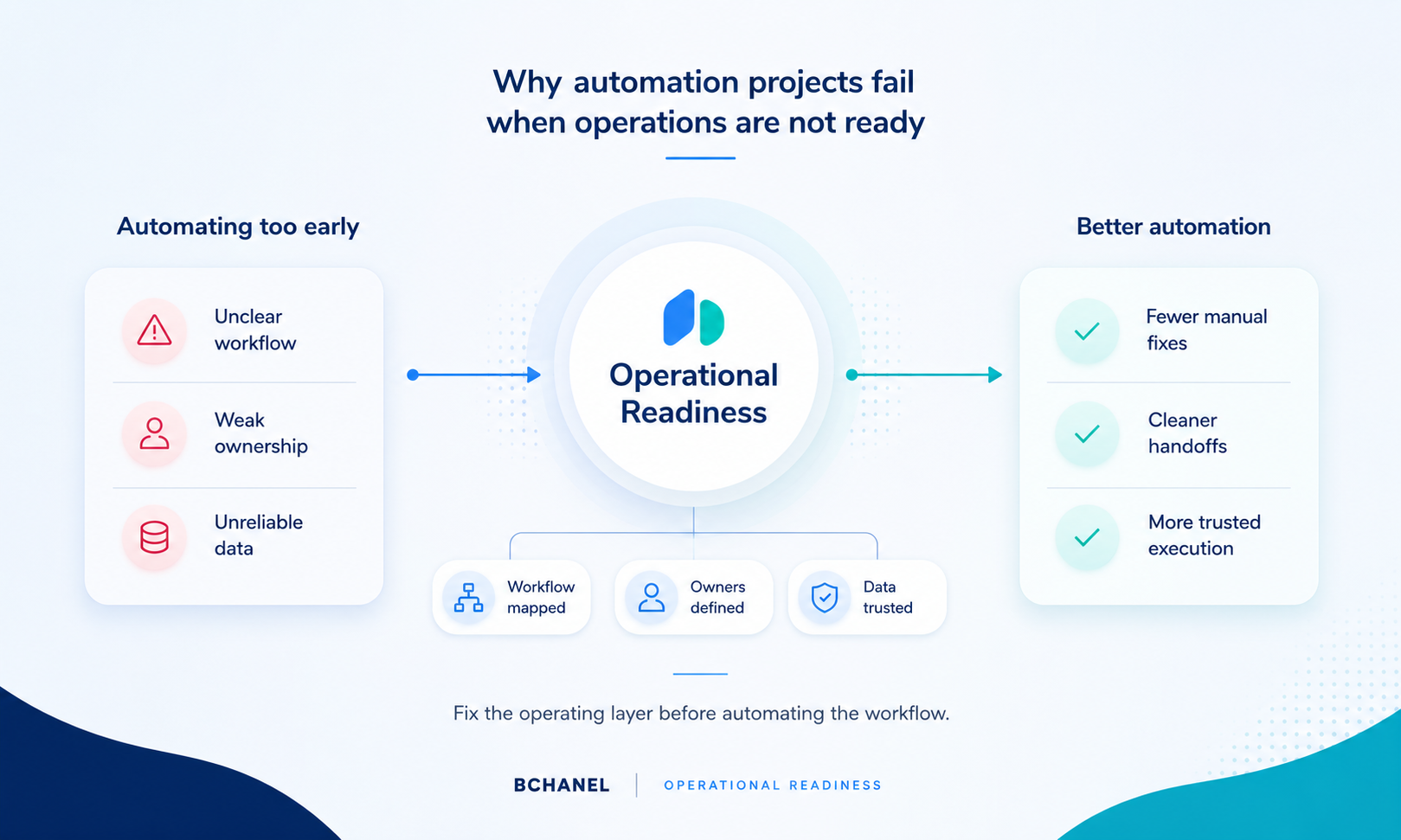
Most automation project failure happens because the business is trying to automate an operation that is not ready.
The workflow is unclear. Ownership is not defined. Data lives across too many tools. Reporting cannot be trusted. Handoffs depend on people remembering to send updates. Exceptions are handled manually, but nobody has mapped when or why they happen.
Then a company adds automation on top of that environment and expects clarity.
Instead, the automation exposes the existing problems faster.
For founders, COOs, and operations leaders, this matters because automation should create leverage. It should reduce manual work, improve visibility, and make execution more consistent. But when the operating foundation is weak, automation can create more confusion, more exceptions, and more work for the team.
That is why operational readiness before automation matters.
Automation Does Not Fix an Unclear Workflow
A common mistake is assuming automation will force clarity into the business.
It rarely does.
If a workflow is unclear before automation, it usually stays unclear after automation. The only difference is that the confusion now moves faster.
For example, if nobody owns the client handoff between sales and delivery, automating a CRM notification will not solve the ownership problem. It may simply notify the wrong person, at the wrong time, with incomplete context.
If inventory data is inconsistent across Shopify, Amazon, a 3PL, and spreadsheets, automating a report will not automatically create trusted numbers. It may just pull unreliable data into a cleaner-looking dashboard.
If support teams manually check three tools to answer one customer question, automation can help. But only after the business defines which system should be trusted, what information matters, and who owns the update.
This is where workflow automation failure often begins: the team automates activity before designing the workflow.
Why Automation Projects Break Down
Most failed automation projects have a similar pattern.
The team starts with a tool or integration idea. Someone says, "We should automate this." The business selects a platform, connects systems, and builds triggers or workflows.
At first, the project looks productive.
But then the questions start:
Which system is the source of truth?
Who owns this step?
What happens when the data is missing?
When should the workflow stop?
Who reviews exceptions?
What should leadership actually see?
Is this process even the right one to automate?
These questions are not technical details. They are operating design questions.
If they are answered too late, the automation project becomes harder than expected. The team spends more time patching edge cases, rebuilding workflows, fixing data issues, and clarifying ownership than actually improving the operation.
That is why automation readiness should be reviewed before implementation begins.
The Real Problem Is Usually Operational Readiness
When automation does not work, teams often blame the platform.
They say the CRM is too limited. The automation tool is too complex. The project management system does not connect cleanly. The dashboard is not flexible enough.
Sometimes those things are true.
But in many cases, the deeper issue is operational readiness.
The business has not clearly defined how work should move. The team does not have consistent rules for ownership, data, approvals, exceptions, and reporting. The automation project becomes the first time these questions are seriously discussed.
That is too late.
A better approach is to review the operating layer first.
Before building automation, companies should understand:
Which workflows create the most manual work
Which handoffs create the most delay
Which systems hold critical data
Which reports leadership does not fully trust
Which steps lack clear ownership
Which exceptions happen repeatedly
Which workflows are ready to automate
Which workflows need redesign first
This is the difference between automating tasks and improving the system behind the work.
Signs Your Operation Is Not Ready for Automation
Not every workflow is ready to automate.
Some workflows need to be redesigned first. Others need better visibility. Some need clearer data ownership. Some need fewer manual exceptions before automation makes sense.
Here are common signs that the operation is not ready yet.
The team cannot clearly explain how the workflow works from start to finish.
Different people describe the process differently.
Nobody knows which system is the source of truth.
Important updates happen in Slack, email, spreadsheets, or private notes.
Reports require manual checking before leadership trusts them.
Tasks move between teams without clear ownership.
Exceptions are common, but not documented.
The workflow depends on one person who "just knows how it works."
These are not small issues. They are readiness gaps.
If a company automates before fixing them, the automation may look functional on paper but fail in daily execution.
This is why an operational assessment should happen before automation. As we discussed in our article on why growing teams should run an operational assessment before automation, the goal is to understand where work actually breaks before investing in technology.
Automation Should Follow System Design
Good automation starts with system design.
That means defining how the operation should work before deciding what should be automated.
A system design roadmap helps answer the questions that automation depends on:
What is the workflow?
Who owns each step?
Which tools are involved?
Where does data move?
What should be visible?
What should trigger action?
What should be escalated?
What should be automated now?
What should wait?
Without this roadmap, automation decisions become reactive.
The team may automate the loudest pain instead of the most important workflow. They may build around the current messy process instead of designing a better one. They may create a faster version of a workflow that should have been simplified first.
This is why we recently wrote about turning operational assessment findings into a system design roadmap. Assessment identifies the friction. System design turns that friction into implementation priorities.
Automation should come after that.
Data Quality Matters More Than the Automation Tool
Automation depends on data.
If the data is incomplete, outdated, duplicated, or owned by the wrong system, automation will struggle.
A reporting automation cannot create trusted visibility if the inputs are not reliable. A CRM-to-project handoff cannot work properly if deal information is incomplete. A fulfillment update cannot help support if inventory, tracking, and order status do not stay aligned.
This is why manual reporting is often a warning sign.
When teams manually rebuild reports every week, the issue is usually not just the spreadsheet. It is often a visibility problem underneath: disconnected tools, unclear data ownership, and workflows that do not move information cleanly.
We covered this in more detail in our article on why manual reporting is usually a visibility problem.
Before automating reporting, alerts, handoffs, or updates, companies need to know which data can be trusted and which system should own it.
Otherwise, automation may only move bad data faster.
AI Agents Raise the Bar Even Higher
Traditional automation usually follows rules.
AI agents can do more. They can interpret information, draft responses, summarize updates, support decisions, or trigger actions across workflows.
That makes readiness even more important.
If a basic automation fails because ownership is unclear, an AI agent can create even more risk in the same environment.
Before AI agents support execution, the business needs:
Clear workflows
Reliable data
Defined ownership
Approval paths
Exception rules
System visibility
Monitoring and escalation logic
AI agents should not be added to unclear operations and expected to create structure. The structure needs to come first.
That is why AI readiness is not mainly about prompts. It is about operational clarity.
As we explained in our article on AI agents needing clear workflows, ownership, and reliable data, agents become useful when the operating layer is mature enough to support them safely.
What Teams Should Review Before Automating
Before starting an automation project, leadership should review the workflow with a few practical questions.
First, is the workflow clearly documented? Second, does every major step have an owner? Third, is there a trusted source of truth for the data involved? Fourth, are handoffs clear between teams or tools? Fifth, does leadership know what visibility is needed? Sixth, are exceptions defined and handled consistently? Seventh, is automation solving the root problem or just speeding up a broken process?
These questions help teams avoid building automation around operational confusion.
They also help identify where the business should start.
Sometimes the right next step is automation. Sometimes it is workflow redesign. Sometimes it is reporting cleanup. Sometimes it is system design. Sometimes it is simply clarifying ownership.
The important thing is knowing the difference.
A Better Way to Approach Automation
Automation should not be the first move.
It should be the result of a clear operating decision.
At BChanel, we believe the sequence should look like this:
Operational Assessment: understand where work breaks. System Design: define how work should move. Workflow Automation: automate approved workflows once the structure is clear. AI Agents: support execution when workflows, data, ownership, and approvals are reliable enough.
This approach reduces the risk of automation project failure because it does not treat technology as the strategy.
It treats technology as the implementation layer.
The strategy is operational clarity.
If your team is considering automation but still has unclear ownership, disconnected systems, manual reporting, or weak visibility, the next step may not be building automations immediately.
The next step may be reviewing whether the operation is ready.
FAQ
Why do automation projects fail?
Automation projects often fail because the underlying workflow is unclear. If ownership, data, handoffs, reporting, and exceptions are not defined, automation can expose those problems instead of solving them.
What is automation readiness?
Automation readiness means the business has enough operational clarity to automate safely. This includes clear workflows, defined ownership, reliable data, trusted systems, and visible reporting.
Should companies automate before redesigning workflows?
Usually, no. If the workflow is broken or unclear, it should be reviewed and redesigned before automation is implemented.
What is the difference between workflow automation and system design?
System design defines how work should move across teams, tools, data, and ownership. Workflow automation supports that structure by reducing manual steps and improving execution.
How can BChanel help?
BChanel helps teams review operational readiness before automation. We identify workflow gaps, ownership issues, reporting problems, and automation opportunities so implementation is based on a clearer operating system.