
Most growing teams do not have a tool problem at first. They have a visibility problem.
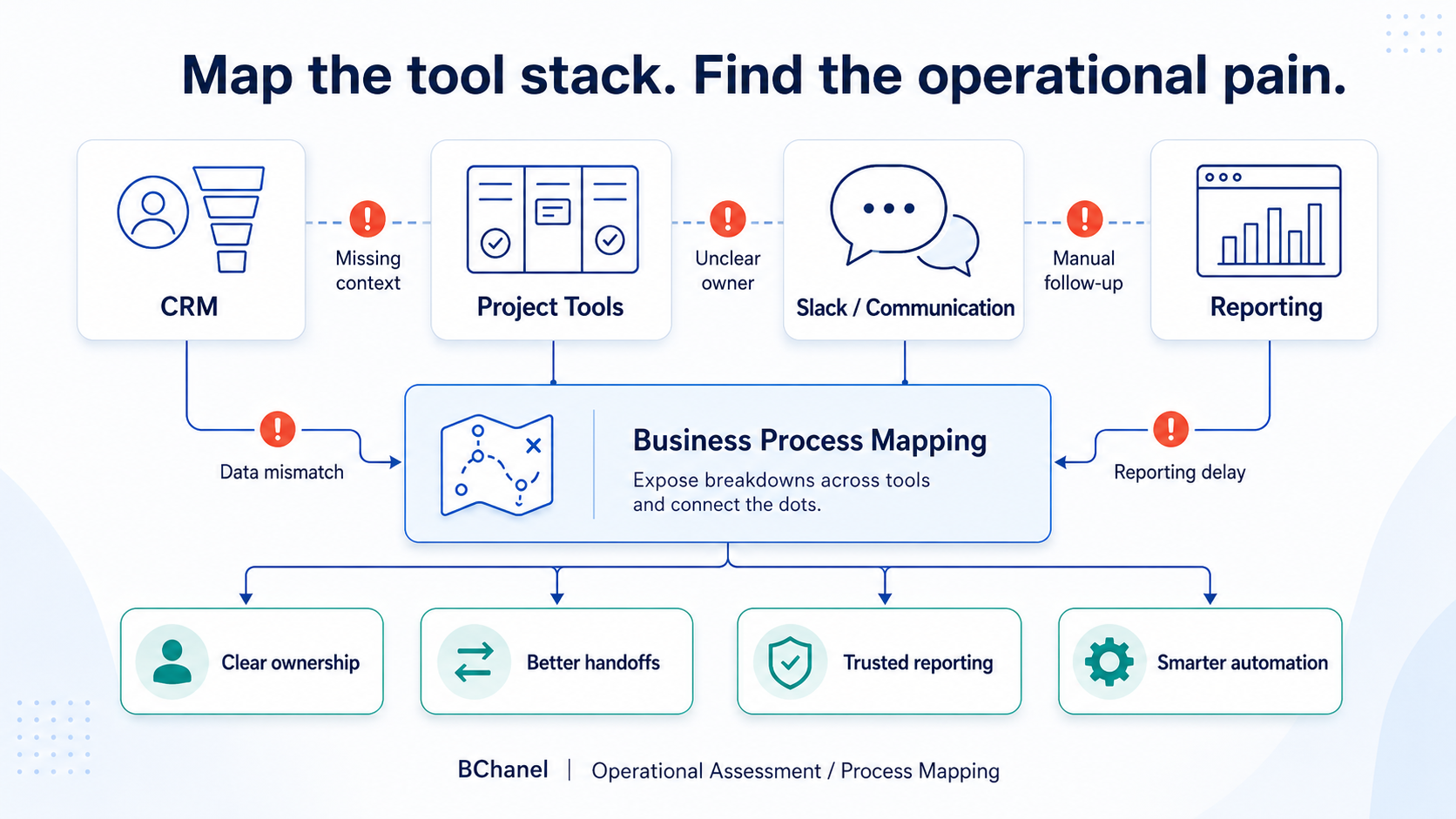
The CRM holds sales context. The project tool holds delivery tasks. Slack holds daily updates. Spreadsheets hold reporting fixes. Someone always has the real answer — but the business does not have a clear view of how work is actually moving.
That is where business process mapping becomes useful. Not as a theoretical exercise. Not as a diagram that sits in a folder. But as a practical way to understand where work slows down, where ownership gets unclear, where data becomes hard to trust, and where automation should or should not be added.
For BChanel, process mapping is not just about documenting workflows. It is about finding operational pain across the tool stack before teams invest more time, money, or energy into workflow automation.
Your Tool Stack Can Hide the Real Problem
A company may have strong tools in place: HubSpot or Salesforce for CRM, ClickUp, Asana, Monday, or Jira for project management, Slack for communication, Google Sheets or dashboards for reporting, Zapier, Make, n8n, or native automation connecting the pieces.
On paper, that looks like a functional stack. But the question is not only whether the tools exist — it's whether the workflow is clear across them.
A deal may be marked closed in the CRM, but delivery may not have the right scope, timeline, billing details, or client expectations. A project may exist in the project tool, but the latest update may only live in Slack. A report may show the final number, but no one fully trusts how the data was collected.
That is why adding more software does not always improve operations. If the workflow behind the tools is unclear, the stack becomes a collection of disconnected places where work is only partially visible.
Business Process Mapping Should Reveal Where Work Breaks
Business process mapping is often treated as a way to draw the happy path — step one, step two, step three, done. But real operations rarely work that cleanly.
A useful process mapping exercise should uncover what happens when the workflow breaks:
Where does work wait?
Who has to chase an update?
Which system is missing context?
Where does the team duplicate information?
What happens when the standard path does not apply?
This matters because many operational problems look like tool problems from the outside. A team may say "we need better reporting" — but the real issue may be inconsistent source data. They may say "we need workflow automation" — but the real issue may be that no one owns the handoff. They may say "we need to clean up Slack" — but the real issue may be that Slack has become the informal system of record for decisions, blockers, and approvals.
When inconsistent source data is the real issue, reporting automation should only be introduced after ownership and reporting logic are clearly defined.
Good process mapping helps separate the symptom from the operating problem underneath.
The CRM Shows Where Context Starts
The CRM is often the first place to review. For many growing teams, it holds the earliest version of the customer, deal, project, or request — sales notes, customer expectations, contract details, pricing, timeline, owner, and next steps.
But a CRM record is only useful if the next team can act on it. A HubSpot workflow, Salesforce automation, or CRM workflow can create tasks and notifications — but if the underlying information is incomplete, automation only moves incomplete context faster.
When mapping the CRM layer, teams should ask:
What information needs to be captured before the next step starts?
Who owns the transition from sales to delivery, operations, or finance?
Which fields are required for execution?
Where does the information go after the CRM?
What happens when the CRM record is incomplete?
This is where business process mapping starts turning into operational clarity.
Project Tools Show Whether Work Is Actually Owned
Project management tools are usually where work becomes execution. ClickUp, Asana, Jira, Monday, Trello, or similar tools organize tasks, deadlines, owners, and dependencies — but they do not automatically create accountability.
A project management workflow can still break if tasks are created without context, owners are unclear, or updates are not tied back to the original customer need. This is especially common in service businesses, agencies, IT services companies, and operations-heavy teams.
A project may technically exist, but the team may still be asking:
Who owns the next step?
What was promised to the client?
Is finance aligned?
Has support been informed?
Is the project blocked?
Does leadership have visibility?
If the project tool only holds tasks, but not the operating logic behind those tasks, the workflow still depends on follow-ups and interpretation. That is a process mapping problem.
Slack Often Reveals the Hidden Workflow
Slack is useful because it is fast. But that speed can also hide operational pain.
Many teams use Slack to ask for updates, confirm status, chase missing information, escalate blockers, clarify ownership, and make decisions. Over time, Slack can become the place where the real workflow happens. That is not always bad — but it becomes risky when Slack is the only place important context lives.
A Slack workflow should not replace clear ownership, reliable data, or structured reporting. If the team needs to search messages to understand what happened, the workflow is probably not visible enough.
When mapping Slack, look for repeated patterns:
Which updates are people asking for again and again?
Which handoffs depend on manual reminders?
Which decisions happen in messages but never make it back to the system of record?
Which blockers are discovered too late?
Those patterns often show where the operating system needs to be redesigned.
Reporting Shows Whether the Workflow Can Be Trusted
Reporting is usually where operational problems become visible to leadership. If dashboards are delayed, spreadsheets need manual cleanup, or numbers are hard to trust, the reporting problem often started earlier in the workflow.
The issue may not be the report itself. It may be unclear data ownership, disconnected tools, duplicate fields, manual exports, inconsistent naming, or missing workflow steps.
That is why we previously wrote about manual reporting as a visibility problem, not just a spreadsheet problem. A report is only as reliable as the workflow feeding it. If teams want better reporting, they need to understand where the data is created, who owns it, where it moves, and where it gets changed manually.
Business Process Mapping vs. Workflow Automation
Business process mapping and workflow automation are connected, but they are not the same thing. Process mapping helps the team understand how work actually moves today. Workflow automation helps the team execute parts of that work faster once the workflow is clear.
The risk is that many teams jump straight to automation before they understand the process. That usually creates more complexity.
A Zapier workflow, Make scenario, n8n automation, HubSpot workflow, or Salesforce automation can move data between systems. But it cannot decide who should own the step, what information should be trusted, which exceptions need escalation, or what leadership needs to see. Those decisions need to be designed first.
That is the same principle behind workflow automation after workflow design: better automation starts with a better understanding of how work should move.
Where Workflow Automation Fits
Workflow automation becomes useful after the team understands the workflow. Once ownership is clear, the source of truth is defined, handoffs are structured, and reporting needs are understood, automation can help reduce manual work.
That might mean creating CRM-to-project handoffs, syncing status updates, notifying owners, escalating exceptions, or updating reporting views.
But automation should support the operating model. It should not define it by accident. If a team automates a broken workflow, the problem does not disappear. It usually moves faster.
How BChanel Uses Tool Stack Mapping
At BChanel, tool stack mapping is part of understanding the operating layer behind a business. We look at where work starts, where it moves, which tools hold important information, who owns each step, where updates happen, and where leaders lose visibility.
The goal is not to criticize the tools. The goal is to find the workflow gaps behind them.
Sometimes the answer is system design. Sometimes it is workflow automation. Sometimes it is better reporting. Sometimes it is simply clarifying ownership before adding another tool.
The important part is knowing which problem you are actually solving.
If your team is using CRM, project management tools, Slack, spreadsheets, and automation platforms but still depends on manual follow-ups, unclear ownership, or reporting cleanup, an operational assessment can help identify which workflows are worth fixing first.
FAQ
What is business process mapping?
Business process mapping is the practice of documenting how work moves across people, systems, data, and decisions. For operations teams, it helps identify bottlenecks, unclear ownership, manual steps, and visibility gaps.
How is process mapping different from workflow automation?
Process mapping helps teams understand the workflow before automation is built. Workflow automation uses tools to execute parts of that workflow once the process, ownership, data, and exception paths are clear.
Why should teams map their tool stack?
Teams should map their tool stack because operational pain often appears between systems. CRM, project tools, Slack, spreadsheets, and reporting dashboards may each hold part of the workflow, but not the full picture.
What tools should be included in tool stack mapping?
Teams should review the tools where work starts, moves, gets discussed, and gets reported. This often includes CRM platforms, project management tools, Slack or email, spreadsheets, dashboards, and workflow automation platforms.
When should a team do business process mapping before workflow automation?
A team should do business process mapping before workflow automation when the workflow depends on manual follow-ups, unclear ownership, inconsistent data, delayed reporting, or repeated Slack updates. These are signs that the process needs to be clarified before automation is added.