
An operational assessment should not end with a list of problems.
For many growing businesses, the assessment phase is useful but incomplete. The team identifies bottlenecks, disconnected tools, unclear ownership, manual reporting, and repeated follow-ups. Everyone agrees the operation needs improvement.
But then the question becomes: what happens next?
A list of issues is not enough to improve how a business runs. Findings need to become decisions. Decisions need to become a roadmap. And that roadmap needs to show how the operating system of the business should be designed before automation, workflow tools, or AI agents are added.
That is where system design becomes important.
At BChanel, we see the operational assessment as the starting point. It helps reveal how work currently moves across teams, tools, data, ownership, and reporting. But the real value comes when those findings are translated into a practical system design roadmap.
That roadmap gives founders, COOs, and operations leaders a clearer view of what needs to change, what should be prioritized, and what should eventually be automated.
An Assessment Should Reveal More Than Operational Problems
A strong operational assessment should not only identify what feels inefficient. It should explain why those inefficiencies keep happening.
For example, a team may say that reporting takes too long. But the real issue may not be the spreadsheet itself. It may be that data lives across a CRM, fulfillment tool, finance platform, and manual updates from different team members.
This is why manual reporting should not always be treated as a spreadsheet issue. In many cases, manual reporting is usually a visibility problem caused by disconnected systems, unclear ownership, and unreliable data movement.
A team may say that project handoffs are messy. But the deeper issue may be unclear ownership between sales, delivery, finance, and client success.
A team may say they need automation. But the real issue may be that the workflow has never been clearly defined.
Good assessment findings usually reveal patterns such as:
Repeated manual checks
Unclear workflow ownership
Disconnected systems
Delayed reporting
Missing handoff rules
Poor data visibility
Inconsistent task routing
No clear source of truth
Automation opportunities that are not yet ready to build
These findings matter because they show where the business is losing time, clarity, and control. But they are still only the diagnosis.
The next step is to turn them into a design.
Why Findings Alone Are Not Enough
Most teams do not struggle because they lack observations. They struggle because they do not know how to convert those observations into an operating structure.
This is where many improvement efforts slow down.
The leadership team may know that reporting is manual. They may know that onboarding depends on too many messages. They may know that fulfillment updates are not visible enough. But unless those problems are organized into a clear system design roadmap, the team often jumps straight into tool selection or automation.
That usually creates more complexity.
A business might add another dashboard before defining who owns the data. It might automate a notification before clarifying what should trigger it. It might connect two tools before deciding whether the workflow itself makes sense.
This is why operational assessment findings need to be translated carefully.
The goal is not to create a longer list of problems. The goal is to define how the business should operate better.
What a System Design Roadmap Actually Does
A system design roadmap connects the current operational reality to the future operating model.
It answers a practical question: how should work move across the business so the team has better visibility, ownership, reporting, and execution?
This is different from a traditional project plan. A project plan usually lists tasks, owners, and timelines. A system design roadmap goes deeper. It defines the operating structure behind the tasks.
It should clarify:
Which workflows need to be redesigned
Which tools should remain part of the operating system
Which data needs to move between systems
Who owns each step of the workflow
Where visibility needs to improve
Which manual steps should be eliminated
Which automations are actually worth building
Which workflows may eventually support AI agents
This roadmap gives the team a clear path from diagnosis to implementation.
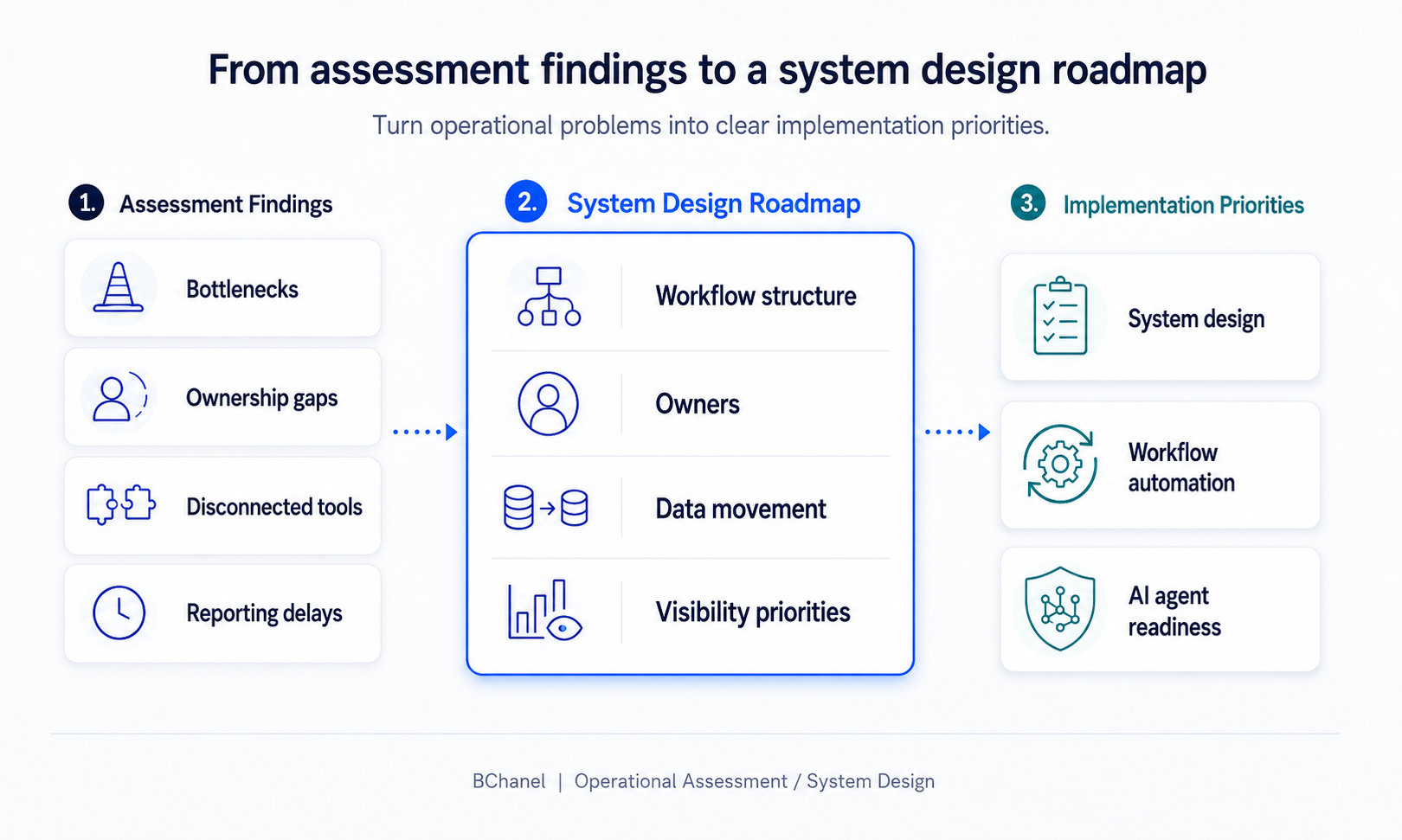
Turning Assessment Findings Into Design Decisions
The first step is grouping the findings into operational themes. Not every issue should be treated separately. Many problems are connected.
For example, manual reporting, inconsistent dashboards, and delayed leadership updates may all point to one root problem: unclear data ownership and disconnected reporting workflows.
Client onboarding delays, missed kickoff details, and billing confusion may point to a handoff design problem between sales, delivery, and finance.
Inventory discrepancies, fulfillment delays, and customer support follow-ups may point to a visibility gap across ecommerce systems.
Once findings are grouped into themes, each theme can become a design decision. The team can decide:
Which workflow needs to be redesigned first
Which system should become the source of truth
Which team owns each step
Which information needs to move automatically
Which reports should be trusted by leadership
Which exceptions need to be flagged earlier
This is how assessment findings become useful. They stop being isolated issues and become inputs for a better operating system.
What the Roadmap Should Include
A useful system design roadmap should be clear enough for leadership and practical enough for implementation. It does not need to be overly technical, but it should give the team a real path forward.
A strong roadmap should usually include five core areas:
Priority workflows — the workflows where inefficiency creates the most operational drag or commercial risk.
Ownership — every important step should have a clear owner, especially where work moves between teams.
Systems and data movement — where critical information is created, updated, transferred, or lost.
Visibility requirements — what should be visible, where it should be visible, and how often it should update.
Implementation priorities — not every workflow should be automated immediately. Some need redesign first. Others may be ready for reporting improvements, integrations, or automation.
This helps prevent the common mistake of automating the wrong thing too early.
Where Workflow Automation Fits
Workflow automation should come after the workflow is understood. That does not mean automation should wait forever — it means automation should be built on top of a clear operating structure.
Once the system design roadmap is clear, automation opportunities become easier to prioritize.
For example, if the assessment shows that support teams manually check order status across Shopify, fulfillment, and inventory tools, the roadmap may recommend a clearer fulfillment visibility workflow first. After that, automation can help move updates, trigger alerts, or sync reporting.
If the assessment shows that sales-to-delivery handoffs are inconsistent, the roadmap may define what information must move from the CRM to the project tool. Then automation can support project setup, owner assignment, or kickoff notifications.
In both cases, automation is not the strategy. Automation supports the strategy once the workflow has been designed.
Where AI Agents Fit
AI agents require even more operational clarity than traditional automation.
A simple automation may move data from one tool to another. An AI agent may interpret context, trigger actions, draft responses, summarize updates, or support execution. That means the operating foundation needs to be stronger.
Before a company gives an AI agent responsibility inside a workflow, the team should understand:
What the agent is allowed to do
What it should never do
When it should escalate
Who approves sensitive actions
Which data sources it can trust
How its actions will be monitored
What happens when an exception appears
This is why AI agent readiness should be connected to system design. As we explained in our article on AI agents needing clear workflows, ownership, and reliable data, agents are only useful when the operating layer around them is reliable enough to trust.
If workflows, data, ownership, and approvals are unclear, AI agents can create more risk than value. But when the operating system is clear, agents can support execution more safely.
Why This Matters for Founders and Operations Leaders
Founders and operations leaders do not need more complexity. They need a clearer way to improve how the business runs.
A system design roadmap helps leadership move from vague operational frustration to specific improvement decisions. Instead of saying, "We need automation," the team can say:
This workflow needs clearer ownership.
This system should become the source of truth.
This reporting process needs better data movement.
This handoff should be redesigned before it is automated.
This workflow may be ready for automation.
This area may eventually support an AI agent.
That level of clarity changes the conversation. It helps teams prioritize better, invest more carefully, and avoid building technology on top of broken operations.
A Better Path From Assessment to Implementation
The best operational assessments do not end with a report. They create a path — one that moves from findings to design, and from design to implementation.
At BChanel, this is how we think about the progression:
Operational Assessment identifies where work breaks.
System Design defines how work should move.
Workflow Automation supports approved workflows once the structure is clear.
AI Agents become possible when workflows, ownership, data, and approvals are mature enough to trust.
This is the difference between fixing symptoms and improving the operating system behind the business.
If your team has already identified operational problems but does not yet have a clear roadmap for what to fix first, the next step may not be automation. The next step may be turning those findings into a system design roadmap.
FAQ
What is a system design roadmap?
A system design roadmap is a practical plan that shows how workflows, tools, data, ownership, reporting, and automation opportunities should be structured across the business. It connects assessment findings to implementation priorities.
How is this different from an operational assessment?
An operational assessment identifies where work is breaking. A system design roadmap defines how the operation should be redesigned based on those findings.
Should automation come before or after system design?
Automation should usually come after the workflow is clearly designed. If ownership, data movement, triggers, and exceptions are unclear, automation may create more confusion.
Can this help with AI agents?
Yes. AI agents need clear workflows, reliable data, defined ownership, and approval paths. A system design roadmap helps identify whether the operation is ready for agents and where they could safely support execution.
What should companies review first?
Start with workflows that create repeated manual work, delayed reporting, unclear ownership, poor handoffs, or inconsistent visibility. These are often the best candidates for assessment and system design.