
For growing teams, the issue is rarely just that a tool is missing or an automation has not been built yet. More often, the problem is that work does not move clearly across teams, systems, and handoffs.
An ecommerce team may receive orders, check inventory, coordinate fulfillment, update support, and rebuild reporting manually. An IT services team may close a deal in the CRM, but still need to recreate the project context across onboarding, delivery, finance, and client communication.
In both cases, the question is not only, "What should we automate?"
The better question is, "How should the workflow move before automation is added?"
That is where workflow architecture matters.
What Workflow Architecture Means in Practice
Workflow architecture is the design of how work should move across people, tools, data, decisions, and handoffs.
It is not just process documentation. It is not just automation mapping. And it is not just connecting one tool to another.
A useful workflow architecture example should show:
What operational problem is slowing the team down
Which systems are involved
Where information gets delayed or lost
Who owns each step
Which manual checks happen repeatedly
What should become clearer, faster, or easier to trust
This is important because automation only works well when the workflow underneath it is clear.
If ownership is unclear, automation will not fix accountability. If data is unreliable, automation will move unreliable data faster. If handoffs are messy, automation may hide the mess instead of solving it.
That is why workflow architecture comes before automation systems.
Example 1: Ecommerce Fulfillment Visibility
For ecommerce teams, fulfillment visibility is one of the most common workflow problems.
At first, the workflow may seem simple. An order comes in. Inventory is checked. Fulfillment is triggered. The customer gets an update. Reporting is synced.
But as the business grows, that flow often becomes fragmented.
Order data may live in Shopify or another ecommerce platform. Inventory may sit in an ERP, warehouse tool, or spreadsheet. Fulfillment updates may come from a 3PL portal. Customer questions may arrive through support. Reporting may be rebuilt manually at the end of the week.
The result is a visibility gap.
A customer asks, "Where is my order?"
Support checks the helpdesk. Then Shopify. Then the 3PL portal. Then inventory. Sometimes someone asks operations in Slack. Eventually, the customer gets an answer, but the team had to manually reconnect the workflow to find it.
The problem is not only customer support. It is the fulfillment workflow behind support.
This is similar to the broader ecommerce visibility problem we covered in the article onwhy growing ecommerce brands lose operational visibility.
What the Workflow Architecture Should Clarify
Before automating fulfillment updates, the team should understand how the workflow should work.
A strong fulfillment workflow architecture should clarify:
Which system owns order status
Which system owns inventory availability
How fulfillment updates move from the 3PL to the internal team
When support should be notified
What exceptions require human review
Which reporting fields need to update automatically
Who owns delayed or unclear orders
This turns a scattered process into a designed workflow.
Instead of support checking multiple systems manually, the workflow should make the right information visible before the customer asks. Instead of operations rebuilding reports later, fulfillment status should already be structured in a way that supports reporting. Instead of automating a broken process, the team can first define what needs to be trusted.
That is the difference between "automating fulfillment" and improving fulfillment visibility.
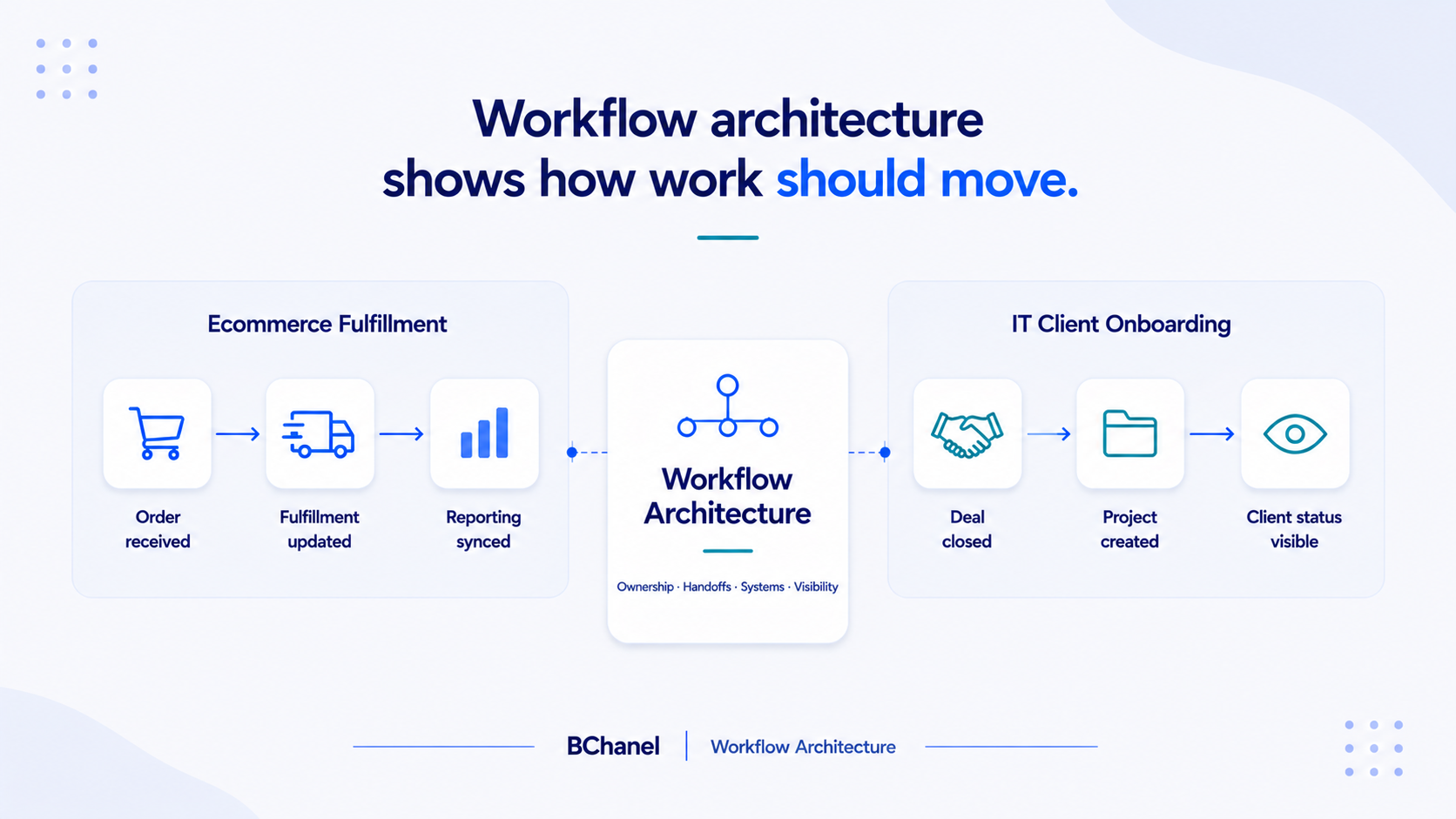
Example 2: IT Client Onboarding
IT services companies often face a similar problem after a deal closes.
Sales closes the opportunity in the CRM. The client is ready to begin. But delivery still feels like starting from scratch.
The project team may need to ask:
What was promised during sales?
What is the scope?
Who owns implementation?
What access is needed?
What billing details matter?
Has the client received the next steps?
Where should project status be tracked?
If this information does not move cleanly from CRM to delivery, onboarding becomes a manual reconstruction exercise.
The sales team has context. The delivery team needs context. Finance needs billing details. The client expects a smooth transition. But the workflow between those groups is often unclear.
This is why CRM-to-project handoffs create so much operational drag, especially as IT services teams grow. We explored this more deeply in the article on theCRM-to-project handoff problem in IT services companies.
What the Client Onboarding Workflow Should Clarify
A well-designed client onboarding workflow should not depend on memory, Slack messages, or one person translating the deal after it closes.
The workflow should clarify:
What information must move from sales to delivery
Which fields are required before a project can begin
Who owns project setup
Who confirms client expectations
How finance receives billing context
Where delivery status should be visible
What the client should receive after handoff
Once those pieces are clear, automation becomes more useful.
A project can be created automatically. A kickoff checklist can be generated. A delivery owner can be assigned. Finance can receive the right billing details. Client status updates can be easier to track.
But those automations are only valuable if the workflow has already been designed. Otherwise, the team may automate project creation while still missing context, ownership, or client expectations.
Workflow Architecture Is the Layer Between Strategy and Automation
Many teams move too quickly from strategy to tools.
They know they want faster reporting, better fulfillment visibility, smoother onboarding, or less manual follow-up. So they start looking for dashboards, integrations, or automation tools.
Those tools may help, but only after the operating logic is clear.
Workflow architecture is the layer in between. It translates the business problem into a clear operating design.
For ecommerce, that might mean understanding how orders, inventory, fulfillment, support, and reporting should stay aligned. For IT services, that might mean defining how sales context, project setup, delivery ownership, finance, and client updates should move after a deal closes.
In both cases, the workflow needs structure before technology can support it properly.
What Good Workflow Examples Should Show
A good workflow example should not only show the final automation. It should show the problem behind the workflow.
For BChanel, a useful workflow example should answer four questions.
What is slowing the team down? This could be manual checks, repeated follow-ups, unclear ownership, disconnected tools, or reporting delays.
What systems and teams are involved? This matters because many workflow problems do not live inside one tool. They happen between tools and teams.
Where does visibility break? This is where the team starts chasing updates, rebuilding reports, or checking multiple systems to answer one question.
What should improve after the workflow is redesigned? The outcome should be clearer ownership, better visibility, fewer manual steps, more reliable reporting, or stronger automation readiness.
This is why workflow examples are more useful than generic automation screenshots. They show the operating problem, not just the technical setup.
Why This Matters for Growing Teams
As companies grow, small workflow gaps become expensive.
A fulfillment update that used to be handled manually becomes a recurring support burden. A sales-to-delivery handoff that used to happen informally becomes a client onboarding risk. A spreadsheet that used to provide quick visibility becomes a manual reporting dependency.
None of these problems are solved by automation alone. They are solved by understanding how the workflow should operate, then applying automation where it actually supports the business.
That is the practical value of workflow architecture. It helps teams move from scattered work to structured execution.
The BChanel Perspective
At BChanel, we use workflow examples to make operational problems easier to see.
The goal is not to make every process look complex. The goal is to understand where work breaks, where ownership is unclear, and where visibility depends too much on manual effort.
Once the workflow is clear, automation becomes more precise. The team knows what should move automatically. They know which data needs to be trusted. They know who owns each step. They know where reporting should come from.
That is why workflow architecture is not a theoretical exercise. It is the operating layer that makes better automation possible.
Workflow architecture is not just a mapping exercise. It is often the business telling you where ownership, visibility, and handoffs need to improve.
If workflows keep breaking down or automation keeps stalling, the first step is not always a new tool. It is understanding how the workflow should move.
Explore BChanel workflow exampleshere
FAQ
What is a workflow architecture example?
A workflow architecture example shows how work should move across teams, systems, ownership points, handoffs, and reporting. It focuses on the operational problem before showing the automation.
Why does workflow architecture matter before automation?
Workflow architecture matters because automation depends on clear workflows. If ownership, data, and handoffs are unclear, automation may speed up the wrong process.
What is an ecommerce workflow architecture example?
An ecommerce example could include order received, inventory checked, fulfillment updated, support informed, and reporting synced. The goal is to clarify visibility across fulfillment before automating updates.
What is an IT services workflow architecture example?
An IT services example could include CRM handoff, client onboarding, project setup, delivery ownership, finance details, and client status visibility.
How does BChanel use workflow examples?
BChanel uses workflow examples to show where work breaks, which systems are involved, what should be redesigned, and what operational outcome should improve before automation is implemented.