
Manual reporting is often treated like a spreadsheet issue.
The report takes too long to build. The numbers need to be checked again. Someone has to export data from one system, copy it into another file, ask another team for the latest update, and then clean everything before leadership can review it.
At first, the obvious solution seems simple: automate the spreadsheet.
But in many growing ecommerce, IT services, and operations-heavy teams, manual reporting is not the root problem. It is the visible symptom of a deeper visibility issue.
Teams do not fully trust where the data lives, who owns each update, which system is current, or whether the report reflects what is actually happening in the business.
That is why manual reporting deserves a closer look before it gets automated.
Manual Reporting Usually Starts as a Practical Fix
Most manual reports do not begin as a problem. They start because someone needs visibility.
A founder wants to understand fulfillment status. A COO wants to track project delivery. A Head of Operations wants to know which orders are delayed, which clients are waiting, which invoices are pending, or which workflows are creating friction.
At first, it works. The spreadsheet gives leadership a single place to review updates. It creates structure where the tools do not. It helps the team make decisions faster than waiting for disconnected systems to tell the full story.
But as the company grows, more tools, contributors, and exceptions are added. The report stops being a simple visibility layer and becomes another workflow to manage.
That is the point where manual reporting becomes a signal.
Not that spreadsheets are bad, but that the business may not have enough operational clarity behind the numbers.
The Problem Is Not the Spreadsheet. It Is the Workflow Behind It
A spreadsheet can be useful. The issue is what the spreadsheet is forced to compensate for.
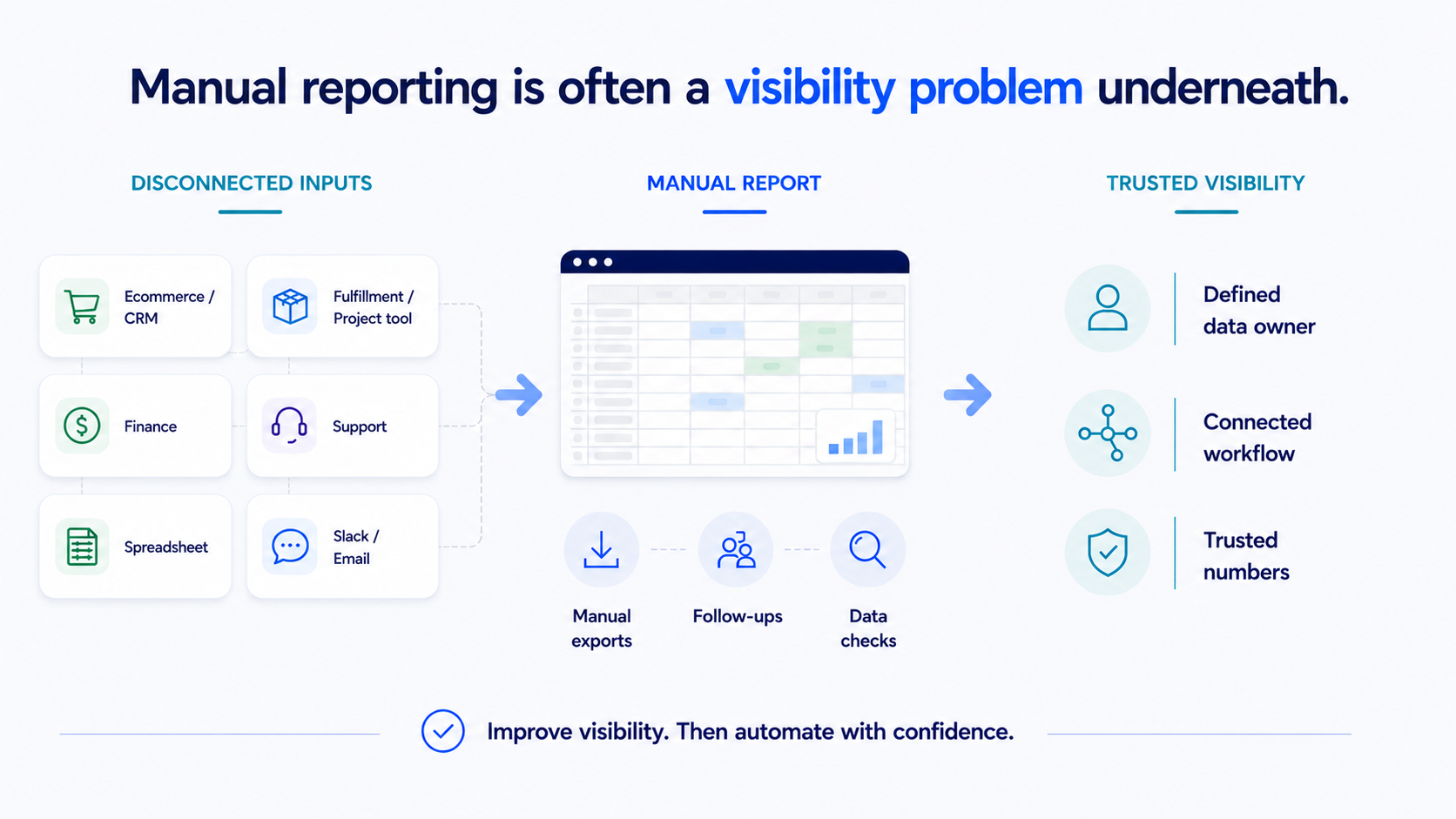
If a weekly report requires three exports, two Slack follow-ups, one manual check with finance, and a last-minute update from operations, the problem is not the file.
The problem is the workflow behind the report.
The team is manually rebuilding visibility because the systems, handoffs, and ownership rules are not clear enough to produce trusted information on their own.
This happens often in ecommerce operations. Order data may live in Shopify. Fulfillment updates may live in a 3PL portal. Inventory information may sit in another system. Customer issues may live inside support, while financial context is tracked separately.
It also happens in IT services companies. Sales context may live in the CRM. Project delivery may happen in a project management tool. Client updates may be shared through Slack or email. Billing details may sit with finance.
In both cases, manual reporting exists because the business needs visibility that the operating system is not providing clearly enough.
This connects directly to the broader problem of operational visibility: when teams have to check multiple places to understand one operational question, reporting becomes manual by default.
What Manual Reporting Is Really Telling You
Manual reporting usually points to one or more operational gaps: disconnected systems, unclear ownership, inconsistent data, delayed visibility, or weak workflow design.
If information lives across multiple tools and does not move cleanly between them, someone has to connect the dots manually.
If nobody knows who owns the update, the report depends on follow-ups. The person building the report becomes the person chasing the business for answers.
If different tools show different numbers, the team has to verify what is accurate before leadership can trust the report.
If the report depends on people remembering to update information, export data, or notify another team, the workflow itself is not strong enough yet.
These are not reporting problems in isolation. They are operating problems.
That is why simply automating the final spreadsheet can create a cleaner-looking report without solving the reason the report was manual in the first place.
Why Automating the Report Too Early Can Make the Problem Worse
Automation can be valuable, but only when the workflow is understood.
If the data is inconsistent, automation will move inconsistent data faster.
If ownership is unclear, automation will not decide who should update what.
If the source of truth is undefined, automation may pull from the wrong system.
If the workflow depends on exceptions, manual judgment, or unclear approvals, automation may hide the problem instead of solving it.
This is why reporting automation should not start with the question, "How do we automate this spreadsheet?"
It should start with better operational questions:
Where does each number come from?
Which system should be trusted?
Who owns each update?
Where does information get delayed?
Which checks are repeated every week?
Which parts of the report are decision-critical?
These questions help separate the report from the operating problem behind it.
That is the difference between automating a task and improving a workflow.
Manual Reporting Often Reveals Leadership Visibility Gaps
A manual report is usually built for leadership, but it is maintained by the team. That creates an important gap.
Leadership wants a clear view of performance. The team has to collect, clean, and explain the information. If the business does not have strong visibility across tools and workflows, the report becomes the bridge between daily execution and leadership decision-making.
This is where friction builds. Operations teams spend time preparing updates instead of improving the work. Project teams confirm status instead of moving delivery forward. Finance and support get pulled into checks that should already be visible.
Over time, the report becomes part of the operating rhythm.
But it also becomes a dependency. If one person is unavailable, the report is late. If one system changes, the numbers break. If one team forgets to update a field, leadership gets an incomplete picture.
That is not a reporting issue. That is a visibility risk.
What Teams Should Review Before Automating Manual Reports
Before automating a manual report, growing teams should review the workflow that creates the report.
The goal is not to eliminate every spreadsheet immediately. The goal is to understand what the spreadsheet is revealing.
Start with the data sources. Identify which tools provide the information and whether each one is accurate, current, and trusted.
Then review ownership. Every important update should have a clear owner. If the report depends on someone chasing updates, the workflow is not ready to scale.
Next, review handoffs. Look at where information moves between teams, systems, or stages. This is often where context gets lost.
Then review manual checks and reporting purpose. Repeated checks often signal missing visibility, while every report should support a clear decision.
Finance teams should also define ownership, reconciliation rules, and exception handling before introducing accounting process automation.
This is why an operational assessment before automation matters. It helps teams understand what is actually breaking before they invest time and money into automating the wrong layer.
What Better Reporting Looks Like
Better reporting is not just faster reporting.
It is more trusted reporting.
A stronger reporting workflow helps leadership see the right information without forcing the team to rebuild visibility manually every week.
That usually means the source of truth is defined, ownership is visible, handoffs are structured, and exceptions are easier to find.
Reports support decisions. Leadership can use the numbers with confidence because the workflow behind them is stronger.
The outcome is not just a cleaner dashboard. It is better operational visibility, fewer repeated checks, and more confidence in the numbers that guide the business.
The BChanel Perspective
At BChanel, we do not see manual reporting as something to dismiss.
We see it as a useful signal.
If a team is spending time building reports manually, there is usually an operational reason behind it. The report may be showing where systems are disconnected, where ownership is unclear, where data quality breaks down, or where leadership does not have enough visibility into daily execution.
That is why the first step is not always automation.
The first step is understanding the workflow behind the report.
Once that is clear, automation becomes much more useful. Reports can connect to cleaner data, better-defined workflows, and trusted information.
Manual reporting is not just a spreadsheet problem.
It is often the business telling you where visibility needs to improve.
If manual reporting is taking too much time, the first step is not always a dashboard. It is understanding the workflow behind the report.
FAQ
What causes manual reporting problems?
Manual reporting problems are usually caused by disconnected systems, unclear ownership, inconsistent data, delayed visibility, or workflows that still depend on people chasing updates.
Why do growing teams rely so much on manual reporting?
Growing teams often rely on manual reporting because their tools, workflows, and data sources do not stay fully aligned as the business becomes more complex.
Should manual reports always be automated?
Not always. If the issue is unclear ownership, inconsistent data, or disconnected systems, automation alone may not solve the real problem.
What is the biggest risk of manual reporting?
The biggest risk is that leadership may make decisions based on delayed, incomplete, or manually adjusted information.
How can companies improve manual reporting?
Companies can improve manual reporting by reviewing the workflow behind the report. This includes identifying data sources, ownership, handoffs, repeated checks, and the decisions the report is meant to support.
When is a reporting workflow ready for automation?
A reporting workflow is ready for automation when the source data is trusted, ownership is clear, handoffs are structured, and the team understands which information needs to move automatically and why.