
When an IT services company closes a deal, delivery should not feel like starting from scratch. But in many growing implementation, consulting, managed services, and technology service teams, that is exactly what happens. Sales has the context. The CRM has some notes. Delivery needs to create the project. Finance needs billing details. The client expects a smooth next step.
Somewhere between sales, onboarding, delivery, finance, and reporting, the workflow becomes unclear. Scope gets clarified again. Project setup depends on manual follow-up. Ownership is not obvious. The team starts asking questions that should already have been answered.
This is not just a CRM problem or a project management problem. It is a CRM-to-project handoff problem, and it often becomes a larger workflow architecture issue.
Why the Handoff Breaks After the Deal Closes
Most IT services teams already have useful tools. A CRM manages sales activity. A project management platform manages delivery. A ticketing system may manage support. Finance may use QuickBooks, NetSuite, Xero, or another billing tool.
The problem is usually not the tools themselves. It is the handoff between them.
A deal can be marked as closed in the CRM, but delivery may still not know what was promised, who the stakeholders are, what the first milestone should be, what access is required, or when billing should begin.
At low volume, someone can solve this manually. But as more clients and projects move through the business, manual handoffs become harder to trust.
What Gets Lost Between Sales and Delivery
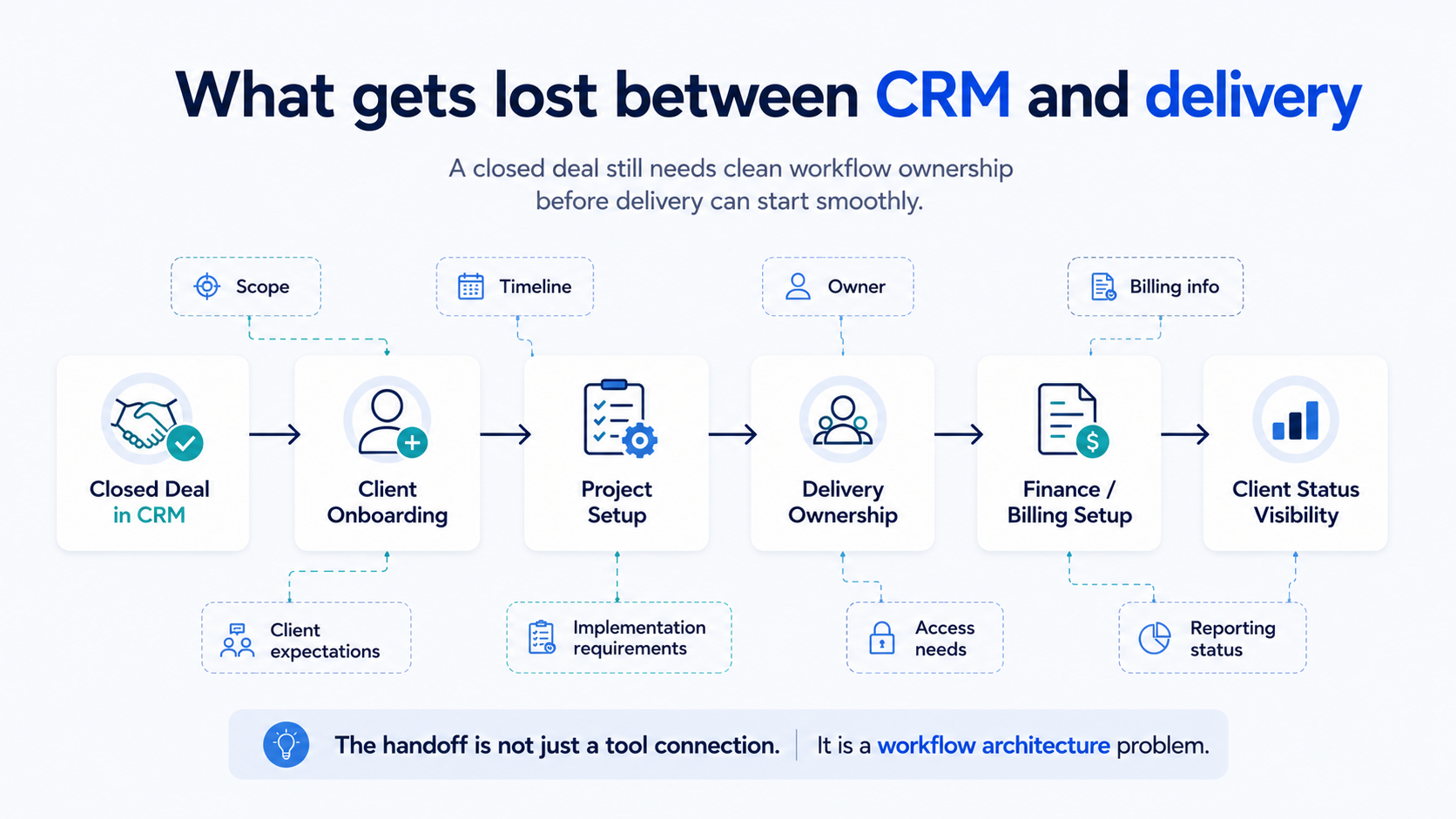
The handoff breaks because important information is captured in one place, discussed in another, and needed somewhere else.
Sales may understand the client context, but delivery needs operational detail. Finance needs billing detail. Leadership needs visibility into whether new work is actually moving.
Common gaps include:
Scope details that are not translated into delivery steps.
Timeline expectations that are not visible to the project team.
Unclear ownership for kickoff, setup, or first client update.
Billing details that finance receives late or incomplete.
Client requirements or implementation notes buried in CRM notes or email threads.
Why This Becomes a Visibility Problem
A weak CRM-to-project handoff does not only slow down onboarding. It creates visibility problems across the business.
Delivery may not know if the project is ready to start. Finance may not know if billing details are complete. The client may not know who owns the next step. Leadership may not know which closed deals are fully onboarded, blocked, or already in delivery.
That is why the issue shows up as scattered follow-up. Sales gets pulled back into closed deals. Project managers chase missing context. Finance asks for details after work has started. Client updates live across Slack, email, CRM, and project tools.
The deal is closed, but operationally, the business is still assembling the work.
Common Signs the Handoff Is Breaking
The symptoms are usually easy to recognize once you look at the workflow instead of the individual tools.
Common signs include:
Kickoff calls are delayed because scope is still being confirmed.
Project setup depends on manually copying information from the CRM.
Delivery asks sales for context that should have transferred earlier.
Finance receives billing information late or incomplete.
Client status updates are scattered across multiple tools.
Leadership cannot quickly see which closed deals are onboarded, blocked, or active.
What to Review Before Automating the Handoff
It is tempting to solve this by connecting the CRM to the project management tool immediately. That can help, but only if the workflow is already clear.
If the process is unclear, automation can move incomplete information faster. It can create projects with missing context, notify the wrong team, or trigger tasks that nobody fully owns.
Before automating, IT services teams should review:
What information must move when a deal closes?
Which fields are required before delivery can begin?
Who owns the transition from sales to onboarding?
Which system becomes the source of truth after the deal closes?
What should finance receive, and when?
These questions help define the operating model before building automation around it.
How Workflow Architecture Improves the Handoff
A stronger CRM-to-project handoff starts with workflow architecture.
The goal is to define how work should move across sales, onboarding, delivery, finance, and client communication. That means clarifying what information is needed, where it should live, who owns each step, and what happens when something is missing.
For example, a closed deal might trigger a project readiness check before delivery begins. That check could confirm scope, stakeholders, timeline, billing details, required access, internal owner, and first client milestone.
Once the workflow is clear, automation becomes more useful. The CRM can trigger project setup. Delivery receives the right context. Finance receives billing details. Leadership sees which clients are onboarded, blocked, or active.
The automation should follow the workflow. It should not replace the need to design it.
How BChanel Thinks About CRM-to-Project Handoffs
At BChanel, we see CRM-to-project handoffs as a workflow architecture problem first.
The objective is not to connect tools for the sake of connecting tools. The objective is to understand how client work should move from closed deal to onboarding, delivery, finance, reporting, and client visibility.
That starts with an operational assessment of the current handoff.
For IT services teams, that may include reviewing CRM fields, project setup steps, onboarding ownership, finance requirements, delivery status updates, and manual follow-up between systems.
The Real Goal: A Cleaner Start for Every Client
A closed deal should not create confusion for the delivery team.
The client should not feel like the company is relearning the conversation. Delivery should not need to chase sales for basic context. Finance should not need to ask for billing details after the project has started.
A strong CRM-to-project handoff gives the team a cleaner start. It helps delivery move faster, finance work with clearer information, leadership see what is happening, and clients feel more confidence in the transition.
If your team closes deals but delivery still feels like starting from scratch, it may be time to review the workflow between sales and project delivery.
Review your client handoff workflow and identify where sales context, project setup, ownership, finance details, or client updates are getting lost.
FAQ
What is a CRM-to-project handoff?
It is the process of moving a closed deal from the sales system into onboarding, project setup, delivery, finance, and client communication.
Why do IT services companies struggle with this handoff?
Sales context, scope, timelines, billing details, and ownership often do not transfer cleanly into the systems delivery teams use every day.
What are signs of a weak client handoff?
Delayed kickoff calls, repeated questions, missing project context, unclear ownership, late billing details, and scattered status updates.
Should teams automate the CRM-to-project handoff?
Yes, but only after the workflow is clear. Teams should first define what information moves, who owns each step, and which system is the source of truth.
What should IT services teams review first?
Review the closed-won process, required CRM fields, project setup steps, onboarding ownership, finance requirements, and client status visibility.