
Property management automation should begin with the operational handoffs that are frequent, repeatable, and easy to verify.
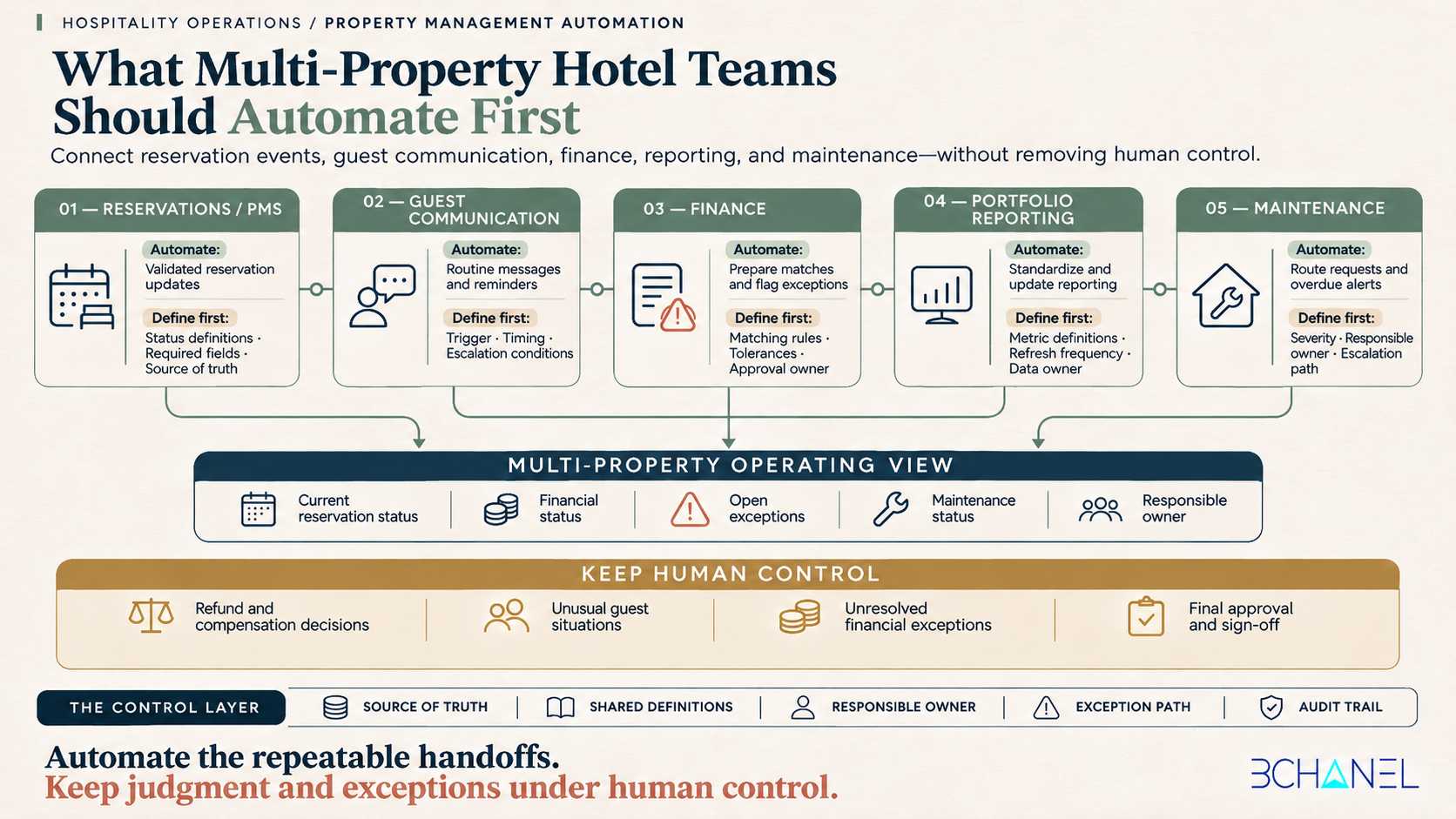
For multi-property hotel teams, that usually means automating reservation updates, routine guest communication, finance data preparation, portfolio reporting, and maintenance routing.
It does not mean automating every decision inside the business.
Refund approvals, unusual guest situations, financial exceptions, disputed charges, and final sign-off still require clear human ownership.
The goal of property management automation is not simply to move data faster. It is to ensure that the right information reaches the right system and the right person at the right time—across every property.
What is property management automation?
Property management automation is the use of connected workflows to move operational information between a hotel property management system, communication tools, finance platforms, maintenance systems, reporting dashboards, and team members.
A well-designed automation can:
Detect a new or updated reservation.
Validate the information received from the PMS.
Trigger the appropriate guest communication.
Update finance or reporting records.
Route operational exceptions to the correct owner.
Record what happened for future review.
The technology is only one part of that system.
Before implementation, the hotel team must define:
Which system owns each piece of information.
What event triggers the workflow.
Which fields are required.
What each operational status means.
Who owns the next step.
Which situations require approval.
How exceptions should be handled.
What information must be recorded.
Without these definitions, property management system integration can move inconsistent information between systems more quickly without improving operational visibility.
Why multi-property visibility breaks between systems
Most multi-property hospitality businesses already use several functional tools.
A typical operating environment may include:
A hotel property management system.
A guest messaging platform.
Accounting or finance software.
Maintenance management software.
Payment processors.
Spreadsheets.
Business intelligence dashboards.
Internal communication tools.
Each system may work correctly on its own while the portfolio view remains incomplete.
The problem often appears in the handoffs between systems.
For example:
A reservation status changes in the PMS, but finance does not receive the update.
A booking is cancelled, but the reporting dashboard still includes the expected revenue.
A guest reports a maintenance problem, but no responsible owner is assigned.
A payment is recorded, but the reservation and accounting records use different references.
Each property defines the same status differently.
Leadership receives a report that depends on several manual spreadsheet updates.
This is why adding another hotel operations software platform does not automatically create connected operations.
The underlying workflow still needs shared definitions, ownership, exception paths, and a reliable source of truth.
What should multi-property hotel teams automate first?
The best starting points are workflows that are high-frequency, rules-based, operationally important, and easy to observe.
For most multi-property hotel teams, five areas deserve priority.
1. Reservation event handoffs
Reservation events influence guest communication, property operations, finance, maintenance, and reporting.
These events may include:
New reservations.
Reservation modifications.
Cancellations.
Check-ins and checkouts.
Payment status changes.
Property or room changes.
Extensions and early departures.
A reservation event can become the trigger for several downstream actions. However, those actions should only run after the incoming information has been validated.
Before automating reservation handoffs, define:
The reservation identifier.
The property identifier.
Required guest information.
Booking and stay dates.
Reservation status definitions.
Payment status definitions.
The system of record.
Duplicate-event handling.
The process for missing or conflicting information.
This matters because reservation events may be delivered more than once or arrive outside the expected sequence. A reliable hotel PMS integration needs to identify duplicate events and retrieve the most current record before updating downstream systems. Guesty’s documentation specifically recommends designing webhook integrations to handle duplicates, sequencing issues, and fresh-object retrieval. Guesty reservation webhook documentation
What to automate
Validated reservation updates.
Creation of downstream operational records.
Routine status synchronization.
Notification of relevant departments.
Reporting updates.
Identification of incomplete information.
What should remain under human control
Conflicting reservation information.
Unusual modifications.
Sensitive guest situations.
Refund or compensation decisions.
Exceptions that cannot be resolved using defined rules.
2. Routine guest communication
Guest communication automation can remove a considerable amount of repetitive work, but it should not attempt to replace every guest interaction.
Good candidates for automation include:
Reservation confirmations.
Pre-arrival instructions.
Check-in reminders.
Access information.
Checkout instructions.
Routine follow-ups.
Requests for missing information.
Internal alerts when a guest does not complete a required step.
These communications are predictable because they are connected to known reservation events and timelines.
Before automating them, define:
The event that triggers each message.
The approved message template.
The communication channel.
The correct send time.
Language or property-specific variations.
Conditions that should stop the message.
When the conversation should be escalated to a person.
A better automation boundary
The system should handle predictable communication.
A person should handle conversations involving:
Complaints.
Safety concerns.
Refund requests.
Unusual accommodation needs.
Booking disputes.
Situations requiring judgment or empathy.
The purpose of guest communication automation is to remove routine coordination so the team has more time for interactions where human attention creates value.
3. Finance reconciliation preparation
Finance is one of the strongest use cases for property management workflow automation because multi-property teams often reconcile information from reservations, payments, refunds, fees, taxes, and accounting systems.
The automation should prepare the reconciliation, not hide uncertainty or force a match.
A strong finance workflow can:
Collect reservation and financial events.
Standardize property and transaction references.
Compare expected and received amounts.
Apply approved matching rules.
Identify missing information.
Flag unmatched transactions.
Assign exceptions to a finance owner.
Update a reporting dashboard.
Preserve a record of what was reviewed.
Reservation details and financial records may also be delivered through different events. Guesty’s newer reservation webhook structure separates stay details from financial or guest-folio information, which reinforces the need to define how those records should be connected. Guesty reservation webhook migration guide
What to automate
Data collection.
Standardization.
Rule-based matching.
Reconciliation preparation.
Exception detection.
Report updates.
Audit trail creation.
What finance should continue to own
Tolerance thresholds.
Approval rules.
Unresolved exceptions.
Adjustments.
Write-offs.
Final reconciliation sign-off.
Automation prepares the match. Finance owns the exception and the final decision.
For a deeper explanation, see Automated Bank Reconciliation: What Finance Teams Should Define Before Implementation.
4. Portfolio reporting
A multi-property management team needs more than reports from individual systems. It needs a consistent portfolio view.
The challenge is rarely the absence of data. It is the lack of shared definitions across properties and platforms.
One property may report a reservation as confirmed while another treats it as pending. Finance may organize revenue by transaction date while operations reports by stay date. Maintenance may track open requests without recording their operational impact.
Before automating hotel financial reporting or portfolio dashboards, define:
Which system owns each metric.
How each status is calculated.
The reporting period.
Property and portfolio naming conventions.
Refresh frequency.
How late-arriving information is handled.
Who reviews incomplete data.
Who approves corrections.
What to automate
Collection of approved data.
Standardization across properties.
Scheduled dashboard updates.
Comparison against defined thresholds.
Alerts for missing or delayed information.
Distribution of approved reports.
What should remain visible
Automation should not quietly replace missing values or present incomplete information as final.
A trustworthy report should indicate:
When information was last updated.
Which systems supplied it.
Which records remain incomplete.
Which exceptions are awaiting review.
Who owns the next action.
Operational visibility is not created by a dashboard alone. It is created by the operating rules behind the dashboard.
5. Maintenance routing and escalation
Maintenance workflows affect guest experience, property availability, safety, and operating costs.
The initial handoff can usually be automated when the required information is clearly defined.
A maintenance workflow may begin with:
A guest message.
A staff submission.
A failed inspection.
A sensor or system alert.
A recurring maintenance schedule.
A reservation-related issue.
The workflow can then:
Create the maintenance request.
Identify the property and unit.
Categorize the issue.
Assign a responsible owner.
Establish a target response time.
Notify the appropriate team.
Escalate overdue requests.
Record completion.
Update the unit’s operational status.
Before connecting a hotel maintenance management system, define:
Issue categories.
Severity levels.
Response thresholds.
Assignment rules.
Escalation paths.
Required evidence of completion.
Who can return the room or property to service.
Automation can route the request. It should not make high-risk operational decisions without an accountable person.
What should hotels not automate first?
Not every repetitive task is ready for automation.
A workflow should usually be redesigned before implementation when:
Different properties follow different rules.
Ownership is unclear.
The same status has multiple meanings.
Required information is frequently missing.
Exceptions are handled informally.
The team cannot agree on the source of truth.
The expected result cannot be verified.
The process changes every week.
The decision requires substantial human judgment.
Automating an unstable process can create faster inconsistency.
The system may complete more actions, but the team will still spend time investigating incorrect statuses, duplicate records, missed exceptions, and unreliable reporting.
For more examples, see Business Process Automation Examples: What to Automate—and What to Redesign First.
The control layer behind hospitality automation
Every reliable hotel automation needs a control layer.
That layer defines how the workflow should behave when everything goes correctly—and what happens when it does not.
Before implementation, document the following eight elements.
1. Trigger
What specific event starts the workflow?
2. Source of truth
Which system owns the information being used?
3. Required inputs
Which fields must be present before the workflow continues?
4. Status definitions
What does each status mean across every property and system?
5. Responsible owner
Who is accountable for the next step?
6. Approval point
Which decisions require human authorization?
7. Exception path
What happens when the workflow cannot complete normally?
8. Audit trail
What should be recorded so the team can understand what happened later?
If these elements cannot be defined, the workflow is probably not ready to automate.
A practical property management automation roadmap
Multi-property teams do not need to automate everything at once.
A controlled implementation is easier to validate and safer to scale.
Step 1: Map the current workflow
Document how information currently moves between the PMS, guest communication, finance, reporting, and maintenance.
Include manual spreadsheets, messages, exports, approvals, and workarounds. These informal steps are often where the most important operational knowledge exists.
Step 2: Identify the bottleneck
Choose a workflow that creates measurable operational friction.
Strong candidates may include:
Nightly financial reconciliation.
Repetitive reservation updates.
Manual portfolio reporting.
Delayed maintenance assignment.
Repeated guest reminders.
Missing escalation alerts.
Avoid selecting a process only because the technology looks impressive.
Step 3: Define the operating rules
Agree on triggers, required fields, owners, approvals, exception paths, and expected outcomes.
This is the workflow architecture that the automation will follow.
Step 4: Pilot with a limited scope
Test the workflow with one property, one process, or one clearly defined event type.
A limited pilot makes it easier to observe incorrect assumptions before they affect the entire portfolio.
Step 5: Run a controlled validation period
Compare automated outputs against the current process.
Review:
Missing records.
Duplicate events.
Incorrect status mappings.
Delayed updates.
Unassigned exceptions.
False matches.
User adoption.
Step 6: Measure operational outcomes
Useful measures may include:
Manual steps removed.
Time required to prepare reports.
Number of unresolved exceptions.
Update latency.
Maintenance response time.
Percentage of records requiring correction.
Time spent reconciling systems.
Visibility across properties.
The objective is not to count how many automations are running. It is to determine whether the workflow has become clearer, faster, and more reliable.
Step 7: Scale only after the workflow is stable
Once the team trusts the workflow, extend it to more properties, events, and systems.
Standardize the operating rules before expanding the technical implementation.
Example: Guesty finance automation across multiple properties
A hospitality operator using Guesty was manually extracting and reconciling reservation finance data across multiple properties every night.
The problem was not simply a lack of accounting software. Finance information existed, but it did not move into a reliable multi-property reporting workflow.
BChanel designed an automation that:
Listened to Guesty reservation events.
Validated the related financial information.
Updated a live financial dashboard.
Created consistent visibility across properties.
Removed the nightly manual reconciliation process.
The result was real-time visibility, multi-site reporting, and the elimination of the nightly reconciliation workflow.
View the Guesty Finance Workflow Case
Start with the workflow, not the software
Property management automation is most valuable when it connects the operational structure behind the systems.
A hotel property management system can record reservations. A communication platform can send messages. An accounting system can record financial activity. A maintenance tool can manage requests.
But those tools will not automatically agree on:
What each status means.
Which system owns the record.
Who is responsible for the next step.
When an exception requires attention.
Which information leadership can trust.
Those decisions belong to the operating model.
Map the workflow. Define the ownership. Establish the control layer. Then automate the parts that are stable, repeatable, and ready.
If your portfolio still depends on manual reporting, disconnected systems, or unclear handoffs, an Operational Assessment can identify where visibility is being lost and which workflow should be addressed first.
Start an Operational Assessment
Frequently Asked Questions
What is property management automation?
Property management automation connects repeatable operational workflows across reservation systems, guest communication, finance, reporting, and maintenance. It moves validated information between systems, routes tasks to responsible owners, and identifies exceptions that require human review.
What should a multi-property hotel automate first?
Multi-property hotel teams should begin with stable, high-frequency workflows such as reservation updates, routine guest communication, finance reconciliation preparation, portfolio reporting, and maintenance request routing.
Can a hotel property management system automate every workflow?
No. A PMS can manage important reservation and property data, but many workflows extend into finance, communication, maintenance, reporting, and team approvals. These handoffs require shared definitions, ownership, and exception rules.
How does hotel automation improve portfolio visibility?
Hotel automation improves visibility by standardizing status definitions, synchronizing approved information, identifying missing records, and updating portfolio reporting without relying on repeated manual exports.
Which hotel workflows should remain under human control?
Refund decisions, disputed charges, unusual guest situations, sensitive maintenance issues, unresolved financial exceptions, and final approvals should remain under accountable human control.
How should a hospitality team begin an automation project?
Start by mapping the existing workflow, identifying the operational bottleneck, defining the source of truth and responsible owner, documenting exceptions, and testing the solution with a limited pilot before scaling it across properties.