
3PL automation improves order fulfillment visibility when operational information moves as reliably as the products themselves.
Orders must reach the fulfillment partner correctly. Inventory updates must return to the ecommerce brand. Shipment events must update customer-facing systems. Exceptions must reach a responsible owner. Reports must use consistent definitions.
If any of these handoffs remain unclear, an integration may transfer data without giving the business reliable visibility.
What Is 3PL Automation?
3PL automation uses integrations, rules, alerts, and reporting workflows to coordinate information between an ecommerce brand, its third-party logistics provider, internal systems, carriers, and operational teams.
A third-party logistics provider typically manages warehousing, inventory, picking, packing, shipping, tracking, and returns. Shopify provides a broader explanation of the responsibilities involved in 3PL ecommerce fulfillment.
Automation does not replace the fulfillment provider. It connects the events surrounding the physical operation so that systems and teams know what has happened, what should happen next, and which exceptions require attention.
How 3PL Automation Improves Ecommerce Order Fulfillment
The following table shows the information handoffs required across a typical order fulfillment process.
| Fulfillment event | What can be automated | What must be defined first |
|---|---|---|
| Order submitted | Send approved order data to the 3PL | Required fields, validation rules, duplicate handling, and order ownership |
| Order accepted | Return confirmation to the ecommerce platform or order management system | Accepted, rejected, held, and cancelled status definitions |
| Inventory updated | Synchronize available, reserved, damaged, and inbound inventory | Source of truth, update frequency, and inventory status definitions |
| Order fulfilled | Return picking, packing, and fulfillment milestones | Required milestones, processing expectations, and SLA thresholds |
| Shipment created | Synchronize carrier, tracking number, and shipment status | Carrier mapping, partial shipments, and customer notification rules |
| Exception detected | Generate an alert and route it to an owner | Exception categories, urgency, ownership, and escalation paths |
| Reporting updated | Consolidate fulfillment and inventory information | Metric definitions, reporting periods, and data-quality controls |
The important distinction is that integration moves information, while operational design determines whether that information is useful.
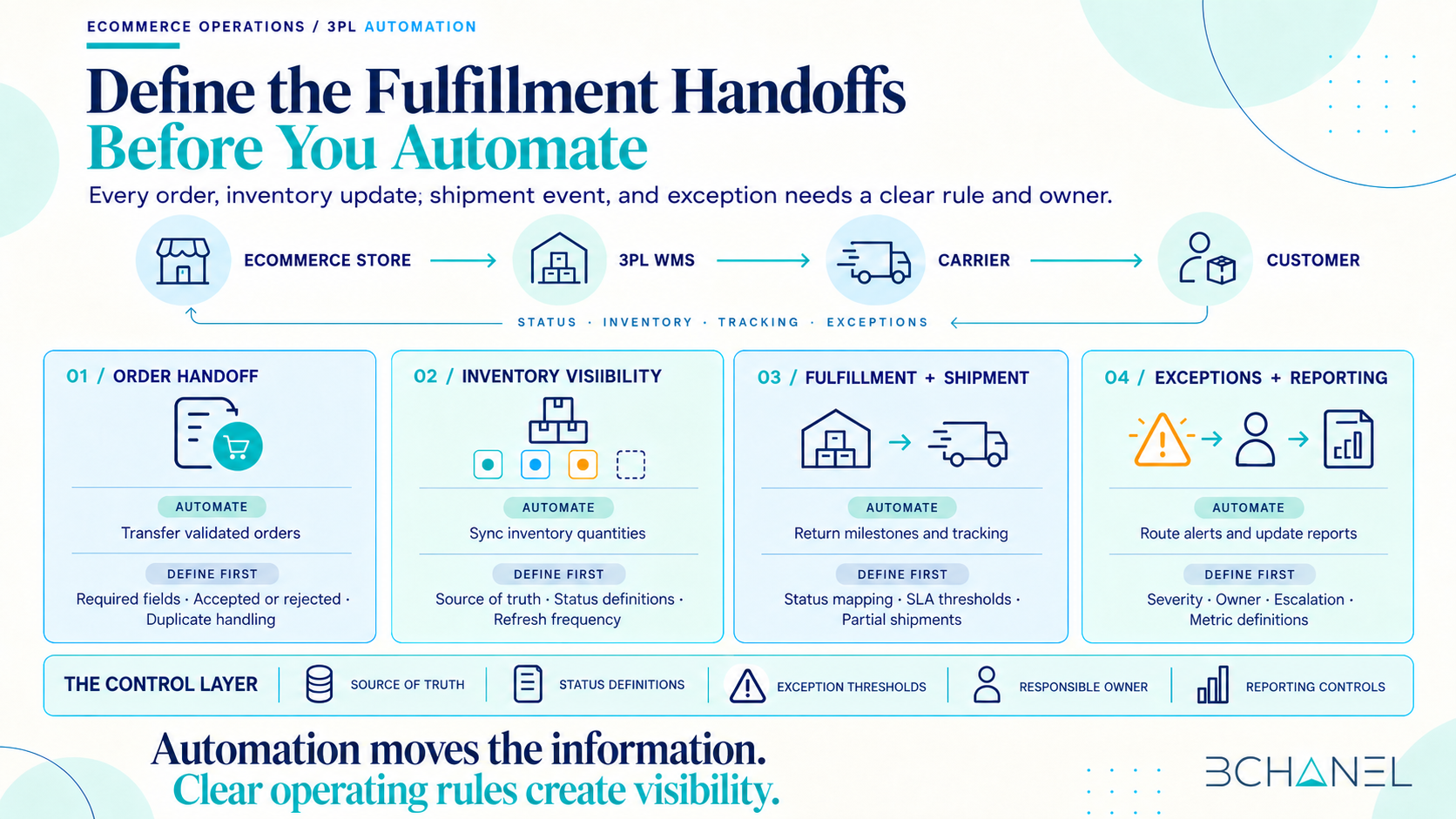
1. Automating the Order Handoff
The order handoff begins when a customer completes a purchase and the approved order is sent to the 3PL.
Automation can validate required fields, transmit the order, confirm receipt, and update the original system. This reduces duplicate data entry and prevents teams from relying on manual exports.
However, ecommerce brands must define what happens when an order is incomplete, duplicated, placed on hold, or rejected by the 3PL. A successful API response does not necessarily mean that the order is ready for fulfillment.
The workflow needs both a technical confirmation and an operational status that the business understands.
2. Creating Real-Time Inventory Visibility
Inventory visibility becomes difficult when the ecommerce platform, internal inventory system, marketplace, and 3PL warehouse management system use different quantities or status definitions.
One system may show physical inventory while another shows available-to-sell inventory. Reserved, damaged, returned, or inbound products may be treated differently across platforms.
3PL automation can synchronize inventory updates, but the brand must first define:
Which system is authoritative for each inventory field
What available, reserved, inbound, and damaged mean
How frequently information must update
What happens when systems disagree
Who investigates inventory discrepancies
Real time inventory visibility depends on shared definitions, not only faster synchronization.
3. Connecting Fulfillment and Shipment Statuses
Once an order enters the warehouse, it may move through accepted, allocated, picked, packed, shipped, delivered, returned, or cancelled stages.
The ecommerce brand and 3PL may use different names for the same milestone. Without status mapping, teams cannot reliably determine whether an order is moving normally or requires intervention.
Order fulfillment automation should translate 3PL statuses into a smaller set of business-facing statuses. Shipment tracking data can then update customer systems, internal dashboards, and operational reports consistently.
This creates visibility without requiring every team member to understand the internal language of each logistics platform.
4. Making Fulfillment Exceptions Visible
Strong 3PL automation does not hide exceptions or force every order through the standard path.
It should identify situations such as:
Orders rejected by the 3PL
Inventory unavailable after purchase
Orders exceeding fulfillment SLAs
Partial shipments
Tracking numbers that were not created
Shipments with no recent movement
Returns awaiting inspection
Inventory discrepancies between systems
Every exception needs a severity, owner, response expectation, and escalation path. Otherwise, automation simply creates a larger queue that nobody actively manages.
The objective is exception-based management: routine orders move automatically while people focus on the situations requiring investigation or judgment.
5. Building Reliable Fulfillment Reporting
Reports often appear complete while hiding delayed updates, conflicting definitions, or missing exceptions.
A reliable fulfillment management system should help teams answer:
How many orders are awaiting fulfillment?
Which orders have exceeded processing expectations?
Where are inventory discrepancies occurring?
Which shipments have stopped progressing?
How frequently is the 3PL meeting its agreed service levels?
Who owns unresolved exceptions?
Reporting automation can consolidate this information, but the metrics must be defined before the dashboard is built. Every number should have an approved source, calculation, owner, and refresh frequency.
That is how ecommerce order fulfillment reporting supports decisions instead of creating another spreadsheet that teams must reconcile manually.
What Ecommerce Brands Should Define Before a 3PL Integration
Before connecting 3PL software with an ecommerce platform, ERP, marketplace, or reporting system, define the operating model behind the integration.
Source of truth
Identify which system owns orders, inventory quantities, customer information, tracking events, returns, and fulfillment status.
Status definitions
Document how statuses used by the 3PL translate into the statuses used by internal teams and customer-facing platforms.
Required events
Determine which events must move between systems and whether they should update records, trigger notifications, or create tasks.
Exception ownership
Assign responsibility for rejected orders, inventory discrepancies, delayed shipments, fulfilment errors, and missing information.
Escalation thresholds
Define how long an exception can remain unresolved and when it should be escalated to another team or manager.
Reporting controls
Establish the metrics, sources, cutoff times, and validation steps used in operational reporting.
Human author
Clarify which actionsity can happen automatically and which require approval, particularly cancellations, inventory adjustments, refunds, replacements, and policy exceptions.
What 3PL Software Can—and Cannot—Solve
3PL software can connect systems, synchronize records, apply rules, generate alerts, and improve supply chain visibility.
It cannot independently decide which system should be trusted, who owns an exception, what an acceptable delay is, or how conflicting information should be resolved.
The best 3PL warehouse management system or integration will still produce weak visibility if the operating rules around it remain undefined.
Technology should support the fulfillment workflow. It should not define the workflow by accident.
Start With the Fulfillment Handoffs
The strongest 3PL automation projects begin by mapping how orders, inventory, shipment events, exceptions, and reports should move across the business.
Only then should teams decide what can be synchronized, automated, or escalated.
For a practical example, review BChanel’s FBA Shipment Tracking Automation workflow, which connects shipment events, delay thresholds, reporting, and responsible owners.
If your team still reconciles fulfillment information manually, the next step is to discuss the fulfillment workflow with BChanel.
Frequently Asked Questions
What is 3PL automation?
3PL automation uses system integrations, predefined rules, alerts, and reporting workflows to coordinate orders, inventory, fulfillment statuses, shipments, returns, and exceptions between an ecommerce brand and its third-party logistics provider.
How does 3PL automation improve ecommerce order fulfillment?
It reduces manual data transfer, synchronizes operational statuses, surfaces exceptions, and gives teams better visibility into inventory, fulfillment, and shipments. Its reliability depends on clear data definitions, ownership, and exception rules.
What data should synchronize between an ecommerce store and a 3PL?
Common data includes order details, customer and shipping information, SKU data, inventory quantities, fulfillment status, tracking numbers, cancellations, returns, and exceptions. Each field should have a defined source of truth.
How can ecommerce brands improve real-time inventory visibility?
Brands should align inventory definitions across systems, identify the authoritative source for each quantity, establish update frequency, monitor synchronization failures, and assign ownership for discrepancies.
What should be defined before a 3PL integration?
Brands should define required data, system ownership, status mappings, automation triggers, exception categories, escalation thresholds, reporting metrics, and the decisions that still require human approval.