
Automated bank reconciliation can reduce manual matching, accelerate the bank reconciliation process, and help finance teams identify differences earlier.
But the software cannot decide which data should be trusted, how close two transactions must be to create a match, or which exceptions require human review.
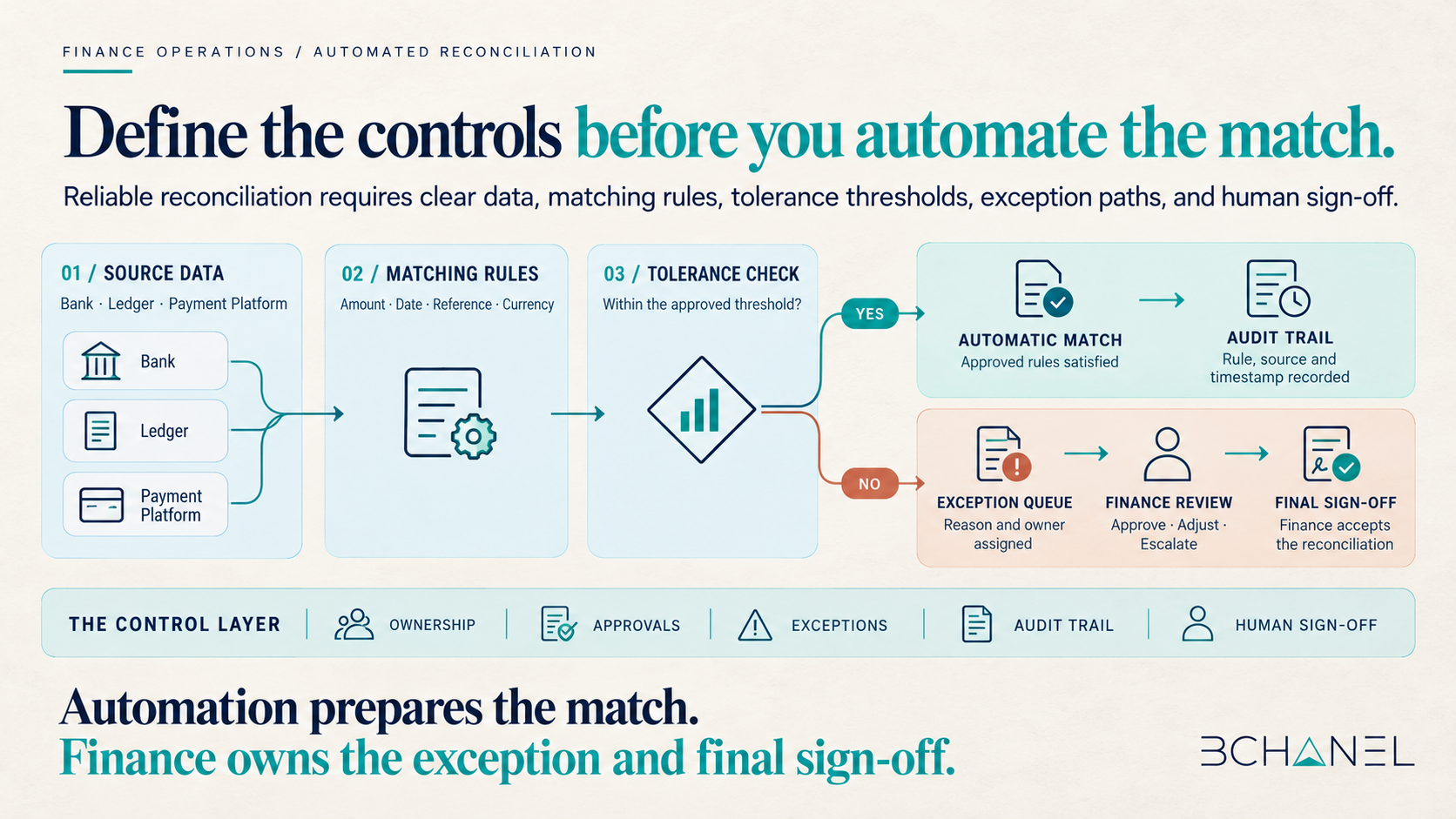
Before implementing automated bank reconciliation, finance teams should define seven elements: data sources, matching rules, tolerance thresholds, approval boundaries, exception ownership, audit trails, and final sign-off.
Without those decisions, automated reconciliation may process transactions faster while making financial controls harder to understand.
What Is Automated Bank Reconciliation?
Automated bank reconciliation is the use of software to compare transactions from bank accounts with records in an accounting system, ERP, payment platform, or internal ledger.
The system attempts to match transactions based on defined criteria such as:
Transaction amount
Transaction date
Bank account
Reference number
Customer or vendor
Currency
Payment processor identifier
Transactions that meet the approved rules can be matched automatically. Transactions that do not meet them should be flagged as reconciliation exceptions and sent to the appropriate person for review.
The objective is not to eliminate finance from the process. It is to reduce repetitive preparation while keeping judgment, approvals, and accountability under human control.
How Does the Automated Bank Reconciliation Process Work?
A controlled bank reconciliation process generally follows five stages:
1. Import transactions from approved sources.
2. Standardize the data into a consistent format.
3. Apply matching rules and tolerance thresholds.
4. Route unmatched transactions for review.
5. Record the match, exception, reviewer, and final decision.
This sounds straightforward, but each stage contains business decisions that bank reconciliation software cannot make independently.
For example, QuickBooks explains that transactions may remain unmatched because amounts or dates differ, the wrong bank account was used, the record was already matched, or exchange-rate movements created a significant difference. These are not necessarily system failures. They are conditions the workflow must be designed to manage. See the QuickBooks transaction-matching guidance.
Seven Decisions Finance Should Make Before Implementation
1. Define the source of truth
Automated reconciliation starts with reliable data.
Finance should document which system owns each record:
The bank for settled cash activity
The accounting platform for ledger entries
The payment processor for transaction references
The property, ecommerce, or billing platform for operational detail
The ERP for approved accounting records
If the same transaction appears differently across systems, the workflow needs a clear hierarchy. Otherwise, the automation may compare two incomplete or inconsistent records.
2. Define the matching rules
Matching rules determine when two records represent the same transaction.
A rule might require an exact match across amount, currency, bank account, and reference number. Another rule may allow a date difference when settlement normally occurs several days after payment.
Finance should define:
Required matching fields
Exact-match conditions
Acceptable date windows
One-to-one and many-to-one matches
Duplicate detection
Currency and exchange-rate handling
Rules for fees, refunds, and partial payments
The rules should reflect accounting policy and the actual bank reconciliation workflow—not simply the default settings in the software.
3. Set tolerance thresholds
Some differences are expected. Payment-processing fees, exchange rates, rounding, or timing can create small variations.
Tolerance thresholds define which differences the system may accept and which require review.
Thresholds may depend on:
Absolute amount
Percentage difference
Currency
Transaction type
Business unit
Bank account
Materiality
Risk level
A single tolerance applied to every transaction is rarely enough. Higher-value or unusual transactions may require stricter controls even when the numerical difference appears small.
4. Define approval boundaries
Not every reconciliation decision should carry the same approval requirement.
Finance should separate:
Matches that can be completed automatically
Matches that require a reviewer
Adjustments that require approval
Transactions that must be escalated
Decisions that require final sign-off
An automated match may be low risk when every required field agrees. A write-off, manual adjustment, or high-value exception carries a different level of consequence.
The workflow should reflect that difference.
5. Assign ownership for exceptions
A reconciliation exception is not an automation failure. It means the available evidence did not support a reliable match.
Every exception needs:
A named owner
A reason code
Supporting evidence
A review deadline
An escalation path
A final status
Without ownership, exceptions often move into spreadsheets, email threads, or shared queues where they remain unresolved.
Strong account reconciliation automation should make uncertainty visible and send it to the right reviewer.
6. Preserve an audit trail
Automated reconciliation should make the bank reconciliation process easier to explain, not more opaque.
The audit trail should record:
Data received from each source
Rule used to suggest or complete the match
Tolerance applied
Changes made to the transaction
Person who reviewed the exception
Supporting documentation
· Final decision and timestamp
This creates a traceable record for internal review, month-end close, and external audit support.
7. Keep final sign-off human-controlled
Automation can prepare the evidence, suggest matches, and organize unresolved items. Finance should still own the final reconciliation.
The person providing sign-off should be able to see:
Automatically matched transactions
Manually approved matches
Open exceptions
Adjustments
Items carried into the next period
Changes made after review
Completion should mean that the reconciliation has been reviewed and accepted—not simply that the software processed every available transaction.
Automated Bank Reconciliation Implementation Checklist
| Area | What Finance must define | Why it matters |
|---|---|---|
| Data sources | Approved bank, ledger, ERP and payment data | Prevents conflicting records |
| Matching rules | Fields and conditions required for a match | Avoids unreliable or duplicate matches |
| Tolerances | Acceptable amount, date and currency differences | Separates expected variation from risk |
| Approvals | Which matches and adjustments need review | Protects higher-consequence decisions |
| Exceptions | Owner, reason, deadline and escalation path | Prevents unresolved items from disappearing |
| Audit trail | Rules, evidence, reviewer and timestamps | Makes decisions traceable |
| Sign-off | Who accepts the final reconciliation | Keeps accountability with Finance |
How to Evaluate Bank Reconciliation Software
Comparing bank reconciliation software only by the number of transactions it can process misses the operational question.
Finance teams should ask:
Can we configure different matching rules by account or transaction type?
Can the system explain why it suggested a match?
Can we prevent false matches?
Can exceptions be assigned to named owners?
Does it support approval thresholds?
Is every manual adjustment recorded?
Can reviewers see unresolved items before sign-off?
Does it integrate with the actual source systems?
Can the audit trail be exported?
What happens when source data is missing?
The same questions apply when evaluating account reconciliation software, financial reconciliation software, or AI bank reconciliation tools.
A more advanced matching engine is useful only if the operating controls around it are clearly defined.
What Does Successful Automated Reconciliation Look Like?
Success is not a 100% automatic match rate.
A stronger implementation produces:
Fewer manual matches
Faster identification of exceptions
Clearer ownership
Fewer unresolved items at close
Consistent review and approval
A complete audit trail
Greater confidence in the final reconciliation
Automation should improve preparation and visibility while protecting the decisions that require financial judgment.
See the Workflow in Practice
BChanel implemented a finance workflow that receives Guesty reservation events, validates financial information, and updates a live dashboard across multiple properties.
The value came from defining the data movement and validation logic before automating the nightly process.
View the Guesty Finance Workflow Case.
If your reconciliation process still depends on spreadsheets, manual matching, or unclear exception ownership, the next step is to understand the workflow before selecting more software.
Request an Operational Assessment.
Frequently Asked Questions
What is automated bank reconciliation?
Automated bank reconciliation uses software to compare bank transactions with accounting records, apply approved matching rules, and identify transactions that require review. It reduces manual preparation but should preserve human oversight for exceptions, adjustments, and final sign-off.
How does automated bank reconciliation work?
The system imports data from approved financial sources, standardizes transaction fields, applies matching rules and tolerance thresholds, and separates matched transactions from unresolved exceptions. Finance reviews the exceptions and approves the final reconciliation.
What are the benefits of bank reconciliation automation?
Bank reconciliation automation can reduce repetitive matching, identify differences earlier, improve exception visibility, support a faster month-end reconciliation process, and create a more consistent audit trail.
What should finance teams look for in bank reconciliation software?
Finance teams should evaluate configurable matching rules, tolerance settings, exception routing, approval controls, integrations, audit trails, user permissions, reporting, and the ability to explain why a match was suggested or completed.
Should every bank transaction be matched automatically?
No. Transactions should only be matched automatically when they satisfy approved rules and thresholds. Missing information, unusual amounts, duplicates, material differences, and unresolved exceptions should be routed for human review.