
Business process automation works best when the underlying workflow is already clear.
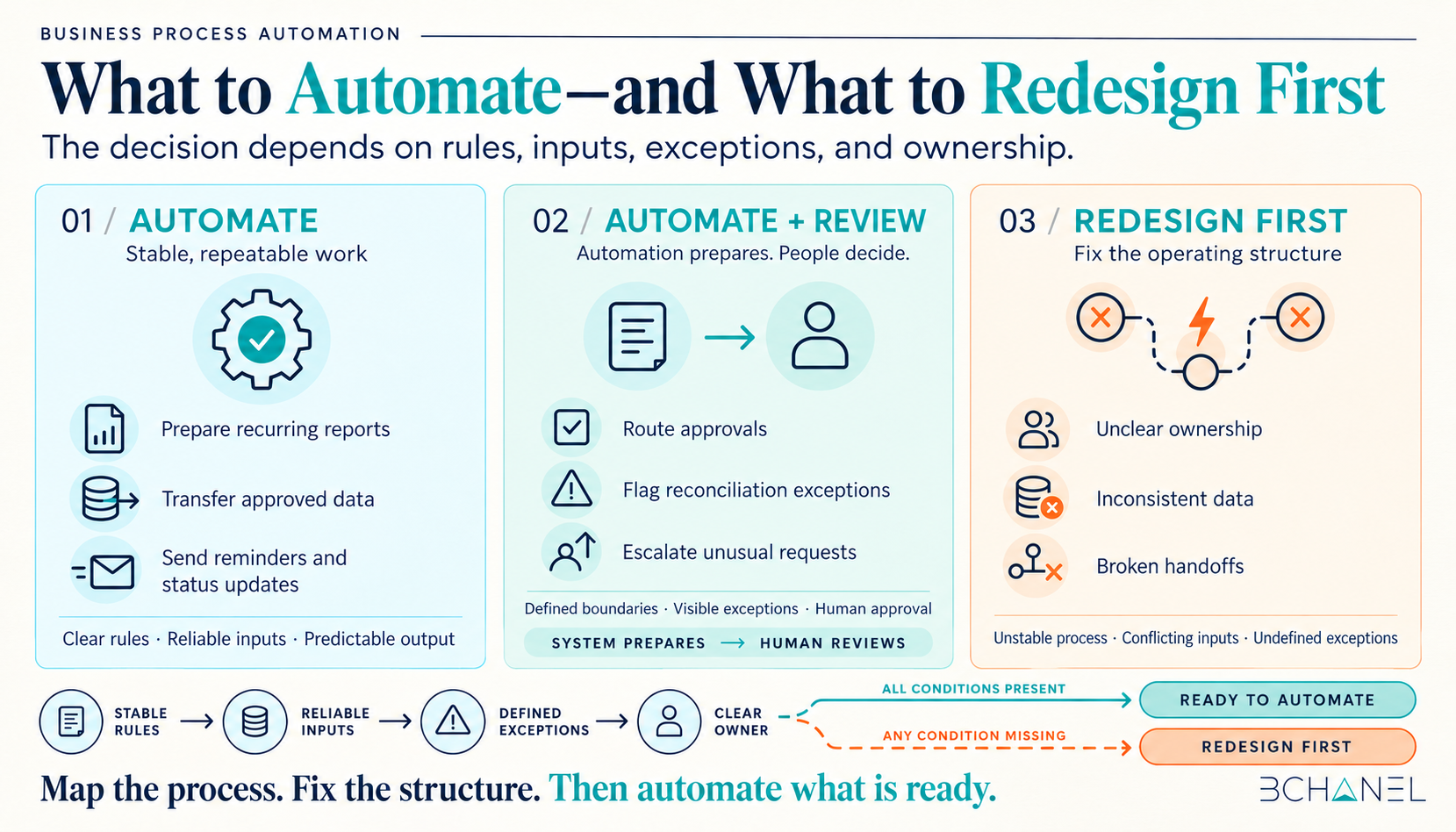
Repetitive tasks, stable rules, predictable inputs, and routine system updates are usually strong automation candidates. Unclear ownership, inconsistent data, unnecessary approvals, and broken handoffs should be redesigned before technology is introduced.
The objective is not to automate every manual task. It is to improve how work moves through the business—and then automate the parts that are stable enough to run consistently.
What Is Business Process Automation?
Business process automation uses software to perform repeatable tasks, transfer information, route work, apply predefined rules, and trigger actions across a business process.
Unlike simple task automation, it can connect multiple steps, teams, and systems. According to IBM’s overview of business process automation, these processes can span departments and be partially or fully automated.
However, software cannot compensate for a poorly designed process. If the workflow has unclear decisions, conflicting data, or missing ownership, automation may simply move those problems faster.
Business Process Automation Examples: What to Automate and What to Redesign First
The following table summarizes common business process automation examples and the operational questions that should be resolved first.
| Business process | What can be automated | What should be redesigned first |
|---|---|---|
| Manual reporting | Data collection, calculations, report preparation, and distribution | Data sources, metric definitions, ownership, and reporting frequency |
| Duplicate data entry | Transferring approved information between systems | The system of record, required fields, and duplicate records |
| Approval workflows | Routing, reminders, status updates, and escalation notifications | Approval authority, thresholds, exceptions, and unnecessary approval layers |
| Client onboarding | Project creation, notifications, document requests, and system updates | Required information, team handoffs, responsibilities, and exception handling |
| Account reconciliation | Transaction matching, tolerance checks, and exception detection | Matching rules, data quality, reviewer ownership, and final sign-off |
| Support requests | Ticket classification, prioritization, routing, and acknowledgements | Service categories, escalation rules, ownership, and response expectations |
This distinction matters because the visible manual task is not always the root problem. A person copying data between systems may indicate an integration opportunity, but it may also reveal that nobody has defined which system owns the information.
1. Manual Reporting Automation
Manual reporting is one of the most common business process automation use cases.
Automation can collect data from approved sources, apply standard calculations, prepare dashboards, and distribute reports on a schedule. This can reduce repetitive spreadsheet work and make information available earlier.
But reporting should be redesigned first when teams disagree about metric definitions, maintain competing spreadsheets, or use different sources for the same number. Automating this situation can produce a faster report without creating a reliable one.
Before implementation, define:
The source of truth for each metric
Who owns data quality
How calculations are performed
Who receives the report
What happens when data is incomplete
2. Duplicate Data Entry Between Systems
Business workflow automation can eliminate the need to re-enter the same customer, order, or project information across multiple tools.
Once a record has been approved, an automated workflow can update the CRM, create a project, notify the delivery team, and prepare a billing record.
The process needs redesign when multiple systems can modify the same field, required information differs between departments, or teams create duplicate records because they do not trust existing data.
The first question should not be, “How do we connect these tools?” It should be, “Which system owns each piece of information?”
3. Approval Workflow Automation
Approval workflows are strong automation candidates when decision authority and thresholds are already defined.
Workflow automation can route requests to the appropriate person, send reminders, document timestamps, update the request status, and escalate overdue items. The decision itself may still remain under human control.
Redesign is necessary when every request follows the same approval path regardless of value or risk. Adding automation to an unnecessarily complicated approval structure makes the inefficiency more consistent—it does not remove it.
Before automating, clarify:
Who can approve each type of request
Which decisions require additional review
What thresholds change the approval path
How rejected or incomplete requests are handled
4. Client Onboarding Automation
Client onboarding includes several useful process automation examples: collecting documents, creating projects, updating internal systems, assigning tasks, and notifying delivery or finance teams.
These steps can be automated after the commercial agreement and required information have been confirmed.
However, onboarding should be redesigned when sales, operations, and finance have different definitions of a ready client. Missing information at the beginning creates delays later, regardless of which business process automation software is used.
A reliable onboarding workflow needs a clear starting condition, mandatory information, defined handoffs, and an owner for every exception.
5. Account Reconciliation Automation
Account reconciliation demonstrates the difference between automating preparation and automating judgment.
Software can import transactions, apply matching rules, check tolerance thresholds, identify unmatched records, and prepare an exception queue. Finance can then investigate exceptions, approve adjustments, and provide final sign-off.
The automation should not force uncertain transactions into a false match. A strong workflow makes exceptions visible and routes them to the appropriate reviewer.
Before implementation, finance should define matching logic, accepted tolerances, reviewer responsibilities, escalation paths, and audit requirements.
6. Support Request Routing
Support teams can automate ticket acknowledgements, classification, priority assignment, and routing.
This works when service categories and escalation rules are clear. It becomes unreliable when customers describe similar problems in different ways, ownership overlaps, or no team is responsible for uncommon requests.
Business process redesign may therefore be required before ticket routing is automated. The objective is not only to route requests faster, but to ensure they reach someone who can act.
How to Decide What Business Processes Can Be Automated
A workflow is generally ready for automation when:
The work happens frequently
Inputs follow a consistent format
Rules can be explained clearly
The expected output is measurable
Ownership is defined
Common exceptions are understood
A person remains accountable for the result
Redesign the process first when:
Teams cannot agree on how the process currently works
Manual effort compensates for missing information
Ownership changes from case to case
Different systems contain conflicting records
Approvals have accumulated without a clear purpose
Exceptions are handled through private messages or individual memory
These signals are more useful than selecting a tool based only on its feature list.
Why Business Process Mapping Should Come First
Business process mapping documents how work actually moves across people, systems, decisions, and handoffs.
A current-state map can reveal duplicate entry, unnecessary approvals, missing ownership, hidden workarounds, and recurring exceptions. Teams can then simplify or redesign the workflow before building automation around it.
This reduces the risk of preserving inefficient steps simply because they already exist.
How to Evaluate Business Process Automation Software
Business process automation tools should be evaluated against the requirements of the workflow—not the other way around.
Consider whether the software can:
Connect with the systems that own critical data
Apply the required business rules
Route exceptions to the correct owner
Preserve an audit trail
Support human approval where needed
Provide visibility into failures and processing status
Adapt when the workflow changes
The best platform is not necessarily the one with the most features. It is the one that supports the redesigned workflow without hiding exceptions or weakening accountability.
The Real Benefits of Business Process Automation
The most valuable business process automation benefits include reduced manual preparation, more consistent execution, improved visibility, clearer ownership, and faster access to reliable information.
Those benefits depend on process quality. Automating a stable workflow can improve efficiency. Automating an unclear workflow can make operational problems harder to detect.
The correct sequence is simple:
Map the process. Fix the structure. Define the controls. Then automate what is ready.
To see how this approach works in real operations, explore BChanel’s workflow automation cases. If your team needs help identifying which process should be fixed first, you can then request an Operational Assessment.
Frequently Asked Questions
What is business process automation?
Business process automation uses software to complete repeatable tasks, route information, apply predefined rules, and coordinate work across systems or departments. It is most reliable when the underlying process, ownership, and exception paths are already clear.
What are examples of business process automation?
Common business process automation examples include automated reporting, client onboarding, approval routing, transaction reconciliation, data synchronization, invoice processing, inventory alerts, and support-ticket routing.
What business processes should be automated?
Processes are good automation candidates when they are repetitive, rules-based, high-volume, and supported by consistent inputs. The expected result, process owner, and method for handling exceptions should also be defined.
What should be redesigned before automation?
Processes should be redesigned first when they contain unclear ownership, inconsistent data, unnecessary approvals, duplicated work, disconnected systems, or undefined exceptions. Automation should not preserve problems that can be removed through better process design.
How do you choose business process automation software?
Start by documenting the workflow, required integrations, business rules, approvals, exception paths, and reporting needs. Then evaluate software against those requirements instead of redesigning the process around a particular platform.