
Growing companies rarely run into operational problems because they lack software.
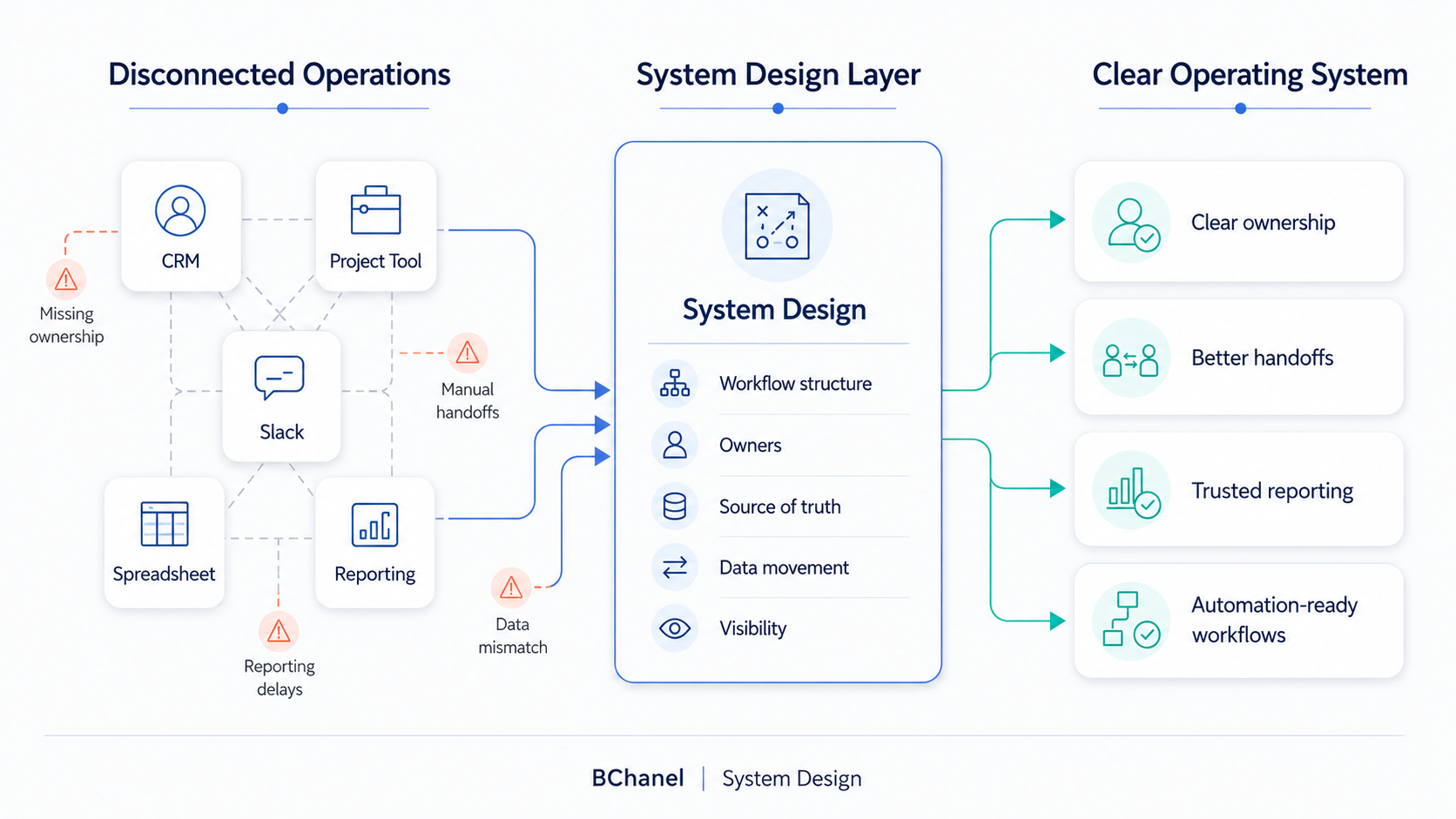
Most already have enough tools: a CRM, project management platform, spreadsheets, Slack channels, reporting dashboards, ecommerce systems, finance tools, and maybe a few automation platforms. The issue is usually that those tools are not connected by a clear operating model.
That is where system design for operations becomes important.
For many teams, this falls under broader ideas like business process management, workflow design, or business process design. But the core problem is simple: work needs a clear structure before it can move reliably across people, tools, and decisions.
Without that structure, teams end up chasing updates, rebuilding reports, duplicating data, and adding more software to fix problems that are not really software problems.
What System Design Means in Business Operations
System design in business operations is the process of defining how work should move across the company.
It answers questions like:
What starts the workflow?
Who owns each step?
Which system holds the source of truth?
Where does data move?
What should be visible to leadership?
What happens when something breaks?
Which parts are ready for automation?
This is closely related to business process management, but with a more practical focus on the operating layer between strategy and technology.
A growing company does not just need processes written in a document. It needs workflows that people can follow, systems that support those workflows, and reporting that reflects what is actually happening.
That is why system design should come before workflow automation.
Why Growing Teams Outgrow Informal Workflows
In an early-stage company, informal workflows often work well enough.
A founder asks a team member for an update. Someone checks the CRM. Someone else confirms in Slack. A spreadsheet gets updated manually. The team moves fast because everyone is close to the work.
But as the company grows, that informal operating model starts to break. More people join. More tools are added. More customers, orders, projects, tickets, or requests move through the business. Suddenly, the team cannot rely on memory, Slack messages, or manual follow-ups to keep work moving.
Common signs include:
Reports take too long to prepare.
Different tools show different numbers.
Ownership is unclear between teams.
Handoffs depend on manual reminders.
Leadership does not trust operational data.
Automation ideas keep appearing, but the workflow is still unclear.
This is when workflow design becomes a business priority.
The company does not only need better tools. It needs a clearer operating system behind the tools.
The Difference Between Tools and an Operating System
A tech stack is not the same as an operating system.
A CRM can store customer data. A project management tool can track tasks. Slack can support
communication. A reporting dashboard can visualize numbers. But none of those tools automatically define how work should move.
The operating system is the structure underneath.
It defines ownership, workflow logic, data movement, visibility, and decision points.
For example, a CRM-to-project workflow might look simple at first:
A deal closes.
A project is created.
The delivery team starts work.
The client receives updates.
Finance prepares billing.
Leadership sees project status.
But if the handoff is not designed, the workflow can break quickly.
Sales context may not transfer. Project ownership may be unclear. Billing details may live in a separate spreadsheet. Client updates may happen manually. Reporting may depend on someone checking three different tools.
That is not just a tool problem.
It is a business workflow management problem.
External resources like Atlassian’s guide to workflow management describe workflow management as a way to structure how work moves through teams. Similarly, IBM’s overview of business process management frames process management around improving, measuring, and optimizing business processes.
BChanel’s point of view is more specific: before automation, teams need to design the operating
structure that makes automation useful.
The Core Parts of Operational System Design
A strong operational system usually includes five core parts.
1. Workflow Structure
The workflow needs to be mapped from trigger to outcome.
That means understanding what starts the process, which steps follow, who touches the work, which systems are involved, and what the final output should be.
Without workflow structure, automation often accelerates confusion.
A more detailed business process mapping exercise can reveal where ownership, data, and handoffs break across that workflow.
2. Ownership
Every important workflow needs clear owners.
Ownership does not only mean “who does the task.” It also means who is accountable for the outcome, who handles exceptions, and who makes decisions when something is unclear.
When ownership is missing, work gets chased instead of managed.
3. Source of Truth
A source of truth defines where reliable information lives.
For example, customer status might live in the CRM. Project delivery status might live in a project tool. Inventory availability might live in an ERP or inventory system.
If the source of truth is unclear, reporting becomes slow and hard to trust.
4. Data Movement
Data needs to move cleanly between tools.
This does not always mean every system needs to be fully automated immediately. It means the team should understand what information needs to move, when it should move, and which system should update next.
Good business process design makes data movement intentional.
5. Visibility
Leadership and operators need visibility into the right things.
That includes workflow status, stuck work, exceptions, ownership, reporting accuracy, and operational risk.
Visibility is what allows the team to manage the business without constantly asking for updates.
Why System Design Should Come Before Automation
Automation works best when the workflow is already clear.
If the workflow is unclear, automation can make the problem worse.
For example:
If ownership is unclear, automation may send work to the wrong person.
If data is unreliable, automation may move bad information faster.
If exceptions are not defined, automation may break when real-world edge cases appear.
If reporting is weak, leadership may still lack visibility after automation is built.
This is why BChanel does not position automation as the first step.
The better sequence is:
Assess the operation.
Design the system.
Automate the right workflows.
This is also why BChanel’s Approach focuses on understanding workflows, bottlenecks, tools, ownership, and visibility before implementation.
What System Design Looks Like in Practice
System design can apply across different types of businesses.
In ecommerce, it might mean connecting order management, inventory, fulfillment, customer support, and reporting so teams can trust what is happening across Shopify, Amazon, 3PLs, spreadsheets, and inventory tools.
In IT services, it might mean redesigning the handoff between CRM, onboarding, project delivery, support, billing, and client reporting.
In agencies, it might mean clarifying how work moves from sales to account management to execution to client updates.
The exact tools may change. The operating problem is usually similar.
Work is moving through the business, but the structure underneath is not clear enough.
BChanel’s workflow examples and case studies show how operational problems can be translated into clearer workflows, better visibility, and implementation priorities.
Where BChanel Fits
BChanel helps growing teams clarify how work actually moves before adding more automation.
That starts with understanding the current operating model:
Which workflows create the most friction?
Where does ownership become unclear?
Which tools hold critical data?
Where do handoffs slow down?
Which reports are hard to trust?
Which workflows are ready for automation?
From there, BChanel helps turn operational findings into a practical system design roadmap.
The goal is not to create more documentation for the sake of it. The goal is to make the business easier to operate, easier to measure, and easier to improve.
FAQ
What is system design in business operations?
System design in business operations is the process of defining how workflows, tools, owners, data, and reporting should work together. It helps teams create a clearer operating model before implementing automation or adding more software.
How is system design different from business process management?
Business process management is a broader discipline focused on improving and managing business processes. System design is more focused on the operating structure behind those processes: ownership, systems, data movement, visibility, and automation readiness.
Why should workflow design happen before automation?
Workflow design should happen before automation because automation depends on clear rules. If the workflow, owner, source of truth, exception path, or reporting logic is unclear, automation may create more complexity instead of solving the problem.