
HubSpot is often introduced to make work cleaner, faster, and easier to manage.
And in many ways, it can.
HubSpot workflow automation can assign leads, update lifecycle stages, create tasks, send internal notifications, clean CRM properties, and connect with other tools. For sales, marketing, customer success, and operations teams, that can remove a lot of repetitive work.
But many growing companies still run into the same problem:
They have HubSpot.
They have workflows.
They have integrations.
And the team is still doing too much manual cleanup, follow-up, routing, and reporting.
That does not always mean HubSpot is the problem.
In many cases, the issue is that the operating workflow around HubSpot was never clearly designed.
Before adding more HubSpot automation, more integrations, or more CRM rules, teams need to
understand how work should actually move across people, systems, data, and decisions.
That is where CRM workflow automation becomes an operations problem, not just a software
configuration problem.
What HubSpot Workflow Automation Can Do
HubSpot has strong automation capabilities. According to HubSpot’s own workflow automation guide, workflows can use triggers, actions, and CRM records to automate business steps such as sending emails, assigning tasks, updating properties, routing ownership, and triggering integrations.
For example, a HubSpot workflow can:
Assign a new inbound lead to a sales rep
Create a task when a deal moves stages
Send an internal notification when a form is submitted
Update lifecycle stages based on activity
Trigger a follow-up sequence
Sync or route data to other tools
That is useful. But automation only works well when the business rules behind it are clear.
If a team cannot agree on what makes a lead qualified, who should own the next step, what data must be complete, or when a handoff should happen, HubSpot will not magically solve that. It will simply execute unclear logic faster.
Why Manual Work Still Happens in HubSpot
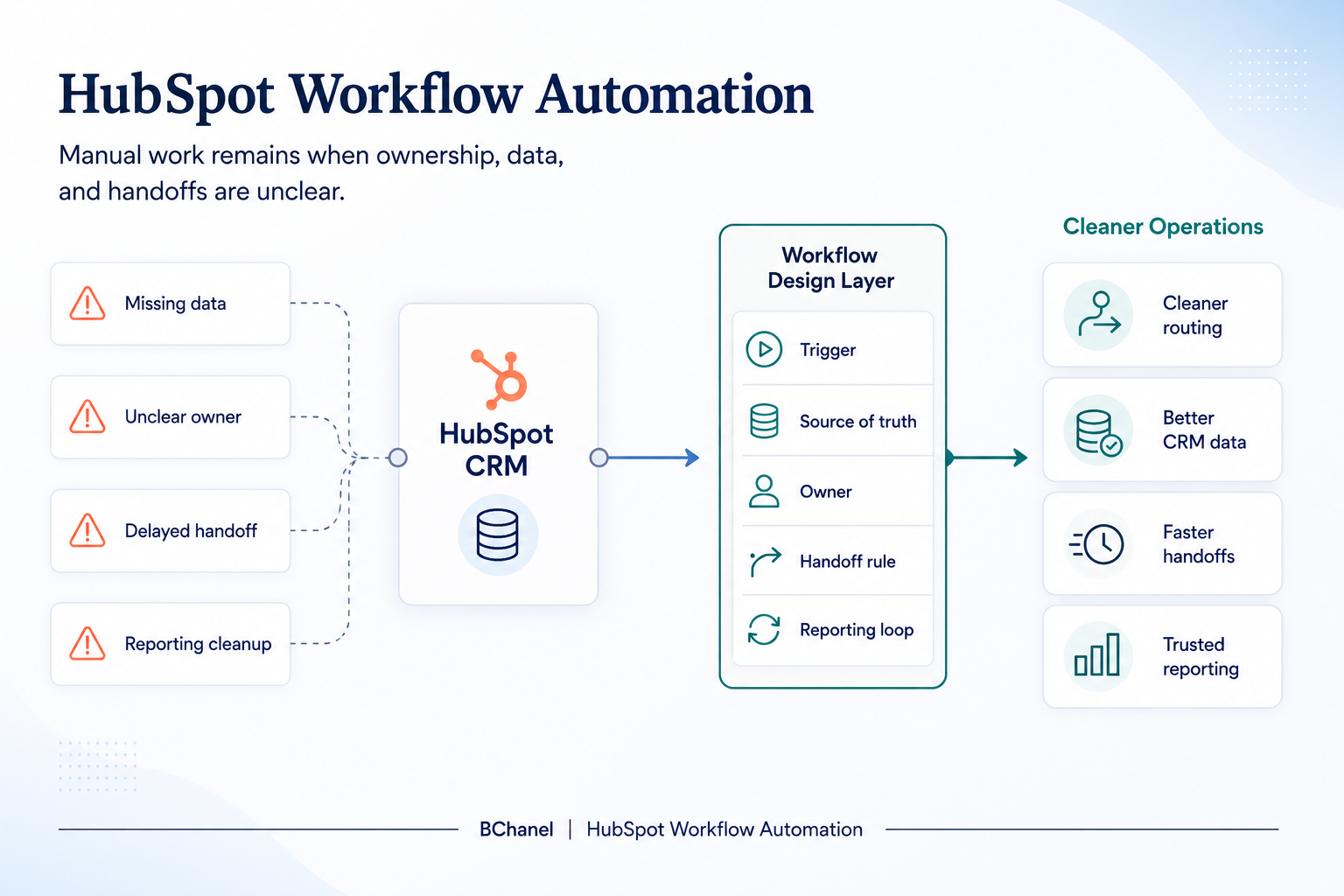
Manual work usually remains in HubSpot for one of five reasons.
First, ownership is unclear. A lead enters the CRM, but nobody knows who should review it, who should follow up, or who is responsible if the information is incomplete.
Second, lifecycle stages are not consistently defined. HubSpot’s lifecycle stage documentation explains how contacts and companies can be categorized across the customer journey. But the tool cannot decide for the business what each stage should mean operationally.
Third, data is messy. Required fields are missing, company records are duplicated, lead sources are inconsistent, and sales teams do not trust what they see in the CRM.
Fourth, handoffs are not designed. Marketing passes leads to sales. Sales passes customers to delivery. Customer success sends requests back to operations. But the handoff rules are often informal.
Fifth, reporting depends on manual interpretation. A dashboard may exist, but someone still needs to clean fields, check deal status, compare source data, and explain why numbers do not match.
This is why teams can have HubSpot automation and still feel operationally stuck.
CRM Workflow Automation Is Not Just a HubSpot Setup
A common mistake is treating CRM automation as a list of automations to build.
Create this workflow.
Update this field.
Route this contact.
Send this alert.
Connect this app.
Those steps matter, but they are not the full workflow.
A real CRM workflow includes:
The trigger that starts the process
The data needed to make a decision
The system that should be trusted
The person or team that owns the outcome
The rules for moving work forward
The exception path when something is missing
The reporting loop that shows whether the process worked
Without that structure, HubSpot workflow automation becomes reactive. Teams keep adding rules to fix symptoms, but the underlying process remains unclear.
This is especially common when HubSpot is connected to project management tools, Slack,
spreadsheets, billing tools, or delivery systems. The more tools involved, the more important workflow architecture becomes.
We wrote more about this in The CRM-to-Project Handoff Problem in IT Services Companies, where the issue is not simply moving data from one tool to another. The real issue is defining what should happen when a sales opportunity becomes operational work.
Where HubSpot Workflows Usually Break
HubSpot workflows tend to break at the same operational points.
Lead routing breaks when assignment rules are too simple or not tied to territory, account type, priority, or capacity.
Lead qualification breaks when teams do not agree on what makes a contact sales-ready.
Data cleanup breaks when fields are optional, naming conventions are inconsistent, or ownership of CRM hygiene is unclear.
HubSpot integrations break when data moves between tools without clear rules for which system owns which information.
Reporting breaks when dashboards depend on properties that are not maintained consistently.
None of these are purely technical problems. They are operating system problems.
The question is not only, “Can HubSpot automate this?”
The better question is:
“Is this workflow defined clearly enough for HubSpot to automate it reliably?”
What to Define Before Adding More HubSpot Automation
Before building more HubSpot workflows, teams should define six things.
1. Workflow trigger
What starts the workflow?
A form submission, deal stage change, meeting booked, ticket created, lead score threshold, or missing property can all trigger automation. But the trigger should represent a real operational moment, not just a convenient CRM event.
2. Source of truth
Which system should HubSpot trust?
If customer data lives in HubSpot, billing status lives somewhere else, and project status lives in another tool, the workflow needs clear source-of-truth rules. Otherwise, automation may act on outdated or incomplete information.
3. Required data
What information must be present before the workflow can continue?
For example, a lead routing workflow may require company size, country, industry, source, and product interest. If those fields are missing, the workflow needs an exception path.
4. Owner
Who is accountable for the next step?
Automation can assign tasks, but accountability still needs to be designed. Every workflow should have a clear owner for progress, exceptions, and results.
5. Handoff rules
When does work move from one team to another?
This is where many HubSpot workflows fail. The CRM may update a stage, but the receiving team may not have enough context to act.
6. Reporting feedback
How will the team know if the workflow is working?
A workflow should produce visibility. If leads are being routed faster but conversion quality drops, the automation may be moving work quickly in the wrong direction.
Example: From Inbound Lead to Delivery Handoff
Imagine a company uses HubSpot for inbound leads, sales pipeline, and customer records.
A potential customer submits a demo form. HubSpot creates the contact, assigns the lead, and notifies sales. The rep qualifies the opportunity, moves the deal forward, and eventually marks it closed-won.
At that point, delivery needs to start.
A basic HubSpot automation might create a task or send a Slack message.
But a better workflow design asks:
What customer information must be complete before handoff?
Who confirms the scope?
What happens if billing details are missing?
Which project tool receives the work?
Who owns the first customer touchpoint after the sale?
What should leadership be able to see in reporting?
This is the difference between simple HubSpot automation and operational workflow design.
The goal is not just to move a deal stage.
The goal is to make sure the right team has the right information, at the right moment, with clear ownership and visibility.
How Integrations Fit Into HubSpot Workflow Automation
HubSpot integrations can help teams connect CRM data with project tools, forms, calendars, billing systems, spreadsheets, and reporting platforms.
Tools like Zapier’s HubSpot integrations can also connect HubSpot with thousands of other apps, making it easier to move data between systems without custom development.
But integrations do not replace workflow clarity.
If the business has not defined where data should live, which updates matter, or who owns the next step, integrations can make confusion spread faster.
This is why teams should avoid treating every manual step as an automation opportunity.
Some manual work exists because a workflow is repetitive and ready to automate.
Other manual work exists because the process is unclear.
Those are different problems.
We covered this distinction in Workflow Automation Works Better After Workflow Design, which
explains why the best automation usually starts with process clarity, not tool configuration.
Where BChanel Fits
BChanel is not a HubSpot implementation agency.
The goal is not to simply add more HubSpot workflows, integrations, or automations.
BChanel helps growing teams understand where operational friction is coming from before they invest more time into automation. That means reviewing how work moves across the CRM, project tools, communication channels, reporting systems, and human decision points.
For HubSpot-heavy teams, that often includes:
Mapping the workflow around HubSpot
Clarifying lifecycle stage definitions
Identifying where CRM data becomes unreliable
Reviewing lead routing and ownership rules
Finding handoff gaps between sales, delivery, and operations
Separating workflow problems from automation opportunities
Designing the structure before building more automation
The outcome is a clearer operating model.
Once the workflow is clear, HubSpot automation becomes much more useful. It can support the process instead of trying to compensate for missing structure.
FAQ
What is HubSpot workflow automation?
HubSpot workflow automation is the use of HubSpot workflows to automate actions based on triggers inside the CRM. These actions can include assigning records, updating properties, creating tasks, sending notifications, routing leads, and connecting HubSpot with other tools.
Why does manual work still happen after setting up HubSpot automation?
Manual work usually remains because the workflow around HubSpot is unclear. Common causes include missing data, unclear ownership, inconsistent lifecycle stages, poor handoffs, disconnected tools, and reporting that still requires manual cleanup.
Is CRM workflow automation the same as workflow design?
No. CRM workflow automation executes steps inside a system. Workflow design defines how work should move across people, tools, data, decisions, and reporting. Automation works better when workflow design happens first.
What should teams define before automating HubSpot workflows?
Teams should define the workflow trigger, source of truth, required data, owner, handoff rules, exception handling, and reporting feedback loop. Without those elements, HubSpot automation can create more confusion instead of less.
When should a company get help with HubSpot workflow automation?
A company should get help when HubSpot is active but the team still relies on manual follow-up, spreadsheet cleanup, unclear routing, inconsistent CRM data, or disconnected handoffs between sales, operations, and delivery.