
AI agents are becoming more useful for business operations because they can support real work, not just generate content or answer questions.
They can review context, draft responses, update records, route tasks, summarize information, trigger actions, and help teams move faster across tools.
But that also creates a new operational risk.
When AI agents are added to unclear workflows, they do not automatically create better operations. They can move faster through bad data, weak ownership, missing approval paths, and disconnected systems.
For founders, COOs, and operations leaders, the question is not only whether AI agents can help. The better question is whether the business has the right workflow structure for agents to execute safely.
That is where AI agent workflows matter.
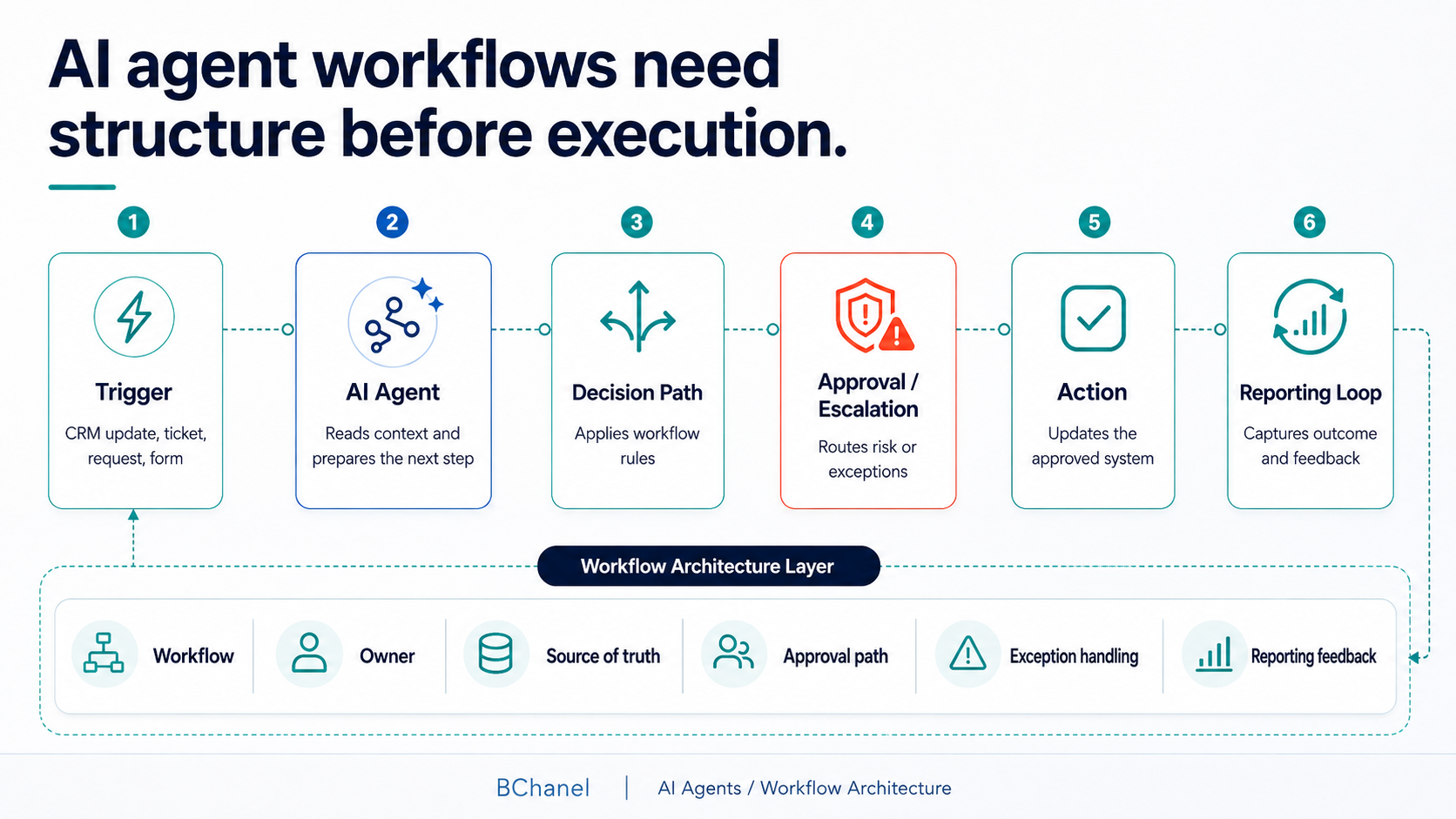
An AI agent workflow defines when an agent acts, what data it uses, what it can do, what requires human approval, what should be escalated, and how outcomes are tracked. Without that structure, AI agent implementation can create more confusion than leverage.
What Are AI Agent Workflows?
AI agent workflows are the operating processes that guide how an AI agent supports or executes work. A workflow may include a trigger, a source of truth, a set of allowed actions, an approval path, exception rules, and a reporting loop.
For example, an AI agent could support client onboarding by reviewing a closed deal in the CRM, checking required fields, drafting an onboarding summary, creating a project task, and notifying the delivery owner.
But the agent should not decide everything alone.
The workflow needs to define what the agent can complete independently, what requires review, and where the output should be recorded.
This is the difference between using AI as a tool and designing AI agents for business operations.
Why AI Agents Need Workflow Design Before Implementation
AI agents are only as useful as the operating structure around them. If a workflow is already unclear, adding an agent can expose the problem faster.
Common issues include:
No clear workflow owner
Inconsistent data across tools
Unclear approval rules
Manual follow-ups hidden in Slack
No defined escalation path
Reporting that depends on manual updates
This is why AI agent readiness starts before implementation. The team needs to understand how work moves today, where it breaks, which systems hold trusted data, and who owns each step.
This connects directly with BChanel’s broader point of view: AI agent readiness starts with clear
workflows, reliable data, ownership rules, approvals, and reporting structure.
AI Agent Workflows vs. Traditional Workflow Automation
Traditional workflow automation usually follows fixed logic. When this happens, do that.
For example:
When a form is submitted, create a CRM record.
When a deal moves stages, notify the delivery team.
When a task is overdue, send a reminder.
AI agent workflows are more flexible. The agent can interpret context, compare information, draft an answer, suggest a next step, or decide whether something should be escalated.
That flexibility is useful, but it also adds risk.
Workflow automation needs clear triggers and actions. AI agent workflows need triggers, data rules, ownership, approval paths, exception handling, and reporting feedback.
The more judgment the agent uses, the more structure the workflow needs.
OpenAI’s practical guide to building AI agents frames agents as systems that can use tools, follow instructions, and operate within guardrails. For business operations, those guardrails are not only technical. They are operational.
They come from knowing:
Which workflow the agent supports
Which systems the agent can access
Which actions are allowed
Which decisions need approval
Which exceptions require escalation
Which outcomes need to be visible to the team
Anthropic also makes a useful distinction in its guide to building effective agents, separating more predictable workflows from more autonomous agent behavior. That distinction is important for operations teams because not every process needs a fully autonomous agent.
In many cases, the first step is not more autonomy.
It is clearer workflow design.
The 6 Parts of a Safe AI Agent Workflow
A safe AI agent workflow should define six core areas before implementation.
1. Workflow Trigger
The trigger is the event that tells the AI agent when to act.
Examples include:
A new form submission
A CRM stage change
A support ticket
A Slack request
A missing field
An overdue task
A reporting threshold
A fulfillment exception
The trigger should be specific.
"Help with operations" is not a workflow trigger.
"A support ticket is tagged as urgent and missing order status" is much clearer.
The more specific the trigger, the easier it is to define what the agent should do next.
2. Source of Truth
AI agents need reliable data.
If the same customer, order, project, or invoice has different information across tools, the agent needs to know which system to trust.
A source of truth defines where approved information lives.
For example:
CRM for customer and deal data
Project management tool for delivery status
ERP or inventory platform for stock data
Helpdesk for support history
BI dashboard for reporting metrics
Without source-of-truth rules, an AI agent may act on outdated or incomplete information. That is why data clarity is a core part of AI agent readiness.
3. Human Owner
AI agents can support execution, but someone still needs to own the outcome.
Every AI agent workflow should define the human owner. This person or role is accountable for:
The workflow result
Exceptions
Approval decisions
Quality control
Continuous improvement
The owner may be an operations manager, project lead, support manager, delivery lead, or COO.
The key point is simple: the agent can help move work, but accountability should not disappear.
This is also why BChanel focuses on operational assessment before automation. Before a team
automates or introduces AI agents, it needs to understand where ownership is clear, where it is missing, and where work depends on informal follow-up.
If nobody owns the workflow, an AI agent will not solve the accountability problem.
It may only make the gap harder to see.
4. Approval Path
Approval paths define what the AI agent can do independently and what requires human review.
Some actions may be low risk:
Summarizing a ticket
Drafting a response
Flagging missing data
Creating an internal task
Updating a non-sensitive status field
Other actions may require approval:
Sending client-facing messages
Updating financial data
Changing delivery scope
Escalating account risk
Triggering refunds
Making commitments on timelines
This is where AI agent approval workflows become important. The team needs to decide where autonomy is useful and where human review protects the business.
5. Exception Handling
Not every workflow will be clean.
Some requests will be missing context. Some records will conflict. Some decisions will be too sensitive for the agent. Some workflows will require judgment.
Exception handling defines what happens when the AI agent should not continue.
A strong exception path should answer:
What counts as an exception?
When should the agent pause?
Who should be notified?
What information should be included?
Where should the issue be logged?
How does the workflow resume?
Without exception handling, the agent may either stop too often or take action when it should not. Both create operational risk.
6. Reporting Feedback Loop
AI agent workflows should create visibility.
The team should be able to see what the agent did, what it skipped, what it escalated, and where the workflow still needs improvement.
A reporting loop can track:
Tasks completed
Actions pending approval
Exceptions escalated
Data issues found
Manual follow-ups avoided
Workflow steps still causing delays
This matters because AI agents should not operate like a black box. They should help the business understand what is working and where the operating system still needs attention.
AI Agent Workflow Examples for Business Operations
Here are practical AI agent workflow examples that growing teams may consider.
Client Onboarding Agent
Trigger: A deal is marked as closed in the CRM.
What the agent can do: Review deal notes, summarize client context, check required onboarding fields, draft a kickoff brief, and create an onboarding task.
What needs human approval: Client-facing kickoff messages, scope confirmation, timeline commitments, and billing details.
Where output should go: CRM, project management tool, internal onboarding checklist, and reporting dashboard.
Support Triage Agent
Trigger: A new support ticket is submitted or tagged as urgent.
What the agent can do: Read the ticket, identify issue type, check customer history, suggest priority, and route the ticket to the right owner.
What needs human approval: Refunds, policy exceptions, sensitive client responses, or escalation to leadership.
Where output should go: Helpdesk, CRM notes, support dashboard, and escalation queue.
CRM Data Cleanup Agent
Trigger: A record is missing required fields or has conflicting information.
What the agent can do: Identify missing data, compare records, suggest updates, and flag duplicates.
What needs human approval: Merging records, changing account ownership, updating financial fields, or modifying lifecycle stages.
Where output should go: CRM, data quality report, and operations review queue.
Reporting Update Agent
Trigger: A weekly reporting cycle begins or a metric change unexpectedly.
What the agent can do: Pull data from approved systems, summarize changes, identify missing inputs, and draft reporting notes.
What needs human approval: Leadership commentary, client-facing reporting, budget interpretation, or strategic recommendations.
Where output should go: BI dashboard, reporting document, Slack update, or leadership review.
Fulfillment Exception Agent
Trigger: An order is delayed, inventory status conflicts, or fulfillment tracking is missing.
What the agent can do: Check order status, compare inventory data, review 3PL updates, and alert the responsible owner.
What needs human approval: Customer-facing communication, refunds, replacement orders, or changes to fulfillment priority.
Where output should go: Ecommerce platform, support tool, fulfillment tracker, and operations dashboard.
AI Agent Workflow Checklist Before Implementation
Before implementing AI agents, teams should answer these questions:
What starts the workflow?
Which system is the source of truth?
Who owns the outcome?
What can the agent do without approval?
What requires human review?
What counts as an exception?
Where are actions logged?
How does the team review performance?
What should never be automated?
What data does the agent need to trust?
Who gets notified when something fails?
How does the workflow improve over time?
This checklist helps teams move from AI experimentation to safer operational execution.
Where BChanel Fits
BChanel is not an automation agency.
BChanel helps growing businesses clarify workflows, improve operational visibility, redesign operating systems, and automate the right processes once the workflow is clear.
For AI agents, that means helping teams assess whether the operating structure is ready.
BChanel helps define:
Which workflows are strong candidates for AI agents
Where ownership is unclear
Which systems should be treated as the source of truth
What approval paths are needed
Where exception handling should exist
What reporting loop should track performance
Which actions can be automated safely
The goal is not to add AI agents everywhere. The goal is to understand where agents can support execution without creating unnecessary operational risk.
AI agents need clear workflows, reliable data, ownership, approval paths, exception handling, and reporting loops before they can execute safely. That is the foundation for useful AI workflow automation.
FAQ
What is an AI agent workflow?
An AI agent workflow is the structured process that defines when an AI agent acts, what data it uses, what decisions it can make, what actions it can take, when it should escalate, and how outcomes are reported.
How do AI agent workflows differ from traditional automation?
Traditional workflow automation usually follows fixed rules. AI agent workflows allow the agent to interpret context and support decisions, which means they require stronger guardrails, approval paths, and exception handling.
What should be defined before implementing an AI agent?
Before implementation, teams should define the trigger, source of truth, workflow owner, approval path, exception rules, reporting loop, and actions that should never be automated.
Which business workflows are good candidates for AI agents?
Good candidates include client onboarding, support triage, CRM data cleanup, reporting updates, fulfillment exceptions, internal follow-ups, and operational alerts.
Why do AI agents need approval paths?
AI agents need approval paths because some actions carry operational, financial, client-facing, or compliance risk. Approval paths help teams decide where autonomy is useful and where human review is required.