
Shopify inventory management becomes more difficult as an ecommerce operation expands beyond one storefront and one fulfillment location. Orders may begin in Shopify, stock may sit across warehouses or Amazon, fulfillment updates may come from a 3PL, and leadership may rely on a spreadsheet that combines information from every system.
Each tool can be working correctly while the business still lacks a reliable answer to a basic question:
what inventory is actually available, committed, incoming, delayed, or at risk?
The issue is rarely solved by adding another dashboard. It requires clear rules for where data originates,
how it moves, who owns discrepancies, and which system should be trusted for each decision.
This article builds on our explanation of why growing ecommerce brands lose operational visibility and focuses on how to design the operating structure behind reliable inventory information.
Why Shopify Inventory Visibility Breaks Across Systems
Visibility usually breaks when different systems describe different parts of the same workflow.
Shopify may contain the order and customer record. A warehouse management system or 3PL portal may reflect physical inventory and fulfillment activity. Amazon may hold another pool of stock.
Spreadsheets may track purchase orders, transfers, exceptions, or expected arrival dates.
The problem is not necessarily that one platform is wrong. The problem is that the company has not defined how those records relate.
When updates happen at different times or teams interpret statuses differently, operators begin
checking several systems and manually reconciling the result. Leadership sees a number, but the team still needs to investigate where it came from and whether it can be trusted.
Define the Source of Truth Before Connecting More Apps
A source of truth does not mean forcing every piece of information into one platform. It means deciding which system has authority over each operational field.
For example, Shopify might own the customer order and payment status. A 3PL could own pick, pack, and shipment confirmation. A warehouse or inventory platform might own physical on-hand quantities.
A purchasing system could own incoming stock until it is received.
The decision must be field-specific. “Shopify is our source of truth” is too broad when another system controls the physical event.
Shopify distinguishes between on-hand, available, committed, unavailable, and incoming quantities in its official inventory-state documentation. Teams must understand these definitions and determine how external systems will update or interpret them.
Otherwise, two platforms may use the word “available” while calculating it differently.
Six Rules for Reliable Shopify Inventory Management
1. Define What Creates the Record
Document where every order, transfer, return, adjustment, and inbound shipment begins.
If teams can create the same event in multiple places, define which system generates the official identifier. This prevents duplicate records and gives every downstream update a consistent reference.
2. Assign Ownership to Each Data Field
Clarify who owns order status, fulfillment status, available quantity, expected arrival date, tracking information, and exception notes.
Ownership should include responsibility for investigating incorrect or missing updates. A system can display a discrepancy, but someone still needs to decide what happens next.
3. Standardize Status Definitions
Terms such as pending, committed, fulfilled, received, delayed, and available need one operational definition.
Each status should have a trigger, required data, owner, and expected next action. If the warehouse and ecommerce team interpret “fulfilled” differently, reporting will remain difficult to trust.
4. Establish the Update Sequence
Map what should happen after an order is paid, inventory is reserved, a fulfillment request is accepted, a shipment leaves the warehouse, or a return is received.
The sequence should identify which system updates first, which systems receive the change, and how quickly the update is expected.
5. Define Exception Paths
The normal workflow is only part of inventory management.
Teams also need rules for rejected fulfillment requests, unmapped SKUs, partial shipments, damaged inventory, delayed transfers, missing tracking, cancellations, and returns.
Every exception should have an owner, an escalation point, and a place where the resolution is
recorded.
6. Build a Reporting Feedback Loop
A Shopify inventory report should do more than combine numbers. It should expose discrepancies, delayed updates, and unresolved exceptions.
Someone must own the review and decide what happens when the numbers do not match. Without that feedback loop, the report becomes another spreadsheet the team maintains instead of a tool for managing the operation.
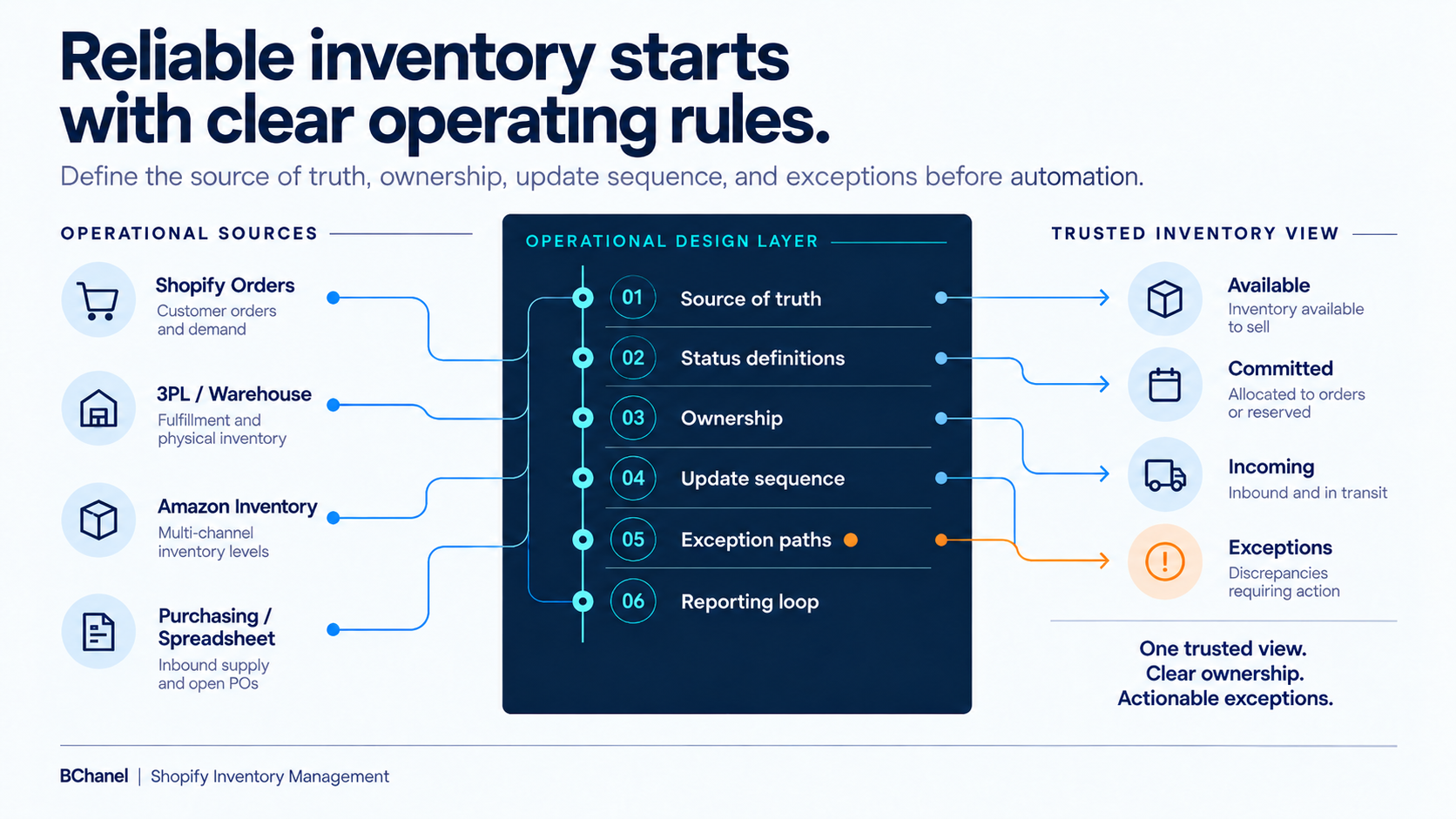
A Shopify and 3PL Workflow Example
Consider a Shopify order fulfilled through an external provider.
Shopify creates the order and confirms payment. The workflow then reserves inventory, sends the fulfillment request, receives acceptance or rejection, records shipment status, and returns tracking information.
Amazon’s official Multichannel Fulfillment integration for Shopify illustrates this type of connection:
Shopify orders can be fulfilled using Amazon inventory, while inventory and tracking updates return to Shopify.
But the integration alone does not answer every operational question.
The business still needs to define how SKUs are mapped, which quantity is sellable, what happens when inventory is out of sync, who handles rejected requests, and how inbound stock is treated. Those are workflow-design decisions.
What a Reliable Shopify Inventory Report Should Show
A useful inventory report should help an operator act, not simply display totals. It should answer:
Which products are currently available to sell?
Which units are committed to existing orders?
What inventory is incoming, and when is it expected?
Which orders, shipments, or transfers are delayed?
Where do Shopify and the fulfillment system disagree?
Who owns each unresolved exception?
When these questions require manual exports and messages to several teams, the reporting problem is a signal that the underlying workflow needs clarification.
The objective is not necessarily one dashboard containing everything. It is a reporting structure that uses approved sources and directs attention toward the exceptions requiring action.
Where BChanel Fits
BChanel helps teams map the workflow connecting ecommerce orders, inventory locations, fulfillment partners, and reporting.
The objective is to identify the trusted source for each field, clarify ownership, define exception rules, and determine which updates are ready for automation.
Our FBA Shipment Tracking Automation case shows this approach in practice. Shipment data, delay thresholds, alerts, and reporting were organized around a clear exception-management workflow rather than another manual status report.
The correct sequence is to assess the operation, design the information flow, and then automate the stable parts of the workflow.
FAQ
What is Shopify inventory management?
Shopify inventory management is the process of tracking available, committed, unavailable, on-hand, and incoming stock across products and locations. Reliable management also requires rules for how orders, adjustments, transfers, returns, and fulfillment updates change those quantities.
How does Shopify track inventory across multiple locations?
Shopify assigns inventory quantities to specific locations, including stores, warehouses, and compatible fulfillment services. Businesses must configure which locations stock and fulfill each product and define how orders are routed when stock exists in more than one place.
Why does Shopify inventory not match a 3PL?
Differences can result from synchronization delays, SKU mapping issues, manual adjustments, returns,damaged stock, or different inventory definitions. The team should identify which event created the discrepancy and which system has authority to correct it.
What should be the source of truth for Shopify inventory?
There is no universal answer. Shopify may own order and sellable-quantity data, while a warehouse or 3PL owns physical stock and fulfillment activity. The source of truth should be defined for each field, status, and business decision.
When should a Shopify inventory workflow be automated?
Automation is appropriate after triggers, data ownership, status definitions, update sequences,
exception paths, and reporting responsibilities are documented. Automating before those rules are clear can move incorrect inventory information faster without improving visibility.