
QuickBooks can reduce repetitive reporting work, but it cannot decide how a finance operation should run.
If weekly reports still require spreadsheet checks, transaction matching, approval follow-ups, and last- minute corrections, the problem may not be the accounting platform. It may be the workflow feeding it.
Accounting workflow automation is only as reliable as its rules. An unclear process can produce reports faster while leaving basic questions unresolved.
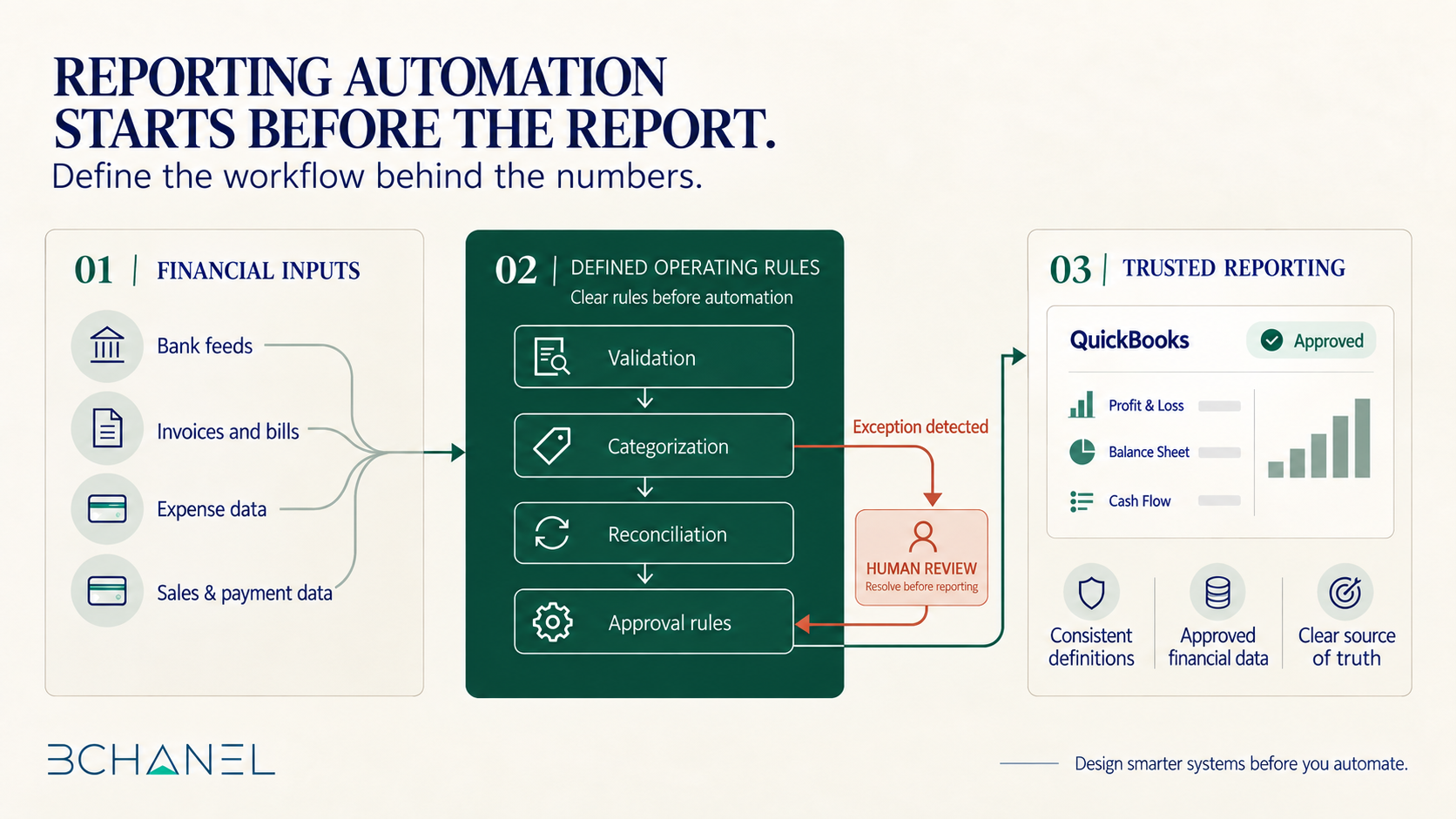
Before automating QuickBooks reports, finance teams should define the operating structure that makes those reports trustworthy.
Why Reporting Automation Often Starts in the Wrong Place
A report is an output. Its reliability depends on how transactions enter QuickBooks, how they are
categorized, which approvals are required, when accounts are reconciled, and how exceptions are resolved.
QuickBooks supports customized reports and recurring schedules. According to Intuit’s official reporting guidance, saved reports can be shared, scheduled, emailed, or exported, depending on the subscription and reporting experience.
Those capabilities are useful, but scheduling an output does not guarantee that the information is complete or approved. Financial reporting automation should therefore begin with the workflow, not the delivery schedule.
What Finance Teams Should Define Before Automating
1. The Purpose of the Report
Every recurring report should support a specific decision.
A weekly cash review, monthly profit and loss statement, accounts payable report, and multi-location performance summary serve different audiences. Define who uses the report, what decision it supports, which metrics matter, and how frequently the information is needed.
If a report has no clear decision attached to it, automating it may simply produce more information that nobody acts on.
2. The Source of Truth
QuickBooks may be the accounting source of truth, but it is rarely the original source for every
transaction.
Revenue and expense data may originate in commerce platforms, payment systems, bank feeds, bills, or spreadsheets.
The team must define where each number originates, where it is validated, and which system becomes authoritative. When systems disagree, there should be a documented rule for determining what is correct. Without that decision, automation can move inconsistent data faster without improving financial visibility.
3. Reconciliation Rules
“Reconciled” needs a practical definition.
Finance teams should identify which records must match, what fields are compared, how often
reconciliation occurs, and what variance is acceptable. They should also separate discrepancies that can follow a defined correction rule from those requiring professional judgment.
For example, aligned amounts, dates, and reference numbers could trigger a match. Missing payments, duplicates, or unexplained variances could go to human review.
The objective is not to eliminate judgment. It is to stop investigating every transaction as though it were an exception.
4. Approvals and Ownership
Accounting workflow automation should make ownership more visible, not less.
Define who can create, review, approve, edit, and release financial records. Requirements may change according to transaction amount, vendor, department, property, or risk level.
It should also establish what happens when an approval is overdue, an approver is unavailable, or an approved record changes.
5. Reporting Timing and Dependencies
A report can run on time and still be wrong.
It may be generated before expenses are submitted, bills are approved, refunds are recorded, or external systems finish updating. Finance teams should define what must be complete before distribution.
If information is missing, the workflow should delay the report, display a warning, or identify the
incomplete section.
6. Exception Handling
Reliable automation defines what happens when normal conditions fail.
An uncategorized transaction, missing approval, unmatched customer, duplicate expense, or
disconnected bank feed should not disappear inside an automated report. Each meaningful exception needs an owner, notification method, deadline, and resolution path.
A Finance Workflow Example Beyond QuickBooks
The same principle appears in BChanel’s Guesty Reservations Finance Automation workflow.
In that example, new, updated, and canceled reservations have different financial consequences. Their data must be extracted, validated, categorized, and reconciled before supporting centralized reporting.
The value comes from defining how operational events become trusted financial records, not simply moving data faster.
QuickBooks reporting requires the same foundation. Different tools may be involved, but the need for clear definitions, ownership, validation, and exception handling remains.
What Automation-Ready Reporting Looks Like
A finance workflow is closer to automation-ready when:
Each report supports an agreed business decision.
Every important metric has a consistent definition.
The source of truth is clear for each data category.
Reconciliation and categorization rules are documented.
Approval responsibilities and thresholds are assigned.
Reporting dependencies are visible.
Exceptions have owners and escalation paths.
The team can verify the automation’s result.
Human review should remain where context, judgment, or financial control matters.
Define the Workflow Before Automating the Report
QuickBooks can support a stronger finance operation, but it cannot define that operation for the
business.
If reports still require manual reconciliation, examine the workflow behind the numbers: its inputs, ownership, approvals, reconciliation rules, and systems.
Once those elements are defined, accounting workflow automation can do more than deliver reports faster. It can provide finance teams and leadership with a more reliable view of the business.
BChanel helps growing companies assess finance operations, design clearer workflows, and determine what should be improved before automation is implemented.
FAQ
What is accounting workflow automation?
Accounting workflow automation uses software and integrations to handle repeatable financial steps such as routing information, matching transactions, requesting approvals, distributing reports, and escalating exceptions.
Can QuickBooks reports be automated?
QuickBooks supports saved, customized, scheduled, and shared reports, although available features depend on the product, subscription, and reporting experience being used.
Why do automated reports still require manual reconciliation?
Manual reconciliation remains necessary when data sources disagree, transactions are missing or duplicated, categories are inconsistent, or the workflow does not define how exceptions should be resolved.
What should be defined before automating a finance workflow?
Teams should define the report’s purpose, data sources, system of record, reconciliation logic, approval requirements, ownership, timing, access controls, and exception-handling process.
Should every accounting task be automated?
No. Repetitive, rules-based work is usually the best candidate. Material discrepancies, sensitive
approvals, unusual transactions, and decisions requiring professional judgment should retain
appropriate human review.