
Accounting automation should reduce the time finance teams spend collecting, matching, validating, and preparing information. It should not remove professional judgment, internal control, or accountability from financial decisions.
This distinction applies whether a company is implementing basic workflow automation, accounts payable automation, or more advanced uses of AI in accounting.
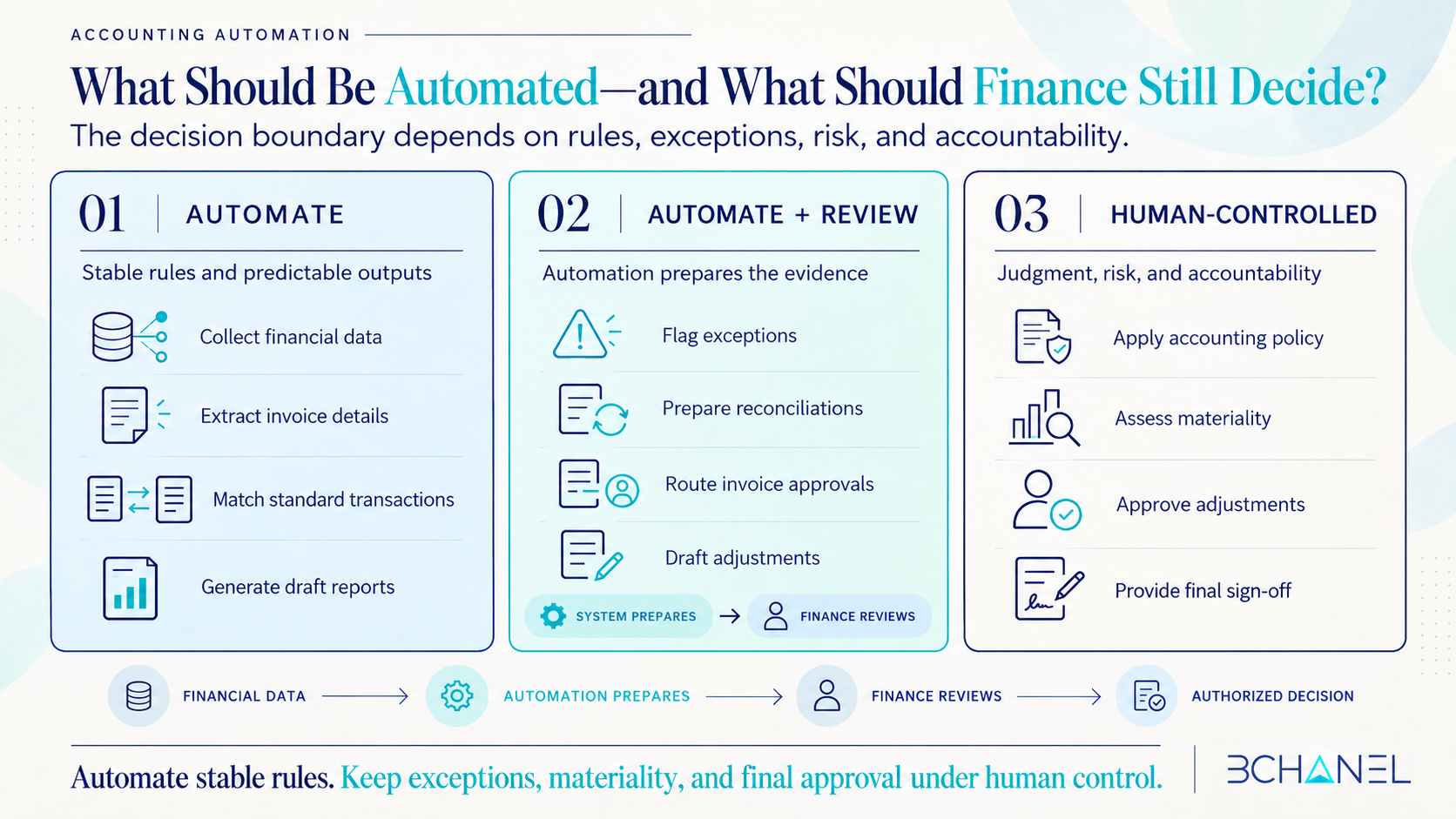
The practical principle remains the same: automate work governed by stable rules and structured inputs. Keep people responsible for exceptions, accounting policy, materiality, approvals, and final sign-off.
The goal is not autonomous accounting. It is a controlled finance workflow that prepares better evidence so people can make better-informed decisions.
What Is Accounting Automation?
Accounting automation uses software, integrations, and predefined workflow rules to complete repetitive finance tasks with less manual intervention.
Common examples include:
Collecting financial data from multiple systems
Extracting information from invoices
Matching transactions and supporting records
Applying validation rules
Identifying missing or inconsistent information
Preparing reconciliations
Generating draft financial reports
Tracking month-end close tasks
These activities are strong candidates for automation because the expected inputs, rules, and outputs can usually be defined in advance.
However, automating a task does not necessarily mean automating the decision attached to it. A system can identify a discrepancy, but finance may still need to determine why it occurred, whether it is material, and what adjustment is appropriate.
Which Accounting Tasks Can Be Automated?
The strongest accounting automation opportunities usually involve high-volume, repeatable work that follows consistent rules.
1. Financial data collection
Automation can collect information from accounting platforms, payment processors, banks, reservation systems, ecommerce platforms, spreadsheets, and operational databases.
This reduces copying and pasting while giving finance a more consistent starting point. Before automating collection, the business must still establish which system is the source of truth and what information is required.
2. Accounts payable and invoice processing
Accounts payable automation can extract supplier information, invoice dates, amounts, purchase order references, and payment terms. It can then classify and route each invoice based on predefined approval rules.
Standard invoices may move through the workflow automatically. Duplicates, missing purchase orders, unusual amounts, or mismatched supplier details should be flagged for human review.
Automation prepares the transaction. The authorized finance owner still determines whether it should be approved, rejected, corrected, or escalated.
3. Transaction matching and reconciliation preparation
Systems can compare bank transactions, invoices, payments, reservations, and ledger records using defined matching logic.
An automated bank reconciliation workflow can complete straightforward matches and isolate the remaining differences. Its value is not that the system makes every accounting decision. Its value is that finance investigates a smaller, more relevant exception list.
4. Financial reporting preparation
Financial reporting automation can consolidate information, perform standard calculations, update dashboards, and prepare draft reports.
This can reduce reporting preparation time. Finance should still validate the completeness of the data, explain significant movements, and approve the final report before it is distributed.
5. Month-end close coordination
Automation can create close tasks, track dependencies, send reminders, update status, and collect supporting documentation.
It can make the financial close more visible and consistent. It cannot determine whether every unusual balance has been appropriately investigated or whether the financial statements accurately reflect the business.
What Still Requires Human Review?
Human review should remain wherever an accounting workflow involves uncertainty, interpretation, risk, or accountability.
Investigating exceptions
An exception indicates that a transaction does not follow the expected pattern. The system can flag it, but someone must determine whether it represents missing data, a timing difference, an error, a process failure, or legitimate business activity.
Applying accounting policy
Classification and recognition decisions may depend on contracts, business context, internal policy, and applicable accounting standards. These decisions cannot always be reduced to a universal workflow rule.
Assessing materiality
Two transactions with the same value may present different risks depending on the account, reporting period, customer, business unit, or reason for the variance.
Materiality requires context and should remain a controlled finance decision.
Approving adjustments
Automation can prepare a proposed adjustment and assemble supporting evidence. An authorized person should verify the rationale and approve the entry when it affects financial reporting.
Providing final sign-off
Finance still owns the accuracy, completeness, and integrity of its reporting. Technology can support that responsibility, but it does not assume it.
The same boundary applies to AI in accounting. AI can classify information, detect patterns, summarize evidence, or recommend a next step. Finance professionals must still validate the output and retain responsibility for consequential decisions.
Research from AICPA & CIMA on future-ready finance similarly emphasizes that automation and AI can improve productivity while critical thinking, ethical judgment, and human validation remain essential.
Accounting Automation vs. Human Review
| Accounting activity | What automation can do | What finance should control |
|---|---|---|
| Data collection | Consolidate data from approved systems | Validate sources and completeness |
| Accounts payable | Extract, classify, and route invoices | Review exceptions and approve payments |
| Transaction matching | Apply predefined matching rules | Investigate unmatched transactions |
| Reconciliation | Prepare matches and flag differences | Explain discrepancies and approve adjustments |
| Financial reporting | Generate calculations and draft reports | Interpret results and approve publication |
| Month-end close | Track tasks, dependencies, and documentation | Assess materiality and provide final sign-off |
| AI-assisted analysis | Detect patterns and recommend actions | Validate outputs and approve consequential decisions |
The decision boundary should be explicit:
Automate stable rules. Keep exceptions, materiality, policy decisions, payment approvals, and final sign-off under human control.
How to Determine Whether an Accounting Workflow Is Ready
Before implementing accounting process automation, evaluate four conditions.
1. Is the workflow consistent?
If different people complete the same process differently, automation may reproduce inconsistency rather than eliminate it.
2. Are the inputs reliable?
Automation depends on complete, structured, and accessible data. Missing fields and disconnected systems should be addressed before implementation.
3. Are the rules defined?
The team should document validation logic, matching tolerances, approval thresholds, and expected outputs. Rules that exist only in one employee’s experience are not ready to automate.
4. Is there an exception path?
Every automated finance workflow needs a defined route for incomplete information, unexpected values, failed matches, and higher-risk decisions.
It should be clear who receives each exception, what evidence they need, what they can approve, and when the issue must be escalated.
These foundations are particularly important for accounts payable automation and AI in accounting because both can influence decisions involving cash, reporting accuracy, vendor relationships, and financial control.
Accounting Automation in Practice
BChanel applied this controlled model to a hospitality finance workflow using Guesty reservation data.
Instead of manually extracting and reconciling reservation finance information across multiple properties every night, the workflow listens for reservation events, validates financial data, and updates a live dashboard.
The system handles repeatable preparation while preserving visibility into the underlying information. It demonstrates how finance automation can remove manual work without removing financial control.
Review the complete Guesty Finance Automation workflow case to see how the process was structured.
Automate Preparation, Not Accountability
The best accounting automation does not attempt to remove finance from the workflow. It removes repetitive preparation that prevents finance professionals from focusing on exceptions, controls, and decisions.
Start by mapping the current process. Separate stable rules from judgment-heavy decisions. Define sources of truth, approval authority, and exception routes. Only then should the team select the technology.
Primary CTA: Review the Guesty Finance Automation workflow case above and compare its structure with your current finance process.
If your accounting workflow still depends on manual consolidation, disconnected systems, or unclear approval paths, explore BChanel’s Operational Assessment, Workflow Architecture, and Automation Systems to identify what should be clarified, redesigned, or automated first.
Frequently Asked Questions About Accounting Automation
1. What is accounting automation?
Accounting automation uses software, integrations, and predefined rules to complete repetitive finance activities such as data collection, invoice processing, transaction matching, reconciliation preparation, reporting, and close coordination.
2. Which accounting tasks can be automated?
Tasks with structured inputs, stable rules, and predictable outputs are the strongest candidates. These include collecting financial data, extracting invoice details, matching transactions, applying validation rules, preparing reconciliations, and generating draft reports.
3. What is accounts payable automation?
Accounts payable automation uses software to capture invoice information, validate required fields, identify duplicates, match invoices with purchase orders, and route transactions for approval. Finance should still review exceptions and retain control over payment authorization.
4. Can account reconciliation be fully automated?
Straightforward matches can often be automated, but unresolved differences still require investigation. A reliable reconciliation workflow automates predictable matching and routes exceptions to the appropriate finance owner.
5. Does AI in accounting eliminate the need for human review?
No. AI in accounting can classify data, detect anomalies, summarize evidence, and recommend actions. Finance professionals should still validate outputs, apply accounting policy, assess materiality, approve adjustments, and provide final sign-off.