
Business Process Analysis: How to Find Root Causes Before Redesigning a Workflow
Business process analysis should happen before a workflow is redesigned or automated.
When a process is slow, inconsistent, or dependent on manual work, the natural response is to change it. But redesigning a process before understanding why it is failing can create a faster version of the wrong workflow.
A structured analysis helps teams understand how work moves today, where performance breaks down, and which conditions are creating the problem. The objective is not simply to document the process. It is to separate visible symptoms from root causes before recommending a solution.
Business process analysis: the short answer
Business process analysis examines the people, steps, systems, decisions, data, handoffs, and exceptions involved in a process. It combines current-state process mapping with operational evidence to determine why a workflow is underperforming and what should change.
What is business process analysis?
Business process analysis is the structured examination of an existing process.
It should answer:
What triggers the process?
Which people and systems participate?
How does information move?
Where are decisions made?
Who owns each step and outcome?
Where do delays, errors, and exceptions occur?
Which steps create value or unnecessary work?
Business process mapping is one part of the analysis. A process map visualizes how work moves. Business process analysis compares that structure with evidence to determine what is actually happening and why.
If the organization has not yet decided which problem deserves attention first, begin with the Business Process Improvement guide. Once the problem is prioritized, process analysis can investigate its cause.
Why symptoms are not root causes
Teams usually encounter symptoms first:
Reports arrive late.
Approvals take too long.
Information is missing.
Employees enter the same data multiple times.
Errors appear in financial or operational records.
Work is lost between teams.
These observations identify where the operation is struggling, but they do not explain why.
A delayed report might result from fragmented data, manual reconciliation, an unclear deadline, missing ownership, or an upstream system that is not updated consistently. Replacing the reporting tool would not necessarily correct those conditions.
The American Society for Quality describes root cause analysis as a group of approaches, tools, and techniques used to uncover the causes of problems. It also notes that root cause analysis must form part of a broader improvement effort to produce results. The ASQ root cause analysis resource provides further guidance on this distinction.
How to find root causes before redesigning a workflow
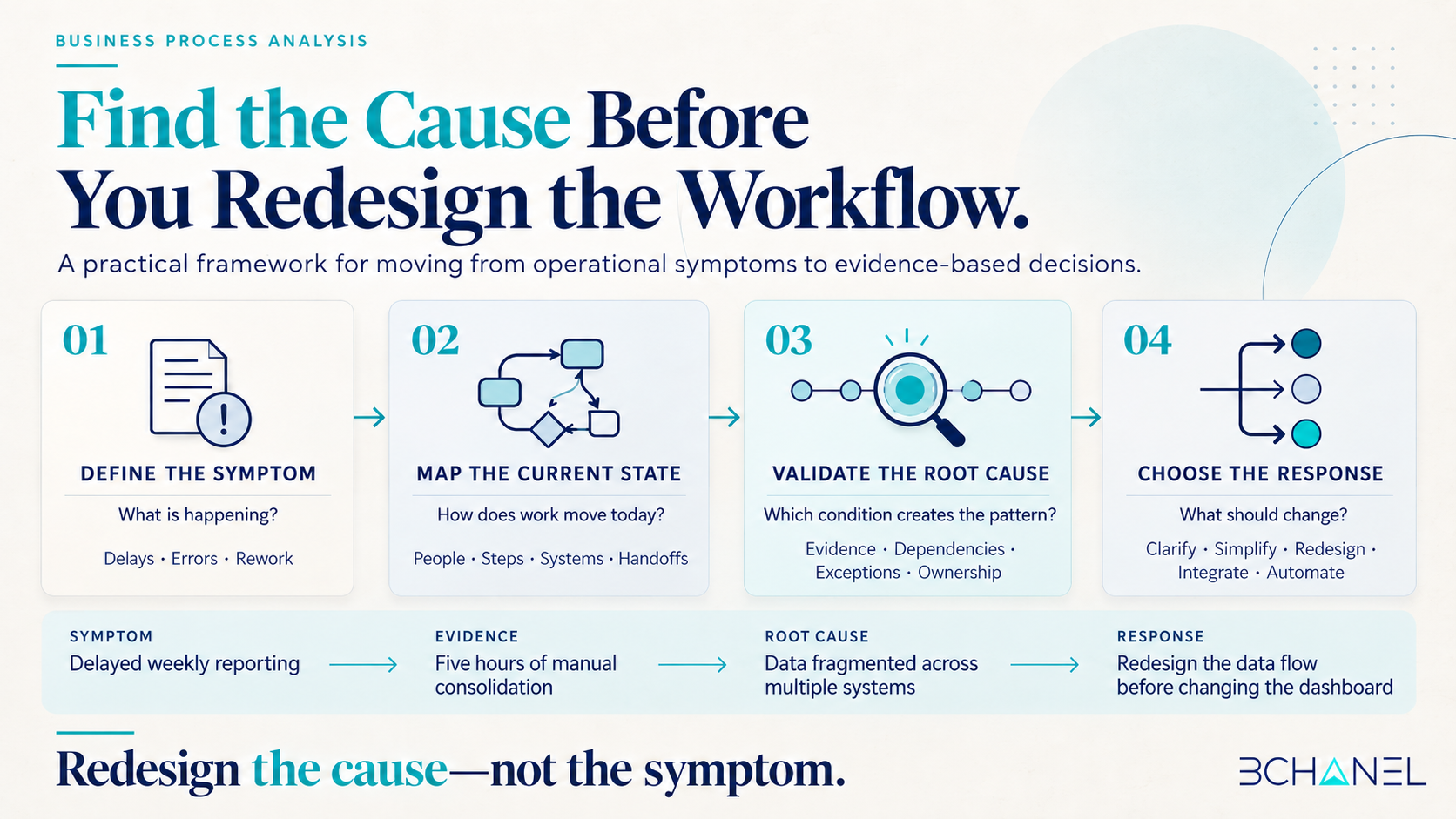
1. Define the problem with evidence
Start with a specific performance gap.
“Reporting is inefficient” is too broad. A more useful statement would be:
The weekly operations report requires five hours of manual consolidation and is frequently delivered after the Monday meeting.
Document what is happening, where it occurs, how often it happens, who is affected, and what operational impact it creates.
2. Map the current-state process
Current-state process mapping should reflect how work actually happens—not how a procedure says it should happen.
Map:
The trigger
Process steps
Systems and data sources
Decisions
Handoffs
Waiting periods
Rework
Exceptions
Ownership
Include spreadsheets, messages, and manual workarounds used outside the official system. These unofficial steps are often where dependencies and visibility gaps appear.
3. Collect evidence from the workflow
Interviews explain how people experience the process. Operational evidence shows where the pattern occurs.
Relevant evidence might include:
Processing and waiting times
Approval timestamps
Error and correction records
Exception frequency
Duplicate data entry
Unassigned work
Spreadsheet activity
Delayed handoffs
System update history
The goal is not to collect every available metric. It is to gather enough evidence to test why the problem occurs.
4. Investigate bottlenecks and dependencies
The step that takes the longest is not always the root cause. A dependency earlier in the process may prevent several later steps from moving.
For each problem point, ask:
What must happen before this step can begin?
Is the required information complete?
Does the owner have decision authority?
What happens when the standard path cannot continue?
Does work return to an earlier step for correction?
Is another team or system creating the delay?
Repeatedly asking “why” can uncover possible causes, but each answer should be tested against evidence. “Human error” and “poor communication” are rarely actionable root causes without a clearer explanation of the operating conditions behind them.
5. Validate the cause before designing the solution
A probable root cause should consistently explain the problem.
Before redesigning, ask:
Would removing this cause materially improve the outcome?
Does the cause appear across multiple examples?
Could another cause produce the same symptom?
Can the organization influence it?
What new risk could the proposed change introduce?
This validation prevents the team from redesigning a workflow around an assumption.
From operational symptoms to redesign decisions
| Operational symptom | Possible root cause | Evidence to review | Appropriate response |
|---|---|---|---|
| Delayed reporting | Data is fragmented across systems | Sources, refresh times and manual consolidation | Redesign the data flow before changing the dashboard |
| Slow approvals | Authority and thresholds are unclear | Approval times, escalations and rework | Define ownership and approval rules |
| Repeated errors | Data is entered multiple times | Error locations and correction history | Remove duplicate inputs and add validation |
| Missed handoffs | No clear owner receives the next step | Queue age, notifications and assignments | Define the handoff, owner and escalation path |
| Frequent exceptions | The documented process does not reflect real work | Exception types and frequency | Redesign the normal and exception paths |
The same symptom can have different root causes in different organizations. The table should guide investigation, not replace it.
What should be redesigned or automated?
Business process analysis should produce a prioritized decision—not a recommendation to rebuild everything.
A process step may need to be:
Clarified when ownership or decision authority is missing.
Simplified when unnecessary reviews or duplicate inputs exist.
Redesigned when the workflow structure creates recurring delays.
Integrated when disconnected systems interrupt data movement.
Automated when rules and inputs are stable.
Kept manual when judgment or risk requires human control.
Automation should follow analysis and workflow design. Otherwise, the organization may automate rework, unreliable data, or unclear approvals.
Start with the workflow, not the proposed solution
A useful process analysis creates a shared view of the current operation, validates the cause of the problem, and provides evidence for deciding what should change.
Ready to understand what is actually breaking?
Review BChanel’s operational improvement approach to see how current workflows, bottlenecks, ownership, data movement, and system dependencies are assessed before redesign or automation. If similar gaps appear in your operation, the next step is an Operational Assessment—not an immediate technology implementation.
Frequently Asked Questions About Business Process Analysis
1. What is business process analysis?
Business process analysis examines a process’s steps, people, systems, decisions, data, handoffs, and exceptions. Its purpose is to identify performance problems and their causes before operational or technological changes are introduced.
2. What is the difference between business process analysis and process mapping?
Business process mapping documents how work moves through a process. Business process analysis uses that map, interviews, and operational evidence to determine why the process performs as it does and what should change.
3. How do you identify the root cause of a workflow problem?
Define the problem, map the current workflow, collect evidence, examine dependencies and exceptions, and test possible causes. A valid root cause should consistently explain the problem and represent something the organization can influence.
4. What data should be reviewed before redesigning a process?
Relevant evidence may include processing times, approval history, errors, rework, exceptions, duplicate entry, system updates, handoffs, ownership, waiting periods, and missing information.
5. When should a workflow be redesigned instead of automated?
Redesign is appropriate when the problem comes from unclear ownership, unnecessary steps, poor handoffs, inconsistent decisions, or an ineffective operating structure. Automation is more appropriate after the workflow has stable rules, structured inputs, and defined exception paths.