
Zoho One Workflow Problems: Why an All-in-One System Still Needs Operational Design
Zoho One can be a strong platform for growing businesses that want to centralize sales, finance, projects, support, marketing, and operations.
That is exactly why many teams choose it.
Instead of managing work across disconnected tools, Zoho One gives companies access to a broad suite of applications in one ecosystem. Zoho describes Zoho One as an integrated system for managing customers, employees, finances, and operations across the business.
But there is an important difference between having an all-in-one platform and having a clearly
designed operating workflow.
A business can use Zoho One, connect multiple Zoho apps, configure automations, and still rely on manual follow-up, spreadsheet checks, duplicate data entry, and unclear ownership.
That does not mean Zoho One is the problem.
It usually means the workflow around Zoho One has not been clearly designed.
What Zoho One Helps Centralize
Zoho One brings many business functions into one platform. Teams can use Zoho CRM for sales, Zoho Books for finance, Zoho Projects for project management, Zoho Desk for support, Zoho Analytics for reporting, and other apps depending on the operation.
That centralization can reduce tool fragmentation.
It can also create a more consistent environment for data, workflows, and automation.
But centralization is not the same as operational clarity.
If each department uses Zoho differently, if data rules are inconsistent, or if nobody owns the handoff between apps, the business may still feel fragmented even inside one ecosystem.
A platform can connect tools.
It cannot automatically decide how the business should operate.
Why Workflow Problems Still Happen Inside Zoho One
Zoho CRM automation and Zoho workflow automation can help teams save time. Zoho’s own workflow documentation explains how workflow rules can trigger actions such as tasks, email notifications, field updates, webhooks, and functions when specific conditions are met.
That is useful.
But automation depends on the quality of the workflow behind it.
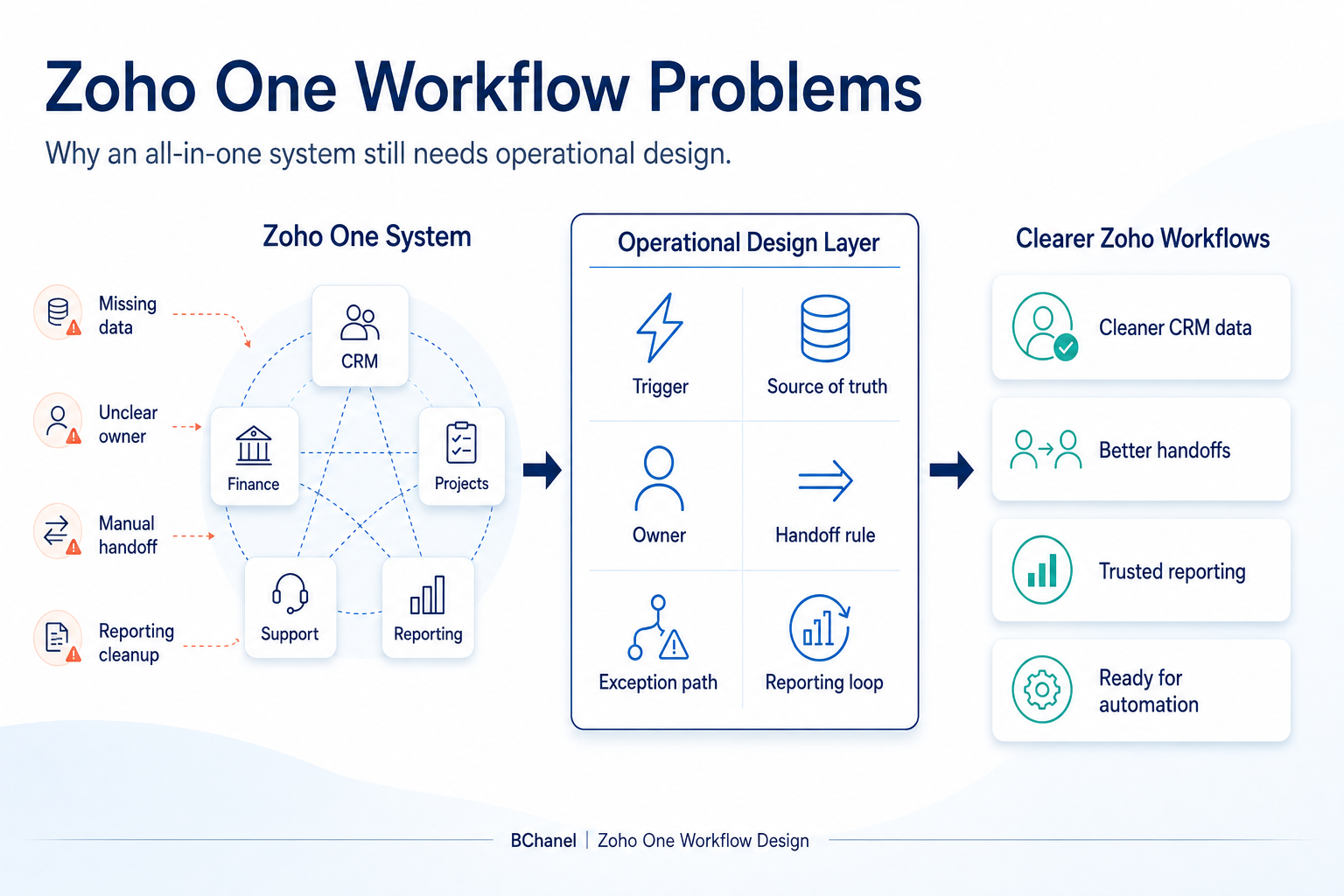
Common Zoho One workflow problems include:
Leads entering Zoho CRM without complete information
Tasks being created without a clear owner
Deals moving forward without finance or delivery visibility
Customer information living across multiple Zoho apps without clear source-of-truth-rules
Reports requiring manual cleanup before leadership can trust them
Teams using automation to patch symptoms instead of fixing the underlying process
This is where many Zoho One implementations become operationally messy.
The company has a strong platform, but the process logic is still informal.
Zoho One Is Not the Same as an Operating Model
Zoho One can support the operating model.
It should not be confused with the operating model itself.
An operating model defines how work moves through the business. It clarifies who owns each step, which system holds the trusted data, when a handoff happens, what should be automated, and what needs human review.
Zoho One can execute many of those rules once they are defined.
But if those rules are missing, automation can create more confusion.
For example, a workflow may create a task when a deal reaches a certain stage. But if the team has not defined who owns that stage, what information must be complete, or what happens when the customer record is incomplete, the task does not solve the problem.
It only moves the confusion forward.
This is why BChanel’s approach starts with operational assessment and workflow architecture before implementation. We covered this broader idea in Why Growing Teams Should Run an Operational Assessment Before Automation.
What to Define Before Automating Zoho Workflows
Before adding more Zoho automation, teams should define the workflow itself.
Start with the trigger.
What starts the process? Is it a new lead, a closed deal, an invoice, a support ticket, a project update, or a missing field?
Then define the source of truth.
If customer details are in Zoho CRM, payment information is in Zoho Books, and project status is in Zoho Projects, which system should the team trust for each type of information?
Next, define ownership.
Who owns the next step? Who checks exceptions? Who is accountable if the workflow does not move?
Then define handoffs.
When does work move from sales to finance? From finance to delivery? From support to operations?
From operations to reporting?
Finally, define visibility.
What should leadership be able to see without asking someone to rebuild a spreadsheet?
These questions matter because CRM workflow automation only works when the business logic is clear.
Example: From Zoho CRM to Finance and Delivery
Imagine a service business using Zoho One.
A new customer is closed in Zoho CRM. The sales team updates the deal stage. Finance needs billing information. Delivery needs project context. Operations needs to know who owns the next step.
Leadership wants visibility into new customer onboarding.
A basic automation might create a task or notify a channel.
A better workflow design asks:
What fields must be completed before the deal becomes operational?
Which system owns the customer record?
When should finance be notified?
What does delivery need before starting work?
What happens if billing details are missing?
Where should the final handoff be visible?
Once those rules are defined, Zoho workflow automation becomes much more useful.
The platform can support the workflow instead of trying to compensate for missing structure.
Where Zoho Integrations Fit
Zoho integrations can help connect Zoho apps with third-party systems. Zoho One also includes tools and capabilities for integrating apps, extending processes, and supporting custom workflows.
But integrations should not be the first answer to every manual process.
Sometimes a team needs an integration.
Sometimes it needs a cleaner workflow.
Sometimes it needs better CRM data rules.
Sometimes it needs a clearer owner.
This is why tool implementation and workflow architecture should be treated as different layers.
We wrote more about this distinction in Workflow Automation Works Better After Workflow Design.
Where BChanel Fits
BChanel is not a generic Zoho One implementation agency.
The goal is not simply to add more workflows, more integrations, or more automation rules.
BChanel helps teams understand where operational friction is coming from before automation is built.
For Zoho One environments, that means looking at how work moves across CRM, finance, projects, support, reporting, and human decision points.
That can include reviewing:
CRM data quality
Workflow ownership
Handoff rules between teams
Source-of-truth logic
Reporting delays
Manual reconciliation
Automation readiness
Once the workflow is clear, Zoho One becomes a stronger execution layer.
The business can automate the right processes, reduce manual work, and create better visibility across the operation.
FAQ
What is Zoho One?
Zoho One is a suite of Zoho applications that helps companies manage areas such as sales, finance, projects, support, marketing, and operations from one ecosystem.
Why do workflow problems still happen in Zoho One?
Workflow problems still happen when ownership, data rules, handoffs, reporting logic, or exception handling are unclear. Centralizing tools does not automatically design the process.
What is Zoho CRM automation?
Zoho CRM automation uses workflow rules, tasks, field updates, notifications, webhooks, and functions to automate actions based on defined triggers and conditions.
What should be defined before automating Zoho workflows?
Teams should define the trigger, source of truth, required data, owner, handoff rules, exception path, and reporting loop before adding more automation.
Is BChanel a Zoho One implementation agency?
No. BChanel focuses on operational assessment, workflow architecture, and automation readiness. Zoho One can be part of the execution layer once the workflow is clear.