
Monday.com Workflow Automation: Why Project Visibility Still Requires Clear Ownership
Monday.com can make projects easier to organize. Teams can display tasks, assign people, track deadlines, and automate routine updates from one board.
But a well-organized board does not necessarily mean the underlying workflow is moving correctly.
A task may be marked “In Progress” while waiting for information. A handoff may appear complete even though the next person has not accepted ownership. Automations may send notifications without resolving the reason work is delayed.
Effective Monday.com workflow automation starts by defining how work should move, not by adding more alerts.
Monday.com workflow automation improves project visibility only when four operating rules are clear: who owns each stage, what every status means, what information is required for each handoff, and how exceptions are reviewed. Without those definitions, automation may increase activity and notifications without resolving stalled work.
A Project Board Shows Activity, Not Always Progress
Most project boards are designed to answer basic questions:
What tasks exist?
What is their current status?
Who is assigned?
When are they due?
Those fields provide useful visibility, but they may not explain whether the workflow itself is operating properly.
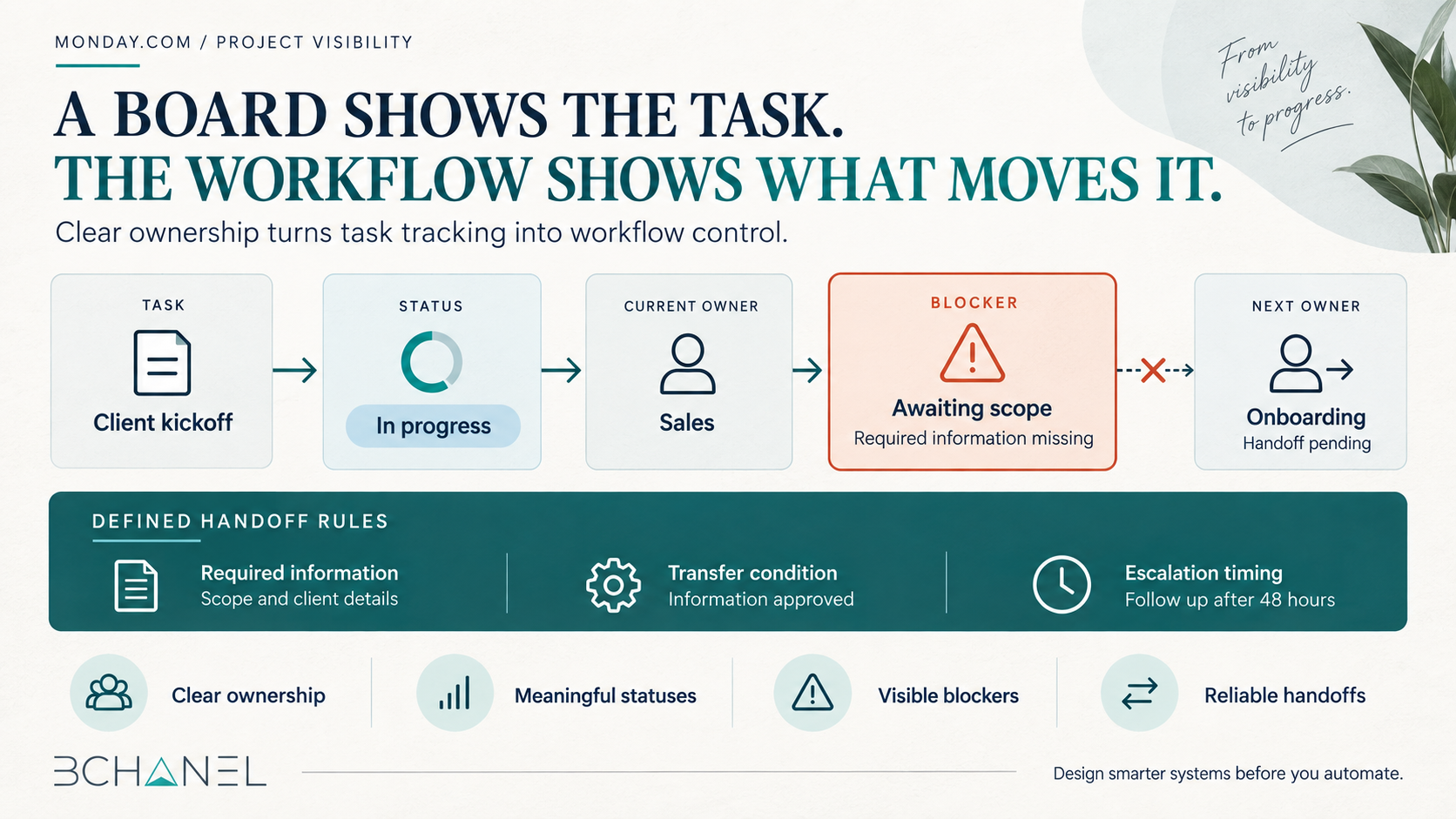
For example, a client onboarding task might show an owner and a due date. However, the board may not reveal that the owner is waiting for signed documents, account access, payment confirmation, or information from the sales team.
The task is visible. The dependency is not.
This is why project visibility requires more than displaying work. Teams also need visibility into ownership, blockers, handoffs, and the decisions required to move a project forward.
Define the Workflow Before Building Automations
Monday.com provides flexible automation capabilities based on triggers, conditions, and actions. Its official guide to monday automations explains how teams can automatically update items, send notifications, assign people, or create actions when defined events occur.
The technology is useful, but the operating rules must come first.
Before automating a board, define:
What event starts the workflow?
Who owns the first action?
What information must be available before work begins?
What does each status mean?
When does ownership transfer?
What qualifies as complete?
What happens when work becomes blocked?
How frequently should the team review exceptions?
Without those definitions, automation accelerates an unclear process.
Four Elements Every Project Workflow Needs
1. One Accountable Owner
A task can involve several contributors, but each active stage should have one clearly accountable owner.
“Marketing Team” or “Operations” may identify the responsible department, but it does not tell the team who must take the next action. When several people appear responsible, work can remain untouched because everyone assumes someone else owns it.
Ownership should change intentionally when the workflow reaches a defined handoff.
2. Meaningful Status Logic
Statuses should communicate operational reality rather than create the appearance of progress.
“In Progress” is often too broad. Depending on the workflow, more useful statuses might include:
· Waiting for client information
· Ready for internal review
· Blocked by approval
· Ready for handoff
· Scheduled
· Completed
Monday.com’s official documentation for the Status Column shows how labels can represent different stages and support related automations.
The important decision is not the color of a label. It is the operational meaning behind it.
Every team member should interpret each status consistently.
3. Defined Handoff Requirements
A workflow should not transfer ownership simply because someone changed a status.
The next owner may need specific information, documents, approvals, or system access before accepting the work. These requirements should be visible and, where practical, validated before the handoff occurs.
A reliable handoff defines:
· The outgoing owner
· The incoming owner
· Required information
· Completion criteria
· Expected response time
· Escalation path
4. A Consistent Operating Cadence
Not every problem needs an instant notification.
Teams need a review cadence for identifying stalled items, unresolved blockers, approaching deadlines, and work without an owner. Depending on the workflow, this may be a daily operational check or a weekly exception review.
The purpose is not to review every task repeatedly. It is to focus attention on the work that requires a decision.
Client Onboarding Is a Useful Example
Client onboarding often crosses sales, finance, operations, and service delivery.
A basic board may list tasks such as contract signed, payment received, kickoff scheduled, access collected, and project created. But the real workflow depends on how those events connect.
When a deal closes, the workflow might need to:
Verify that the agreement and payment are complete
Assign an onboarding owner
Request required client information
Create the delivery project only after that information is received
Notify the service team when the account is ready
Escalate missing information after a defined period
In BChanel’s Client Onboarding Automation workflow case, lead approval initiates a structured handoff across HubSpot or GHL, ClickUp, Slack, Google Sheets, and QuickBooks.
Client records, delivery projects, internal notifications, status tracking, and finance records are created through one coordinated workflow instead of separate manual updates.
The exact technology stack may change, but the operating principle remains the same: define ownership, requirements, and handoffs before connecting the systems.
Is Your Monday.com Workflow Ready for Automation?
| Ready for automation | Redesign the workflow first |
|---|---|
| Each stage has one accountable owner | Ownership is shared or unclear |
| Statuses have consistent definitions | "In Progress" covers multiple situations |
| Required handoff information is documented | Work frequently arrives incomplete |
| Exceptions follow an escalation path | Blocked tasks depend on manual follow-up |
| Completion criteria are measurable | Teams disagree about what "done" means |
If the conditions in the right column are common, adding more automations may create additional activity without addressing the underlying operational problem.
What Should Monday.com Automate?
Once the operating rules are clear, automation can remove repetitive coordination.
Useful examples include:
Assigning the next owner after an approved status change
Notifying an owner when required information is available
Creating standard tasks from an approved template
Flagging items that remain blocked beyond a defined threshold
Reminding owners before deadlines
Escalating overdue approvals
Creating recurring exception reviews
Automation should reduce ambiguity and manual follow-up. It should not generate more notifications than the team can realistically act on.
Start With One Workflow, Not the Entire Workspace
Choose one workflow that regularly creates delays, repeated follow-ups, or unclear ownership.
Map its stages, owners, inputs, decisions, handoffs, and exceptions. Then configure the board and automations around those operating rules.
The goal is not a more sophisticated board. It is a workflow in which the team can quickly understand:
What is moving
What is waiting
Why it is waiting
Who must act next
Need Help Mapping the Workflow Behind Your Board?
BChanel helps growing teams examine how work currently moves before introducing additional automation.
During a discovery call, we can review one operational workflow, identify unclear ownership or broken handoffs, and determine whether the next step should be an Operational Assessment, Workflow Architecture, or Automation Systems
Book a discovery call with BChanel to discuss where work is currently waiting between your teams.
FAQ
What Is Monday.com Workflow Automation?
Monday.com workflow automation uses defined triggers, conditions, and actions to update tasks, assign owners, send notifications, create items, or move work between stages. It works best when the underlying workflow already has clear rules and responsibilities.
Why Does a Monday.com Board Still Need Clear Ownership?
Automations can assign people, but the team must first define who is accountable at each stage. Clear ownership prevents tasks from remaining unclaimed during reviews, approvals, and departmental handoffs.
How Can Monday.com Improve Project Visibility?
Monday.com can centralize tasks, statuses, deadlines, owners, and blockers. Reliable visibility depends on consistent status definitions, accurate updates, visible dependencies, and a regular cadence for reviewing exceptions.
What Should Be Automated First in Monday.com?
Start with repetitive coordination around a stable workflow. Common first automations include owner assignment, deadline reminders, approval notifications, blocked-task alerts, and standard task creation.
Can Monday.com Automate Client Onboarding?
Yes. Monday.com can support client onboarding by creating tasks, assigning owners, collecting information, triggering reminders, and coordinating handoffs. The onboarding criteria and responsibilities should be defined before those automations are configured.